- JMP Statement Regarding Critical PHP Remote Code Execution Vulnerabilities (CVE-2026-109618, CVE-2026-109619)
- Don’t miss your chance to experience Discovery Summit Europe at our best available rate! Early bird registration through 31 Oct.
- Graph Builder Toolbar streamlines interactive graphing. Creates shortcuts on Report and GraphBuilder Helpers toolbars. Download and install the extension.
- Subscribe to RSS Feed
- Mark Topic as New
- Mark Topic as Read
- Float this Topic for Current User
- Bookmark
- Subscribe
- Mute
- Printer Friendly Page
Discussions
Solve problems, and share tips and tricks with other JMP users.- User Community
- :
- Discussions
- :
- Jittered not working inGraph Builder JMPPRO 14

- Mark as New
- Bookmark
- Subscribe
- Mute
- Subscribe to RSS Feed
- Get Direct Link
- Report Inappropriate Content
Jittered not working inGraph Builder JMPPRO 14
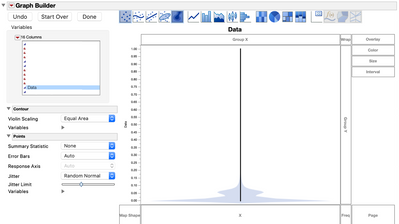
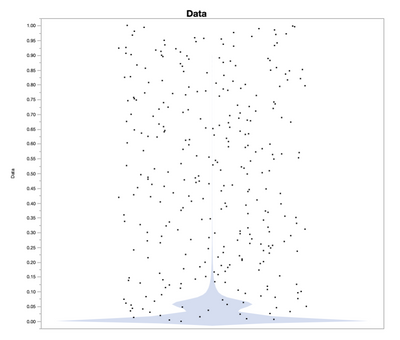
A few months ago my data stop previewing with Jittering in Graph Builder. Jitter is turned on in my preferances. Changing the Jitter Type and Jitter Limit doesn't fix the issue. Also changing my data type between continues and ordinal doesn't fix the issue. When I use the Selection tool to copy my graphs from JMP the graphs pastes looking very different than the preview. As seen in the attached images.
Any one know how to fix this?
Accepted Solutions


- Mark as New
- Bookmark
- Subscribe
- Mute
- Subscribe to RSS Feed
- Get Direct Link
- Report Inappropriate Content
Re: Jittered not working inGraph Builder JMPPRO 14
In preferences under "Graphs", look for the "Fast Marker Threshold". The default value is 50,000. The fast marker drawing may change, but currently this is the threshold that is determining whether the jitter will be applied.

- Mark as New
- Bookmark
- Subscribe
- Mute
- Subscribe to RSS Feed
- Get Direct Link
- Report Inappropriate Content
Re: Jittered not working inGraph Builder JMPPRO 14

- Mark as New
- Bookmark
- Subscribe
- Mute
- Subscribe to RSS Feed
- Get Direct Link
- Report Inappropriate Content
Re: Jittered not working inGraph Builder JMPPRO 14
I am seeing the same issue. I was able to get jittering for my purposes with two imperfect workarounds:
1. Select "Sampling", which seems to work up to 50,000 points.
2. Apply a local data filter to focus on regions of interest
- Mark as New
- Bookmark
- Subscribe
- Mute
- Subscribe to RSS Feed
- Get Direct Link
- Report Inappropriate Content
Re: Jittered not working inGraph Builder JMPPRO 14
In preferences under "Graphs", look for the "Fast Marker Threshold". The default value is 50,000. The fast marker drawing may change, but currently this is the threshold that is determining whether the jitter will be applied.
- Mark as New
- Bookmark
- Subscribe
- Mute
- Subscribe to RSS Feed
- Get Direct Link
- Report Inappropriate Content
Re: Jittered not working inGraph Builder JMPPRO 14

 Community Manager
- Mark as New
- Bookmark
- Subscribe
- Mute
- Subscribe to RSS Feed
- Get Direct Link
- Report Inappropriate Content
Re: Jittered not working inGraph Builder JMPPRO 14
In JMP 16 the Fast Marker setting will not affect the jitter options.
Recommended Articles
- © 2026 JMP Statistical Discovery LLC. All Rights Reserved.
- Terms of Use
- Privacy Statement
- Contact Us