- JMP will suspend normal business operations for our Winter Holiday beginning on Wednesday, Dec. 24, 2025, at 5:00 p.m. ET (2:00 p.m. ET for JMP Accounts Receivable).
Regular business hours will resume at 9:00 a.m. EST on Friday, Jan. 2, 2026. - We’re retiring the File Exchange at the end of this year. The JMP Marketplace is now your destination for add-ins and extensions.
- Subscribe to RSS Feed
- Mark Topic as New
- Mark Topic as Read
- Float this Topic for Current User
- Bookmark
- Subscribe
- Mute
- Printer Friendly Page
Discussions
Solve problems, and share tips and tricks with other JMP users.- JMP User Community
- :
- Discussions
- :
- JSL fill to end of table using first row value

- Mark as New
- Bookmark
- Subscribe
- Mute
- Subscribe to RSS Feed
- Get Direct Link
- Report Inappropriate Content
JSL fill to end of table using first row value
Hi,
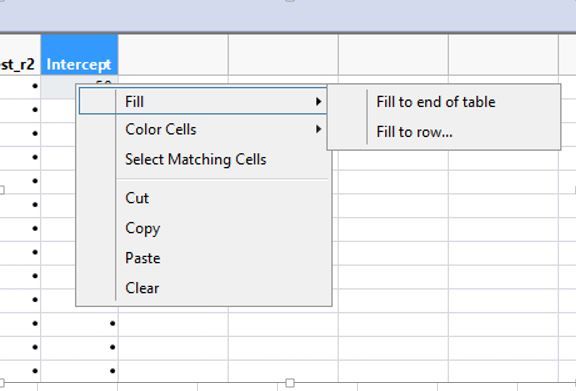
Using JSL script, I want the first cell value in "Intercept" column to Fill to end of table with the same value in first cell. Can anyone show me how to write it in script?
Accepted Solutions

- Mark as New
- Bookmark
- Subscribe
- Mute
- Subscribe to RSS Feed
- Get Direct Link
- Report Inappropriate Content
Re: JSL fill to end of table using first row value
I think the answer depends on what else is happening within your JSL, and how you want a user (assuming there is one) to interact with this. You can do something like:
Names Default To Here( 1 );
dt = Open( "$SAMPLE_DATA/Big Class.jmp" );
dt << New Column( "X" );
dt:X[1] = 5;
dt << New Column( "X2", Formula(if(Row() == 1, :X, Lag(:X2, 1))));
dt << runFormulas;
Wait(2);
dt:X[1] = 10;
dt << runFormulas;
but that doesn't seem very useful. Because a formula column is computed, JMP will not allow you to edit one of the cells therein.
- Mark as New
- Bookmark
- Subscribe
- Mute
- Subscribe to RSS Feed
- Get Direct Link
- Report Inappropriate Content
Re: JSL fill to end of table using first row value
Using 'Help > Scripting Index' is good for this kind of thing. In this case, the example is:
Names Default To Here( 1 );
dt = Open( "$SAMPLE_DATA/Big Class.jmp" );
dt << New Column( "X" );
dt:X << Set Each Value( 5 );- Mark as New
- Bookmark
- Subscribe
- Mute
- Subscribe to RSS Feed
- Get Direct Link
- Report Inappropriate Content
Re: JSL fill to end of table using first row value
Hi Ian,
What if my value in first row can change from time to time instead of having a fix value? Can I script it in a way that it will always use the first row value (not a fix value) to fill up the rest of the rows in that column?
- Mark as New
- Bookmark
- Subscribe
- Mute
- Subscribe to RSS Feed
- Get Direct Link
- Report Inappropriate Content
Re: JSL fill to end of table using first row value
I think the answer depends on what else is happening within your JSL, and how you want a user (assuming there is one) to interact with this. You can do something like:
Names Default To Here( 1 );
dt = Open( "$SAMPLE_DATA/Big Class.jmp" );
dt << New Column( "X" );
dt:X[1] = 5;
dt << New Column( "X2", Formula(if(Row() == 1, :X, Lag(:X2, 1))));
dt << runFormulas;
Wait(2);
dt:X[1] = 10;
dt << runFormulas;
but that doesn't seem very useful. Because a formula column is computed, JMP will not allow you to edit one of the cells therein.

- Mark as New
- Bookmark
- Subscribe
- Mute
- Subscribe to RSS Feed
- Get Direct Link
- Report Inappropriate Content
Re: JSL fill to end of table using first row value
Ian is correct in his answer to your question. I have at times wanted to do the OTHER thing in the menu image you showed (Fill to row ...), which is also pretty simple by just using the Row Index functions to select the cells you want to fill.
dt << Select Where( Any( Row() == Index( 7, 10 ) ) );
Recommended Articles
- © 2025 JMP Statistical Discovery LLC. All Rights Reserved.
- Terms of Use
- Privacy Statement
- Contact Us