Turn on suggestions
Auto-suggest helps you quickly narrow down your search results by suggesting possible matches as you type.
- JMP Statement Regarding Critical PHP Remote Code Execution Vulnerabilities (CVE-2026-109618, CVE-2026-109619)
- Don’t miss your chance to experience Discovery Summit Europe at our best available rate! Early bird registration through 31 Oct.
- Graph Builder Toolbar streamlines interactive graphing. Creates shortcuts on Report and GraphBuilder Helpers toolbars. Download and install the extension.
Options
- Subscribe to RSS Feed
- Mark Topic as New
- Mark Topic as Read
- Float this Topic for Current User
- Bookmark
- Subscribe
- Mute
- Printer Friendly Page
Discussions
Solve problems, and share tips and tricks with other JMP users.- User Community
- :
- Discussions
- :
- In graph builder, is there a way to set the default color code gradient range to...

Level I
- Mark as New
- Bookmark
- Subscribe
- Mute
- Subscribe to RSS Feed
- Get Direct Link
- Report Inappropriate Content
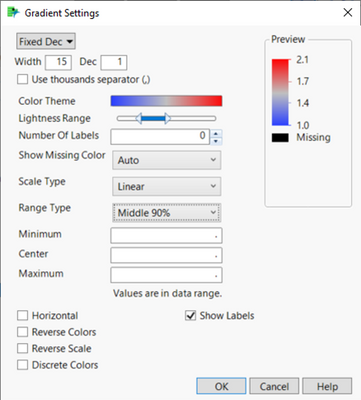
In graph builder, is there a way to set the default color code gradient range to "Middle 90%"?
Created:
Nov 15, 2022 07:58 PM
| Last Modified: Jun 11, 2023 4:29 AM
(2635 views)
I looked in the usual places in "preferences" but don't see a control for this. Is there another way to set the default Range Type to Middle 90% so I don't have to do it manually every time?
Running JMP 16. Thanks.
2 REPLIES 2

Level XIII
- Mark as New
- Bookmark
- Subscribe
- Mute
- Subscribe to RSS Feed
- Get Direct Link
- Report Inappropriate Content
Re: In graph builder, is there a way to set the default color code gradient range to "Middle 90%"?
Created:
Nov 16, 2022 12:07 AM
| Last Modified: Nov 15, 2022 9:41 PM
(2625 views)
| Posted in reply to message from tsg 11-15-2022
would be great :)
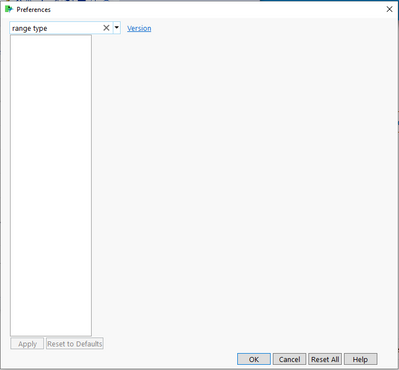
Hm, nothing in the GraphBuilder platform settings, there are no "gradient" platform settings and "range type" doesn't show a result.
Where is it hiding?
Level XIII
- Mark as New
- Bookmark
- Subscribe
- Mute
- Subscribe to RSS Feed
- Get Direct Link
- Report Inappropriate Content
Re: In graph builder, is there a way to set the default color code gradient range to "Middle 90%"?
Created:
Apr 26, 2023 02:51 PM
| Last Modified: Jun 27, 2023 7:00 AM
(2580 views)
| Posted in reply to message from hogi 11-16-2022
If there is no such setting yet, perhaps it will be added in a future release?
I submitted this wish:Graph Builder Preferences: Middle 90%
Recommended Articles
- © 2026 JMP Statistical Discovery LLC. All Rights Reserved.
- Terms of Use
- Privacy Statement
- Contact Us