Turn on suggestions
Auto-suggest helps you quickly narrow down your search results by suggesting possible matches as you type.
- Image to Table JMP extension imports single or batch images as data tables. Useful to extract curves from pictures or convert image data to curve data to use in analyses like Functional Data Explorer. Download and install the extension.
Options
- Subscribe to RSS Feed
- Mark Topic as New
- Mark Topic as Read
- Float this Topic for Current User
- Bookmark
- Subscribe
- Mute
- Printer Friendly Page
Discussions
Solve problems, and share tips and tricks with other JMP users.- User Community
- :
- Discussions
- :
- Re: In graph builder, is there a way to set the default color code gradient rang...

Level I
- Mark as New
- Bookmark
- Subscribe
- Mute
- Subscribe to RSS Feed
- Get Direct Link
- Report Inappropriate Content
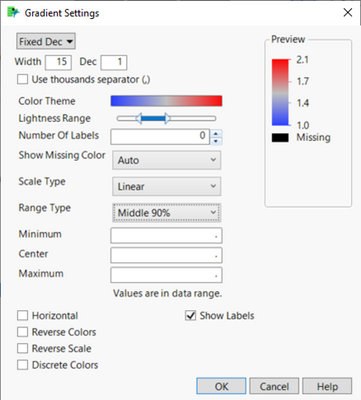
In graph builder, is there a way to set the default color code gradient range to "Middle 90%"?
Created:
Nov 15, 2022 07:58 PM
| Last Modified: Jun 11, 2023 4:29 AM
(2662 views)
I looked in the usual places in "preferences" but don't see a control for this. Is there another way to set the default Range Type to Middle 90% so I don't have to do it manually every time?
Running JMP 16. Thanks.
2 REPLIES 2

Level XIII
- Mark as New
- Bookmark
- Subscribe
- Mute
- Subscribe to RSS Feed
- Get Direct Link
- Report Inappropriate Content
Re: In graph builder, is there a way to set the default color code gradient range to "Middle 90%"?
Created:
Nov 16, 2022 12:07 AM
| Last Modified: Nov 15, 2022 9:41 PM
(2652 views)
| Posted in reply to message from tsg 11-15-2022
would be great :)
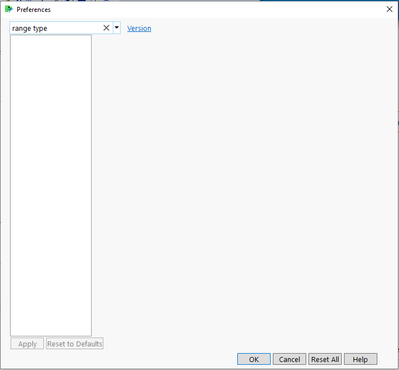
Hm, nothing in the GraphBuilder platform settings, there are no "gradient" platform settings and "range type" doesn't show a result.
Where is it hiding?
Level XIII
- Mark as New
- Bookmark
- Subscribe
- Mute
- Subscribe to RSS Feed
- Get Direct Link
- Report Inappropriate Content
Re: In graph builder, is there a way to set the default color code gradient range to "Middle 90%"?
Created:
Apr 26, 2023 02:51 PM
| Last Modified: Jun 27, 2023 7:00 AM
(2607 views)
| Posted in reply to message from hogi 11-16-2022
If there is no such setting yet, perhaps it will be added in a future release?
I submitted this wish:Graph Builder Preferences: Middle 90%
Recommended Articles
- © 2026 JMP Statistical Discovery LLC. All Rights Reserved.
- Terms of Use
- Privacy Statement
- Contact Us