- JMP will suspend normal business operations for our Winter Holiday beginning on Wednesday, Dec. 24, 2025, at 5:00 p.m. ET (2:00 p.m. ET for JMP Accounts Receivable).
Regular business hours will resume at 9:00 a.m. EST on Friday, Jan. 2, 2026. - We’re retiring the File Exchange at the end of this year. The JMP Marketplace is now your destination for add-ins and extensions.
- Subscribe to RSS Feed
- Mark Topic as New
- Mark Topic as Read
- Float this Topic for Current User
- Bookmark
- Subscribe
- Mute
- Printer Friendly Page
Discussions
Solve problems, and share tips and tricks with other JMP users.- JMP User Community
- :
- Discussions
- :
- How to update axis limits via Global Box

- Mark as New
- Bookmark
- Subscribe
- Mute
- Subscribe to RSS Feed
- Get Direct Link
- Report Inappropriate Content
How to update axis limits via Global Box
Hello,
I want to control the limites of the Y-axis of a graph via Global boxes (to allow the user to quickly change the limites without double-clicking on the axis properties...).
In the script attached, I create a window and a graph. Then I add 2 Global Boxes (Lim1 and Lim2) that I initialyze.
Once the graph is generated, I modify the values of Lim1 and Lim2 but the graph axis is not updated accordingly...I do not see what I am doing wrong.
Can someone help ?
Thanks.
Accepted Solutions


- Mark as New
- Bookmark
- Subscribe
- Mute
- Subscribe to RSS Feed
- Get Direct Link
- Report Inappropriate Content
Re: How to update axis limits via Global Box
I changed the format a bit, just because I wasn;'t sure what everything was doing. However, below is an example of how I typically handle the item that you are questioning. My bigger question, is isn;'t it actually simpler to just drag and move the axis setting simpler for your users, than actually typing in the min and max values?
Names Default To Here( 1 );

//DataPath = "C:\Program Files (x86)\SAS\JMP\11\Samples\Data\Variability Data\Wafer.jmp";
myTable = Open( "$SAMPLE_DATA\Variability Data\Wafer.jmp" );

Param = "Y";
Lim1 = 40;
Lim2 = 160;

FrameSize_X = 775;
FrameSize_Y = 200;

MyWindow = New Window( "Window Controls",
	gr = MyTable << Variability Chart(
		Y( :Name( "Y" ) ),
		X( :Operator, :Wafer ),
		Max Iter( 100 ),
		Std Dev Chart( 1 ),
		Show Range Bars( 0 ),
		Show Grand Median( 0 ),
		Std Dev Chart( 0 ),
		Points Jittered( 1 ),
		Show Box Plots( 1 ),
		Automatic Recalc( 1 ),
		SendToReport(
			Dispatch(
				{"Variability Chart for Y"},
				"2",
				ScaleBox,
				{Min( Lim1 ), Max( Lim2 ), Inc( Abs( Lim2 - Lim1 ) / 10 ), Minor Ticks( 0 ),
				Show Major Grid( 1 ), Show Minor Grid( 1 ), Inside Ticks( 1 )}
			),
			Dispatch( {"Variability Chart for Y"}, "Y", TextEditBox, {Set Text( Param )} ),
			Dispatch(
				{"Variability Chart for Y"},
				"Variability Chart",
				FrameBox,
				{Frame Size( FrameSize_X, FrameSize_Y ), ,
				Row Legend(
					Name( "Operator" ),
					Color( 1 ),
					Color Theme( "JMP Default" ),
					Marker( 0 ),
					Marker Theme( "" ),
					Continuous Scale( 0 ),
					Reverse Scale( 0 ),
					Excluded Rows( 0 )
				)}
			),
			Dispatch(
				{"Variability Chart for Y"},
				"Varability Std Chart",
				FrameBox,
				{Frame Size( FrameSize_X, FrameSize_Y )}
			)

		)

	),
	Panel Box( "1/ Start...",


		g3 = V List Box(
			H List Box(
				Text Box( "Lim 1" ),
				n1 = Number Edit Box(
					Lim1,
					5,
					<<SetFunction(
						Function( {this},
							Report( gr )[AxisBox( 1 )] << Min( n1 << get )
						)
					)
				)
			),
			H List Box( Text Box( "Lim 2" ), n2 = Number Edit Box( Lim2,5,
			<<SetFunction(
						Function( {this},
							Report( gr )[AxisBox( 1 )] << Max( n2 << get )
						)
					)
			 ) ),

		)
	)
);


 Community Manager
- Mark as New
- Bookmark
- Subscribe
- Mute
- Subscribe to RSS Feed
- Get Direct Link
- Report Inappropriate Content
Re: How to update axis limits via Global Box
The issue is that the global variable is used to set the axes when the graph is created but the graph doesn't have any relation the global variable after that.
There are ways to create the interactivity you're looking for (and I'm sure someone here can provide a prototype) but please don't overlook the built-in interactivity of the axis of every graph in JMP. All you have to do is hover over the axis and the cursor will turn into a hand and you can click and drag to change the axis.
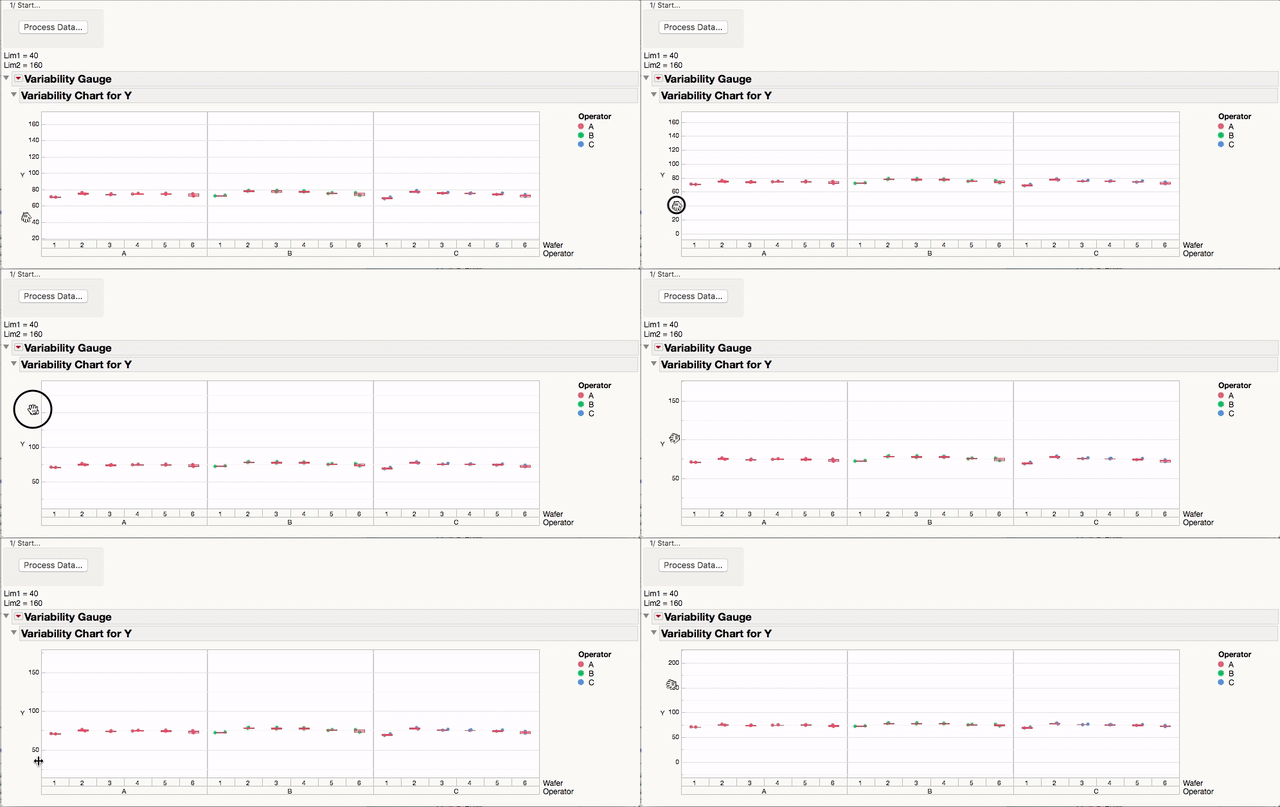
You'd do your users a great service by teaching them this. That way, they'll have control over every graph they see in JMP, not just the ones you create for them and give them handy text box controls for.
- Mark as New
- Bookmark
- Subscribe
- Mute
- Subscribe to RSS Feed
- Get Direct Link
- Report Inappropriate Content
Re: How to update axis limits via Global Box
I changed the format a bit, just because I wasn;'t sure what everything was doing. However, below is an example of how I typically handle the item that you are questioning. My bigger question, is isn;'t it actually simpler to just drag and move the axis setting simpler for your users, than actually typing in the min and max values?
Names Default To Here( 1 );

//DataPath = "C:\Program Files (x86)\SAS\JMP\11\Samples\Data\Variability Data\Wafer.jmp";
myTable = Open( "$SAMPLE_DATA\Variability Data\Wafer.jmp" );

Param = "Y";
Lim1 = 40;
Lim2 = 160;

FrameSize_X = 775;
FrameSize_Y = 200;

MyWindow = New Window( "Window Controls",
	gr = MyTable << Variability Chart(
		Y( :Name( "Y" ) ),
		X( :Operator, :Wafer ),
		Max Iter( 100 ),
		Std Dev Chart( 1 ),
		Show Range Bars( 0 ),
		Show Grand Median( 0 ),
		Std Dev Chart( 0 ),
		Points Jittered( 1 ),
		Show Box Plots( 1 ),
		Automatic Recalc( 1 ),
		SendToReport(
			Dispatch(
				{"Variability Chart for Y"},
				"2",
				ScaleBox,
				{Min( Lim1 ), Max( Lim2 ), Inc( Abs( Lim2 - Lim1 ) / 10 ), Minor Ticks( 0 ),
				Show Major Grid( 1 ), Show Minor Grid( 1 ), Inside Ticks( 1 )}
			),
			Dispatch( {"Variability Chart for Y"}, "Y", TextEditBox, {Set Text( Param )} ),
			Dispatch(
				{"Variability Chart for Y"},
				"Variability Chart",
				FrameBox,
				{Frame Size( FrameSize_X, FrameSize_Y ), ,
				Row Legend(
					Name( "Operator" ),
					Color( 1 ),
					Color Theme( "JMP Default" ),
					Marker( 0 ),
					Marker Theme( "" ),
					Continuous Scale( 0 ),
					Reverse Scale( 0 ),
					Excluded Rows( 0 )
				)}
			),
			Dispatch(
				{"Variability Chart for Y"},
				"Varability Std Chart",
				FrameBox,
				{Frame Size( FrameSize_X, FrameSize_Y )}
			)

		)

	),
	Panel Box( "1/ Start...",


		g3 = V List Box(
			H List Box(
				Text Box( "Lim 1" ),
				n1 = Number Edit Box(
					Lim1,
					5,
					<<SetFunction(
						Function( {this},
							Report( gr )[AxisBox( 1 )] << Min( n1 << get )
						)
					)
				)
			),
			H List Box( Text Box( "Lim 2" ), n2 = Number Edit Box( Lim2,5,
			<<SetFunction(
						Function( {this},
							Report( gr )[AxisBox( 1 )] << Max( n2 << get )
						)
					)
			 ) ),

		)
	)
);
- Mark as New
- Bookmark
- Subscribe
- Mute
- Subscribe to RSS Feed
- Get Direct Link
- Report Inappropriate Content
Re: How to update axis limits via Global Box
Nelson, Jeff,
I understand your reasoning: using the interactive platform (drag, move,...) of the axes is very useful indeed...However for a couple of reasons, it is not helpful for me:
- Most of the graphs I will generate will contain outliers that will have a value much higher than the rest of the population. In this case, the intreactive solution is very time consuming and painfull...
- I intend to generate like 30 graphs in a single window: you can imagine that changing interactively the 30 graphs is not an option. having a box or couple of boxes to set all values is more time-efficient.
Anyway, I see the solution of Nelson is working fine. It looks a big complexe: I have to look in details what is done.
thanks a lot.

- Mark as New
- Bookmark
- Subscribe
- Mute
- Subscribe to RSS Feed
- Get Direct Link
- Report Inappropriate Content
Re: How to update axis limits via Global Box
I came across your question trying to do something very similar (set axis limits by data on many graphs so that outliers aren't missed). I solved it by setting the axis limits to an expression to evaluate (i.e equal to the minimum value - either the LSL or the lowest data point, opposite for max). See below:
// Get min/max for Graph 1
dt = Current Data Table();
G1 = dt << Get Rows Where (:Column 1 == "Group1");
G1_Min = Eval( Min((LSL[1]*0.95), Min(:Column 2[G1])));
G1_Max = Eval( Max((USL[1]*1.05), Max(:Column 2[G1])));
dt << clear select;

// Get min/max for Graph 2 etc. repeat for each graph
dt = Current Data Table();
G2 = dt << Get Rows Where (:Column 1 == "Group2");
G2_Min = Eval( Min((LSL[2]*0.95), Min(:Column 2[G2])));
G2_Max = Eval( Max((USL[2]*1.05), Max(:Column 2[G2])));
dt << clear select;

// Assign axis limits and specification lines within the graph parameters (for Graph 1 - repeat for each)
Dispatch ({Min(G1_Min), Max(G1_Max), Inc( Eval((G1_Max - G1_Min) / 7))),
Add Ref Line( LSL[1], "Solid", "Medium Dark Blue", "LSL", 1 ),
Add Ref Line( USL[1], "Solid", "Medium Dark Blue", "USL", 1 )}
* Note: I know your problem is resolved as its been 4-years, but it may help others with similar problems.
Recommended Articles
- © 2025 JMP Statistical Discovery LLC. All Rights Reserved.
- Terms of Use
- Privacy Statement
- Contact Us