Turn on suggestions
Auto-suggest helps you quickly narrow down your search results by suggesting possible matches as you type.
- Don’t miss your chance to experience Discovery Summit Europe at our best available rate! Early bird registration through 31 Oct.
- Graph Builder Toolbar streamlines interactive graphing. Creates shortcuts on Report and GraphBuilder Helpers toolbars. Download and install the extension.
Options
- Subscribe to RSS Feed
- Mark Topic as New
- Mark Topic as Read
- Float this Topic for Current User
- Bookmark
- Subscribe
- Mute
- Printer Friendly Page
Discussions
Solve problems, and share tips and tricks with other JMP users.- User Community
- :
- Discussions
- :
- Re: How to set label color for graph builder?

Level II
- Mark as New
- Bookmark
- Subscribe
- Mute
- Subscribe to RSS Feed
- Get Direct Link
- Report Inappropriate Content
How to set label color for graph builder?
Apr 21, 2026 02:25 AM
(744 views)
Hi all, I was wondering whether it is possible to set the label color independently of the data point color. I would like all labels to be black, meaning that the labels JACLYN, LOUISE, KATIE, and JANE should be black instead of blue, while the data points themselves should remain blue. Is this possible? Thanks!
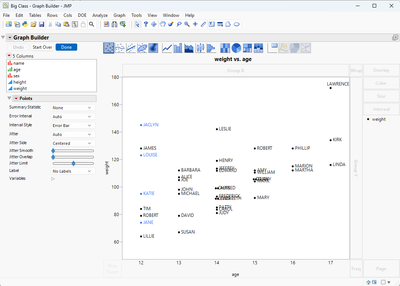
Code for generating the plot:
dt = Open( "$SAMPLE_DATA/Big Class.jmp" );
dt << Clear Select << Select Rows( Index( 1, 4 ) ) << Colors( "Blue" ) << Clear Select;
dt:name << Label( 1 );

dt << Graph Builder(
	Variables( X( :age ), Y( :weight ) ),
	Elements( Points( X, Y, Legend( 5 ) ) ),
	SendToReport(
		Dispatch( {}, "Graph Builder", FrameBox,
			{DispatchSeg( Marker Seg( 1 ), Set Force Labels( "Label by Row" ) )}
		)
	)
);
1 ACCEPTED SOLUTION
Accepted Solutions


Staff
Solution
- Mark as New
- Bookmark
- Subscribe
- Mute
- Subscribe to RSS Feed
- Get Direct Link
- Report Inappropriate Content
Re: How to set label color for graph builder?
Hi @RMSEBird223 ,
There's a preference form marker label color style and marker label fixed color.

I hope this helps,
~John
2 REPLIES 2
Staff
Solution
- Mark as New
- Bookmark
- Subscribe
- Mute
- Subscribe to RSS Feed
- Get Direct Link
- Report Inappropriate Content
Re: How to set label color for graph builder?
Hi @RMSEBird223 ,
There's a preference form marker label color style and marker label fixed color.
I hope this helps,
~John
Level II
- Mark as New
- Bookmark
- Subscribe
- Mute
- Subscribe to RSS Feed
- Get Direct Link
- Report Inappropriate Content
Re: How to set label color for graph builder?
Thanks a lot!
Recommended Articles
- © 2026 JMP Statistical Discovery LLC. All Rights Reserved.
- Terms of Use
- Privacy Statement
- Contact Us