Turn on suggestions
Auto-suggest helps you quickly narrow down your search results by suggesting possible matches as you type.
- Don’t miss your chance to experience Discovery Summit Europe at our best available rate! Early bird registration through 31 Oct.
- Graph Builder Toolbar streamlines interactive graphing. Creates shortcuts on Report and GraphBuilder Helpers toolbars. Download and install the extension.
Options
- Subscribe to RSS Feed
- Mark Topic as New
- Mark Topic as Read
- Float this Topic for Current User
- Bookmark
- Subscribe
- Mute
- Printer Friendly Page
Discussions
Solve problems, and share tips and tricks with other JMP users.- User Community
- :
- Discussions
- :
- Re: How to save data table(colored cells) to Interactive HTML?

Level III
- Mark as New
- Bookmark
- Subscribe
- Mute
- Subscribe to RSS Feed
- Get Direct Link
- Report Inappropriate Content
How to save data table(colored cells) to Interactive HTML?
May 10, 2020 11:15 AM
(5157 views)
Hi,
When I saved 'dt_newin' as Interactive HTML and try to open the file (in chrome\explorer) the color in the columns disappeared.
Is there a solution to this?
Thanks
dt_newin = New Window( "Data Tool", db);

dt_newin() << journal;
Current Journal() << Save INTERACTIVE HTML( "C:\Desktop\Report\Summary Data.html" );
Current Journal() << Close window( nosave );
1 ACCEPTED SOLUTION
Accepted Solutions


Super User
Solution
- Mark as New
- Bookmark
- Subscribe
- Mute
- Subscribe to RSS Feed
- Get Direct Link
- Report Inappropriate Content
Re: How to save data table(colored cells) to Interactive HTML?
Here is how I typically do it
names default to here(1);
dt=Open("$SAMPLE_DATA/big class.jmp");

dt:sex << color Cells("green",dt<<get rows where(:sex=="F"));
dt:sex << color Cells("Orange",dt<<get rows where(:sex=="M"));

interium=new window("interium",<<journal);
dt<<journal;


nw=new window("The Test",<<journal,
	Outline box("Here are the data",
		interium << get picture
	)
);

interium<<close window;

nw << save interactive html ("$TEMP\data table.html");

open("$TEMP/data table.html");
Jim
5 REPLIES 5
Super User
- Mark as New
- Bookmark
- Subscribe
- Mute
- Subscribe to RSS Feed
- Get Direct Link
- Report Inappropriate Content
Re: How to save data table(colored cells) to Interactive HTML?
Save the data table first to a journal and then save the journal to html
Jim
Level III
- Mark as New
- Bookmark
- Subscribe
- Mute
- Subscribe to RSS Feed
- Get Direct Link
- Report Inappropriate Content
Re: How to save data table(colored cells) to Interactive HTML?
Created:
May 10, 2020 07:11 PM
| Last Modified: May 18, 2020 10:25 AM
(5133 views)
| Posted in reply to message from txnelson 05-10-2020
I have tried several options, without success. - see below.
Can you give me more details please?
charts = {};

db = Outline Box( "Cdata Tool", Outline Box( "Summary", myTab = Tab Box() ) );

For( i = 1, i <= N Items( Dis1 ), i++,
myTab << Insert(
Dis[i],
Eval(
Parse(
"charts[" || Char( i ) ||
"] = Charts_1 = V List Box(
V List Box( dt_dtarray1[i] << get as report() ),
ob1=Outline Box( \!"Drill Down Analysis
--> Click Here\!",
V List Box( dt_dtarray2[i] << get as report() ),));"))));

ob1<<close;

dt_newin = New Window( "Cdata Tool",db,<<Journal);
dt_newin << Save interactive HTML( "\\Desktop\Report\Summary .html" );
Super User
Solution
- Mark as New
- Bookmark
- Subscribe
- Mute
- Subscribe to RSS Feed
- Get Direct Link
- Report Inappropriate Content
Re: How to save data table(colored cells) to Interactive HTML?
Here is how I typically do it
names default to here(1);
dt=Open("$SAMPLE_DATA/big class.jmp");

dt:sex << color Cells("green",dt<<get rows where(:sex=="F"));
dt:sex << color Cells("Orange",dt<<get rows where(:sex=="M"));

interium=new window("interium",<<journal);
dt<<journal;


nw=new window("The Test",<<journal,
	Outline box("Here are the data",
		interium << get picture
	)
);

interium<<close window;

nw << save interactive html ("$TEMP\data table.html");

open("$TEMP/data table.html");
Jim

Super User
- Mark as New
- Bookmark
- Subscribe
- Mute
- Subscribe to RSS Feed
- Get Direct Link
- Report Inappropriate Content
Re: How to save data table(colored cells) to Interactive HTML?
Jim's approach captures a picture. Try this to have an HTML table with selectable data:
dt=Open("$SAMPLE_DATA/big class.jmp");
dt:sex << color Cells("green",dt<<get rows where(:sex=="F"));
dt:sex << color Cells("Orange",dt<<get rows where(:sex=="M"));
temp=new window("temp",<<journal);
dt<<journal;
temp<<saveHTML("$desktop/bigclass.html");
temp<<closewindow;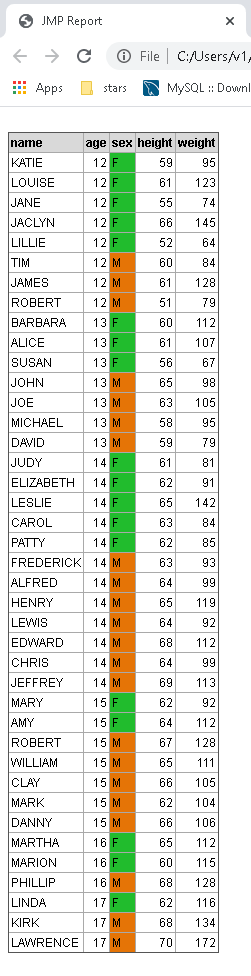
Craige
Level III
- Mark as New
- Bookmark
- Subscribe
- Mute
- Subscribe to RSS Feed
- Get Direct Link
- Report Inappropriate Content
Re: How to save data table(colored cells) to Interactive HTML?
Thank you very much, it works great!
Recommended Articles
- © 2026 JMP Statistical Discovery LLC. All Rights Reserved.
- Terms of Use
- Privacy Statement
- Contact Us