cancel
Showing results for 
Show  only  | Search instead for 
Did you mean: 
  • Due to the recently reported Microsoft outage, users may be temporarily unable to access My JMP or experience a delay receiving their verification codes. If you have previously installed JMP on your computer, this outage should not impact your ability to access the software. My JMP services will be restored as soon as Microsoft resolves this issue.
  • Image to Table JMP extension imports single or batch images as data tables. Useful to extract curves from pictures or convert image data to curve data to use in analyses like Functional Data Explorer. Download and install the extension.

Discussions

Solve problems, and share tips and tricks with other JMP users.
Choose Language Hide Translation Bar
SDF1
Super User

How to replace empty rows until next entry (and continue)?

Dear JMP community,


(W10, 64-bit, JMP 15.0 Pro)


  I have a large data table that is imported from an excel file and I need to have empty rows of a column filled with the entries of the previous list. I am trying to write JSL to go from a column as on the left to the one on the right, as shown below:
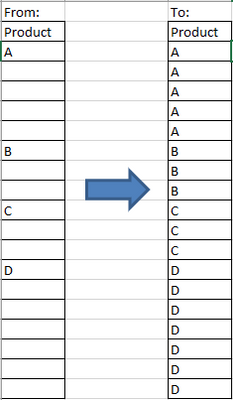
Snap1.png

  I'm thinking it should be pretty easy to code, but the issue I'm having is correctly stopping at the end of the previous product and starting with the new product. I must not be looping through correctly.


  Any suggestions/help is welcome.


Thanks!,

DS

10 REPLIES 10
Byron_JMP
Staff

Re: How to replace empty rows until next entry (and continue)?

A couple of the JMP systems engineers were going round and round on this problem and this was the best solution. This final version by @Brady Brady is heads a tails faster and more robust than the simple formula we started with. I've been using it for years and found it to work well in a number of situations.  Glad it worked for you!

JMP Systems Engineer, Health and Life Sciences (Pharma)

Recommended Articles