cancel
Showing results for 
Show  only  | Search instead for 
Did you mean: 
  • Instantly extract effect sizes, F-ratios, and FDR-adjusted p-values from your models with the Calculate Effects Sizes extension, available now in the JMP Marketplace!
  • New to JMP? Join us Sept. 23-24 for the Early User Edition of Discovery Summit, tailor-made for new users. Register now for free!
  • See how to use the JMP Marketplace – Free tools to expand JMP capabilities. Register. July 10, 2 pm US Eastern Time.

Discussions

Solve problems, and share tips and tricks with other JMP users.
Choose Language Hide Translation Bar
RobRobeyns
Level III

How to prompt a " File in Use" message

Hi,


I'm currently creating a JMP file which acts as a database. Therefore I would like to prompt a "File in use" message and keep the file locked for editing when someone else already opened the database and is making changes to the file. For example, the same message you get when you open an Excel file on a server location that is already in use by someone else:
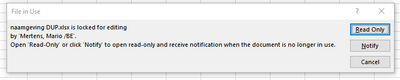
 

file in use message.png


I think I already found a part of the answer in the following Community post: Multi-User Access 


If I'm correct I would still need to figure out how to lock the table if it is opened by another user.


Could someone please help with creating such a script?


Thanks

 

10 REPLIES 10
Craige_Hales
Super User

Re: How to prompt a " File in Use" message

Sorry, lost track of this. I made a video of the data table vanishing off the desktop and sent it to the development team. Thanks!

Craige

Recommended Articles
