cancel
Showing results for 
Show  only  | Search instead for 
Did you mean: 
  • JMP will suspend normal business operations for our Winter Holiday beginning on Wednesday, Dec. 24, 2025, at 5:00 p.m. ET (2:00 p.m. ET for JMP Accounts Receivable).
    Regular business hours will resume at 9:00 a.m. EST on Friday, Jan. 2, 2026.
  • We’re retiring the File Exchange at the end of this year. The JMP Marketplace is now your destination for add-ins and extensions.

Discussions

Solve problems, and share tips and tricks with other JMP users.
%3CLINGO-SUB%20id%3D%22lingo-sub-523793%22%20slang%3D%22en-US%22%20mode%3D%22NONE%22%3E%C2%BFC%C3%B3mo%20hacer%20que%20el%20valor%20p%20se%20muestre%20en%20formato%20de%20notaci%C3%B3n%20cient%C3%ADfica%3F%3C%2FLINGO-SUB%3E%3CLINGO-BODY%20id%3D%22lingo-body-523793%22%20slang%3D%22en-US%22%20mode%3D%22NONE%22%3E%3CP%3EHola%20a%20todos%2C%3C%2FP%3E%3CP%3E%3CSPAN%20class%3D%22lia-inline-image-display-wrapper%20lia-image-align-inline%22%20image-alt%3D%22pvalue%20display.JPG%22%20style%3D%22width%3A%20428px%3B%22%3E%3CSPAN%20class%3D%22lia-inline-image-display-wrapper%22%20image-alt%3D%22pvalue%20display.JPG%22%20style%3D%22width%3A%20428px%3B%22%3E%3CSPAN%20class%3D%22lia-inline-image-display-wrapper%22%20image-alt%3D%22pvalue%20display.JPG%22%20style%3D%22width%3A%20428px%3B%22%3E%3CSPAN%20class%3D%22lia-inline-image-display-wrapper%22%20image-alt%3D%22pvalue%20display.JPG%22%20style%3D%22width%3A%20428px%3B%22%3E%3CSPAN%20class%3D%22lia-inline-image-display-wrapper%22%20image-alt%3D%22pvalue%20display.JPG%22%20style%3D%22width%3A%20428px%3B%22%3E%3CSPAN%20class%3D%22lia-inline-image-display-wrapper%22%20image-alt%3D%22pvalue%20display.JPG%22%20style%3D%22width%3A%20428px%3B%22%3E%3CSPAN%20class%3D%22lia-inline-image-display-wrapper%22%20image-alt%3D%22pvalue%20display.JPG%22%20style%3D%22width%3A%20428px%3B%22%3E%3CSPAN%20class%3D%22lia-inline-image-display-wrapper%22%20image-alt%3D%22pvalue%20display.JPG%22%20style%3D%22width%3A%20428px%3B%22%3E%3CSPAN%20class%3D%22lia-inline-image-display-wrapper%22%20image-alt%3D%22pvalue%20display.JPG%22%20style%3D%22width%3A%20428px%3B%22%3E%3CSPAN%20class%3D%22lia-inline-image-display-wrapper%22%20image-alt%3D%22pvalue%20display.JPG%22%20style%3D%22width%3A%20428px%3B%22%3E%3Cspan%20class%3D%22lia-inline-image-display-wrapper%22%20image-alt%3D%22pvalue%20display.JPG%22%20style%3D%22width%3A%20428px%3B%22%3E%3Cimg%20src%3D%22https%3A%2F%2Fcommunity.jmp.com%2Ft5%2Fimage%2Fserverpage%2Fimage-id%2F44140iE170D23F815B6893%2Fimage-dimensions%2F428x417%3Fv%3Dv2%22%20width%3D%22428%22%20height%3D%22417%22%20role%3D%22button%22%20title%3D%22pvalue%20display.JPG%22%20alt%3D%22pvalue%20display.JPG%22%20%2F%3E%3C%2Fspan%3E%3C%2FSPAN%3E%3C%2FSPAN%3E%3C%2FSPAN%3E%3C%2FSPAN%3E%3C%2FSPAN%3E%3C%2FSPAN%3E%3C%2FSPAN%3E%3C%2FSPAN%3E%3C%2FSPAN%3E%3C%2FSPAN%3E%3C%2FP%3E%3CP%3EEstoy%20comprobando%20y%20revisando%20los%20resultados%20estad%C3%ADsticos%20realizados%20por%20otros%20utilizando%20diferentes%20herramientas%20de%20software%20estad%C3%ADstico.%20Sus%20valores%20p%20est%C3%A1n%20en%20el%20rango%20%26lt%3B0.00001%20mostrado%20en%20notaci%C3%B3n%20cient%C3%ADfica.%20Algunos%20n%C3%BAmeros%20son%20extra%C3%B1os.%20Cuando%20uso%20JMP%20para%20repetir%20el%20an%C3%A1lisis%2C%20ajuste%20Y%20a%20X%20y%20luego%20seleccione%20el%20m%C3%A9todo%20relevante%2C%20los%20valores%20p%20se%20muestran%20como%20%22%26lt%3B.0001%22.%20%C2%BFHay%20alguna%20manera%20de%20que%20JMP%20muestre%20el%20valor%20p%20en%20formato%20de%20notaci%C3%B3n%20cient%C3%ADfica%20para%20que%20pueda%20comparar%20el%20n%C3%BAmero%20de%20resultados%3F%3C%2FP%3E%3CP%3E%26nbsp%3B%3C%2FP%3E%3CP%3EGracias%2C%3C%2FP%3E%3CP%3EDiana%3C%2FP%3E%3C%2FLINGO-BODY%3E%3CLINGO-LABS%20id%3D%22lingo-labs-523793%22%20slang%3D%22en-US%22%20mode%3D%22NONE%22%3E%3CLINGO-LABEL%3EAnal%C3%ADtica%3C%2FLINGO-LABEL%3E%3C%2FLINGO-LABS%3E%3CLINGO-SUB%20id%3D%22lingo-sub-523808%22%20slang%3D%22en-US%22%20mode%3D%22NONE%22%3ERe%3A%20%C2%BFC%C3%B3mo%20hacer%20que%20el%20valor%20p%20se%20muestre%20en%20formato%20de%20notaci%C3%B3n%20cient%C3%ADfica%3F%3C%2FLINGO-SUB%3E%3CLINGO-BODY%20id%3D%22lingo-body-523808%22%20slang%3D%22en-US%22%20mode%3D%22NONE%22%3E%3CP%3EHaga%20clic%20con%20el%20bot%C3%B3n%20derecho%20en%20el%20encabezado%20de%20la%20columna%20y%20seleccione%20Formato%20de%20columna...%3C%2FP%3E%0A%3CP%3E%3CSPAN%20class%3D%22lia-inline-image-display-wrapper%20lia-image-align-inline%22%20image-alt%3D%22jthi_0-1658316425312.png%22%20style%3D%22width%3A%20400px%3B%22%3E%3CSPAN%20class%3D%22lia-inline-image-display-wrapper%22%20image-alt%3D%22jthi_0-1658316425312.png%22%20style%3D%22width%3A%20319px%3B%22%3E%3Cspan%20class%3D%22lia-inline-image-display-wrapper%22%20image-alt%3D%22jthi_0-1658316425312.png%22%20style%3D%22width%3A%20319px%3B%22%3E%3Cimg%20src%3D%22https%3A%2F%2Fcommunity.jmp.com%2Ft5%2Fimage%2Fserverpage%2Fimage-id%2F44141iF0B6A2323B9D7DF0%2Fimage-size%2Fmedium%3Fv%3Dv2%26amp%3Bpx%3D400%22%20role%3D%22button%22%20title%3D%22jthi_0-1658316425312.png%22%20alt%3D%22jthi_0-1658316425312.png%22%20%2F%3E%3C%2Fspan%3E%3C%2FSPAN%3E%3C%2FSPAN%3E%3C%2FP%3E%0A%3CP%3E%3CSPAN%20class%3D%22lia-inline-image-display-wrapper%20lia-image-align-inline%22%20image-alt%3D%22jthi_1-1658316446977.png%22%20style%3D%22width%3A%20400px%3B%22%3E%3CSPAN%20class%3D%22lia-inline-image-display-wrapper%22%20image-alt%3D%22jthi_1-1658316446977.png%22%20style%3D%22width%3A%20400px%3B%22%3E%3Cspan%20class%3D%22lia-inline-image-display-wrapper%22%20image-alt%3D%22jthi_1-1658316446977.png%22%20style%3D%22width%3A%20400px%3B%22%3E%3Cimg%20src%3D%22https%3A%2F%2Fcommunity.jmp.com%2Ft5%2Fimage%2Fserverpage%2Fimage-id%2F44142i8B76179BA7401B5A%2Fimage-size%2Fmedium%3Fv%3Dv2%26amp%3Bpx%3D400%22%20role%3D%22button%22%20title%3D%22jthi_1-1658316446977.png%22%20alt%3D%22jthi_1-1658316446977.png%22%20%2F%3E%3C%2Fspan%3E%3C%2FSPAN%3E%3C%2FSPAN%3E%3C%2FP%3E%0A%3CP%3E%26nbsp%3B%3C%2FP%3E%3C%2FLINGO-BODY%3E
Choose Language Hide Translation Bar
Diana
Level II

How to make p-Value shown in scientific notation format?

Hi all,

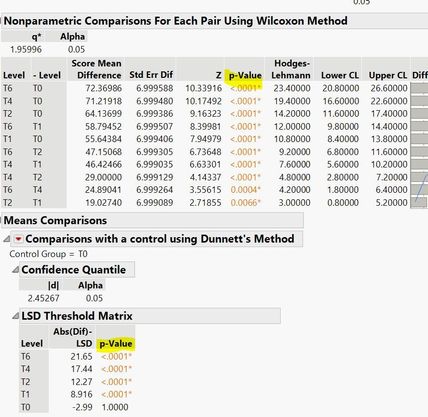
pvalue display.JPG

I'm checking and reviewing statistical results done by others using different statistical software tools. Their p-values are at range <0.00001 displayed in scientific notation. Some numbers are strange. When I using JMP to repeat the analysis, Fit Y to X and then select the relevant method, the p-Values are shown as "<.0001". Is there a way to for JMP to show the p-value in scientific notation format so that I could compare the results number?


Thanks,

Diana

1 ACCEPTED SOLUTION

Accepted Solutions

jthi
Super User

Re: How to make p-Value shown in scientific notation format?

Right click on column header and select Format Column...

jthi_0-1658316425312.png

jthi_1-1658316446977.png


-Jarmo

View solution in original post

1 REPLY 1
jthi
Super User

Re: How to make p-Value shown in scientific notation format?

Right click on column header and select Format Column...

jthi_0-1658316425312.png

jthi_1-1658316446977.png


-Jarmo

Recommended Articles