Turn on suggestions
Auto-suggest helps you quickly narrow down your search results by suggesting possible matches as you type.
- Don’t miss your chance to experience Discovery Summit Europe at our best available rate! Early bird registration through 31 Oct.
- Graph Builder Toolbar streamlines interactive graphing. Creates shortcuts on Report and GraphBuilder Helpers toolbars. Download and install the extension.
- JMP will suspend normal business operations for our Rest and Recharge Day on Friday, October 2, 2026.
Regular business hours will resume on Monday, October 5, 2026.
Options
- Subscribe to RSS Feed
- Mark Topic as New
- Mark Topic as Read
- Float this Topic for Current User
- Bookmark
- Subscribe
- Mute
- Printer Friendly Page
Discussions
Solve problems, and share tips and tricks with other JMP users.- User Community
- :
- Discussions
- :
- How to make a subset file based on certain rows.

Level II
- Mark as New
- Bookmark
- Subscribe
- Mute
- Subscribe to RSS Feed
- Get Direct Link
- Report Inappropriate Content
How to make a subset file based on certain rows.
Created:
Oct 8, 2021 06:23 AM
| Last Modified: Jun 10, 2023 4:38 PM
(2570 views)
Hello guys,
I am working on an experiment, where I had to measure people's baselines and responses and I am sorting the data out. What I need to do is to make a subset file based on all the rows where the name "baseline" is in.
Kind regards,
1 ACCEPTED SOLUTION
Accepted Solutions


Super User
Solution
- Mark as New
- Bookmark
- Subscribe
- Mute
- Subscribe to RSS Feed
- Get Direct Link
- Report Inappropriate Content
Re: How to make a subset file based on certain rows.
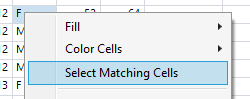
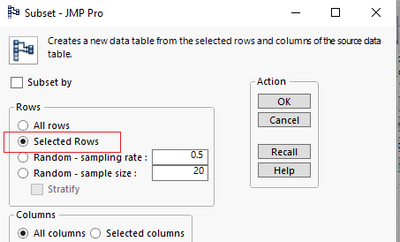
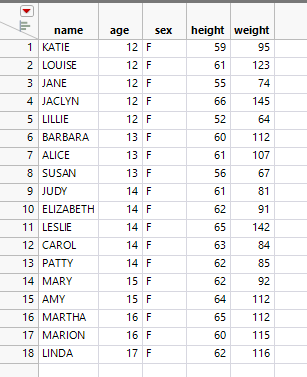
Using Big Class as example (creating subset with sex F):
1. Right click on value of interest and choose Select Matching Cells
2. Go to Tables / Subset
3. Make sure Selected Rows is selected and press OK

-Jarmo
1 REPLY 1
Super User
Solution
- Mark as New
- Bookmark
- Subscribe
- Mute
- Subscribe to RSS Feed
- Get Direct Link
- Report Inappropriate Content
Re: How to make a subset file based on certain rows.
Using Big Class as example (creating subset with sex F):
1. Right click on value of interest and choose Select Matching Cells
2. Go to Tables / Subset
3. Make sure Selected Rows is selected and press OK
-Jarmo
Recommended Articles
- © 2026 JMP Statistical Discovery LLC. All Rights Reserved.
- Terms of Use
- Privacy Statement
- Contact Us