- Discovery Summit 2026: Early User Edition - September 23-24.Register. It's free.
- Graph Builder Toolbar streamlines interactive graphing. Creates shortcuts on Report and GraphBuilder Helpers toolbars. Download and install the extension.
- Subscribe to RSS Feed
- Mark Topic as New
- Mark Topic as Read
- Float this Topic for Current User
- Bookmark
- Subscribe
- Mute
- Printer Friendly Page
Discussions
Solve problems, and share tips and tricks with other JMP users.- User Community
- :
- Discussions
- :
- Re: How to make JSL pop up a dialog box and wait for the user to fill in the par...

- Mark as New
- Bookmark
- Subscribe
- Mute
- Subscribe to RSS Feed
- Get Direct Link
- Report Inappropriate Content
How to make JSL pop up a dialog box and wait for the user to fill in the parameters?
How can a single JSL have it pop up a dialog at runtime, and when I fill in the text, it can read the content and pass it to the variable and continue running?
Thanks!
Accepted Solutions


- Mark as New
- Bookmark
- Subscribe
- Mute
- Subscribe to RSS Feed
- Get Direct Link
- Report Inappropriate Content
Re: How to make JSL pop up a dialog box and wait for the user to fill in the parameters?
for modal, just change the example:
ex = New Window( "Dialog() example",
	<<Modal,
	<<Return Result,
	V List Box( H List Box( "Set this value", variable = text Edit Box( "Change this text" ) ), H List Box( Button Box( "OK" ), Button Box( "Cancel" ) ) )
);
// because the window is modal, the window must be closed before the following code runs
If(
	ex["button"] == 1, // not canceled
// then show the value
	write(ex["variable"] ), // note: variable is the name of the variable holding the text edit box
// else report no selection
	write("CANCEL"); // cancel button or red X was pressed
);
The example in the scripting index needs a small rewrite to be more useful. I've fixed the main problem and added comments above. The main problem is the if-clause in the example is a confusing double-statement with a semicolon.
edit: repair formatting (for some reason, the code formatter wants to mess up the final else statement)

- Mark as New
- Bookmark
- Subscribe
- Mute
- Subscribe to RSS Feed
- Get Direct Link
- Report Inappropriate Content
Re: How to make JSL pop up a dialog box and wait for the user to fill in the parameters?
Here's a working example. You need to include << modal, assign a variable to the text edit box, and retrieve the text edit box value before the user exits the modal dialog.
dt = Open( "$SAMPLE_DATA/Big Class.jmp" );
ex = New Window( "Example: Text Edit Box", << modal,
	panel Box( "Picker Example",
		H List Box(
			Text Box( "Label:" ),
			teb = Text Edit Box() ) ),
	panel box("Options",
		h list box(
			ok_button = button box("OK", na = teb << get text),
			canc_button = button box("Cancel", na = "")
		)
	)
);

show(na);

// Wait for me to input text  "JANE"
dt << Select Where( :name == uppercase(na) );
d3 = dt << Subset( Output Table( "tmp" ), Selected Rows( 1 ), selected columns( 0 ) );- Mark as New
- Bookmark
- Subscribe
- Mute
- Subscribe to RSS Feed
- Get Direct Link
- Report Inappropriate Content
Re: How to make JSL pop up a dialog box and wait for the user to fill in the parameters?
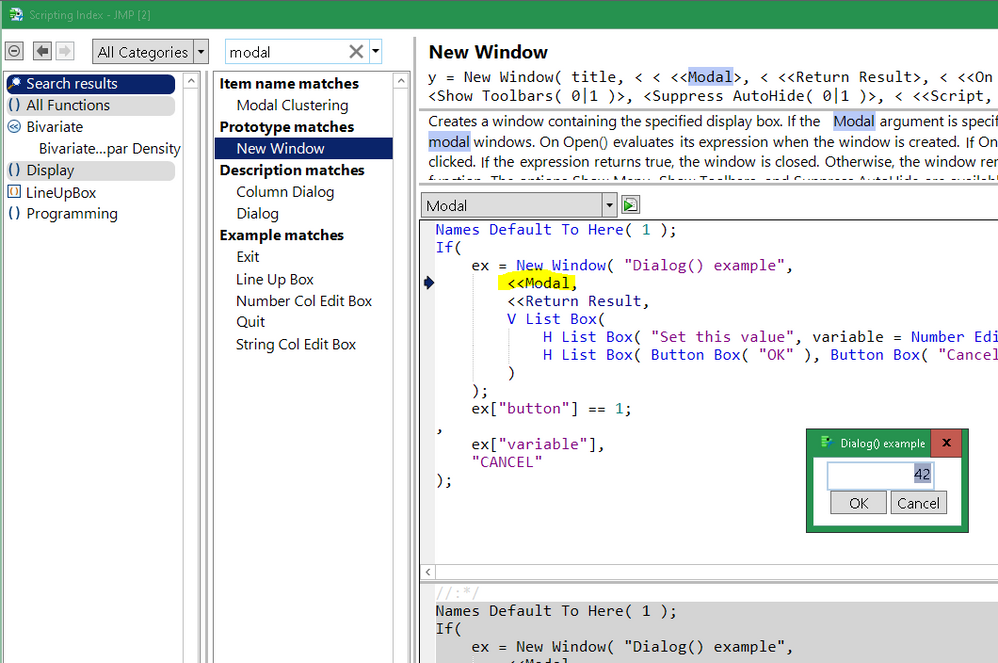
you need the modal option.
- Mark as New
- Bookmark
- Subscribe
- Mute
- Subscribe to RSS Feed
- Get Direct Link
- Report Inappropriate Content
Re: How to make JSL pop up a dialog box and wait for the user to fill in the parameters?
What I want to fill in is not a number, how to modify?
Thank Craige!
- Mark as New
- Bookmark
- Subscribe
- Mute
- Subscribe to RSS Feed
- Get Direct Link
- Report Inappropriate Content
Re: How to make JSL pop up a dialog box and wait for the user to fill in the parameters?
A text edit box, rather than a num edit box.
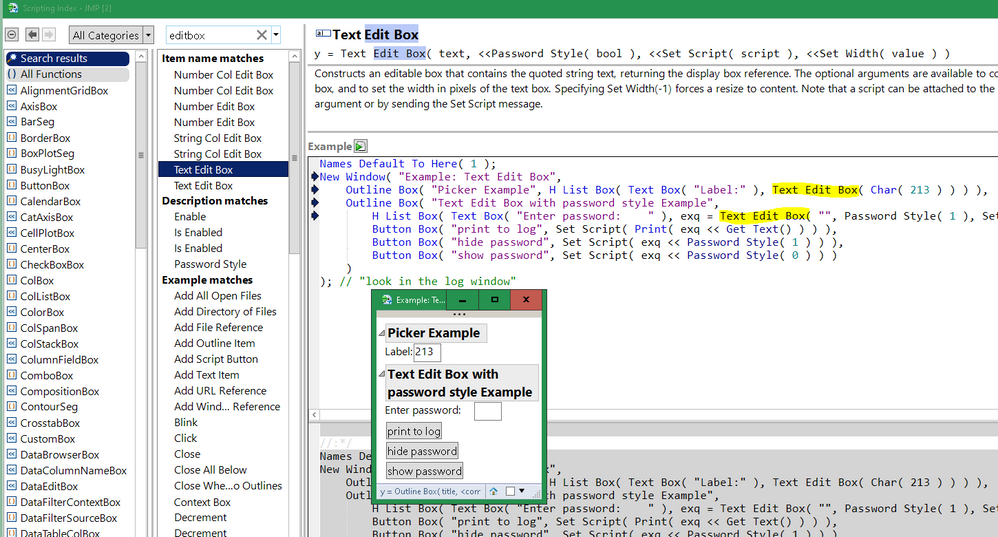
Also, take a look at Modal Dialogs , especially how to get the answers from the modal dialog.
- Mark as New
- Bookmark
- Subscribe
- Mute
- Subscribe to RSS Feed
- Get Direct Link
- Report Inappropriate Content
Re: How to make JSL pop up a dialog box and wait for the user to fill in the parameters?
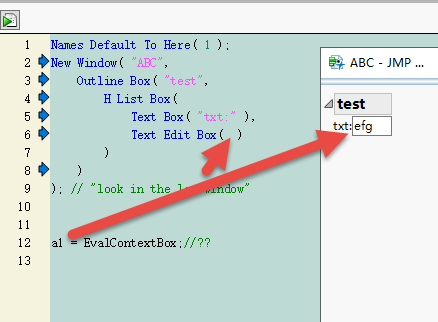
How can variable "a1" get the "efg" I filled in?
Thanks Experts!
- Mark as New
- Bookmark
- Subscribe
- Mute
- Subscribe to RSS Feed
- Get Direct Link
- Report Inappropriate Content
Re: How to make JSL pop up a dialog box and wait for the user to fill in the parameters?
for modal, just change the example:
ex = New Window( "Dialog() example",
	<<Modal,
	<<Return Result,
	V List Box( H List Box( "Set this value", variable = text Edit Box( "Change this text" ) ), H List Box( Button Box( "OK" ), Button Box( "Cancel" ) ) )
);
// because the window is modal, the window must be closed before the following code runs
If(
	ex["button"] == 1, // not canceled
// then show the value
	write(ex["variable"] ), // note: variable is the name of the variable holding the text edit box
// else report no selection
	write("CANCEL"); // cancel button or red X was pressed
);
The example in the scripting index needs a small rewrite to be more useful. I've fixed the main problem and added comments above. The main problem is the if-clause in the example is a confusing double-statement with a semicolon.
edit: repair formatting (for some reason, the code formatter wants to mess up the final else statement)
- Mark as New
- Bookmark
- Subscribe
- Mute
- Subscribe to RSS Feed
- Get Direct Link
- Report Inappropriate Content
Re: How to make JSL pop up a dialog box and wait for the user to fill in the parameters?
How can make this complete operation possible?
Thanks Experts!
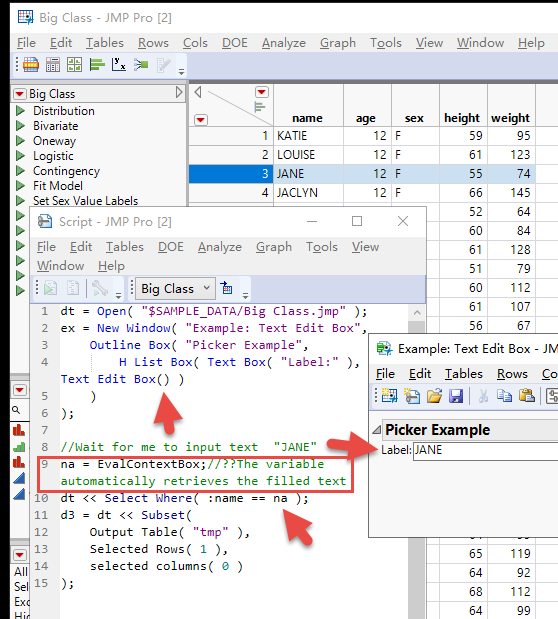
dt = Open( "$SAMPLE_DATA/Big Class.jmp" );
ex = New Window( "Example: Text Edit Box",
	Outline Box( "Picker Example",
		H List Box( Text Box( "Label:" ), Text Edit Box() )
	)
);

//Wait for me to input text  "JANE"
na = EvalContextBox;//??The variable automatically retrieves the filled text
dt << Select Where( :name == na );
d3 = dt << Subset(
	Output Table( "tmp" ),
	Selected Rows( 1 ),
	selected columns( 0 )
);- Mark as New
- Bookmark
- Subscribe
- Mute
- Subscribe to RSS Feed
- Get Direct Link
- Report Inappropriate Content
Re: How to make JSL pop up a dialog box and wait for the user to fill in the parameters?
Here's a working example. You need to include << modal, assign a variable to the text edit box, and retrieve the text edit box value before the user exits the modal dialog.
dt = Open( "$SAMPLE_DATA/Big Class.jmp" );
ex = New Window( "Example: Text Edit Box", << modal,
	panel Box( "Picker Example",
		H List Box(
			Text Box( "Label:" ),
			teb = Text Edit Box() ) ),
	panel box("Options",
		h list box(
			ok_button = button box("OK", na = teb << get text),
			canc_button = button box("Cancel", na = "")
		)
	)
);

show(na);

// Wait for me to input text  "JANE"
dt << Select Where( :name == uppercase(na) );
d3 = dt << Subset( Output Table( "tmp" ), Selected Rows( 1 ), selected columns( 0 ) );- Mark as New
- Bookmark
- Subscribe
- Mute
- Subscribe to RSS Feed
- Get Direct Link
- Report Inappropriate Content
Re: How to make JSL pop up a dialog box and wait for the user to fill in the parameters?
There are two competing approaches.
@pmroz example shows one way to use a <<modal dialog. The JSL callback function on the OK button copies values from the dialog into global variables.
Several answers above, I used the <<ReturnResult approach. <<ReturnResult captures values of named display boxes. The results are returned in a list.
- Mark as New
- Bookmark
- Subscribe
- Mute
- Subscribe to RSS Feed
- Get Direct Link
- Report Inappropriate Content
Re: How to make JSL pop up a dialog box and wait for the user to fill in the parameters?
ex=New Window("",<<modal,panel Box("",H List Box(teb=Text Edit Box())),panel box("",h list box(button box("OK",na=teb<<get text))));Recommended Articles
- © 2026 JMP Statistical Discovery LLC. All Rights Reserved.
- Terms of Use
- Privacy Statement
- Contact Us