Turn on suggestions
Auto-suggest helps you quickly narrow down your search results by suggesting possible matches as you type.
- JMP will suspend normal business operations for our Winter Holiday beginning on Wednesday, Dec. 24, 2025, at 5:00 p.m. ET (2:00 p.m. ET for JMP Accounts Receivable).
Regular business hours will resume at 9:00 a.m. EST on Friday, Jan. 2, 2026. - We’re retiring the File Exchange at the end of this year. The JMP Marketplace is now your destination for add-ins and extensions.
Options
- Subscribe to RSS Feed
- Mark Topic as New
- Mark Topic as Read
- Float this Topic for Current User
- Bookmark
- Subscribe
- Mute
- Printer Friendly Page
Discussions
Solve problems, and share tips and tricks with other JMP users.- JMP User Community
- :
- Discussions
- :
- How to get Parameter Estimates and Summary of Fit

Level V
- Mark as New
- Bookmark
- Subscribe
- Mute
- Subscribe to RSS Feed
- Get Direct Link
- Report Inappropriate Content
How to get Parameter Estimates and Summary of Fit
Created:
Jan 20, 2022 08:24 PM
| Last Modified: Jun 10, 2023 4:42 PM
(3425 views)
Hi,
I'm new in JMP. How can I get the linear fit, summary of fit & parameter estimates make into data table?
Because I need to get the slope, Y-intercept, Rsquare and RMSE of the bivariate plot and make into tabulated format. Please help. I only got the summary of fit script
bivsumfit = rbiv["Summary of Fit"][1] << make combined data table;
bivsumfit2 = bivsumfit << Split( Split By( :Column 1 ), Split( :Column 2 ) );
1 ACCEPTED SOLUTION
Accepted Solutions


Super User
Solution
- Mark as New
- Bookmark
- Subscribe
- Mute
- Subscribe to RSS Feed
- Get Direct Link
- Report Inappropriate Content
Re: How to get Parameter Estimates and Summary of Fit
Created:
Jan 21, 2022 02:23 AM
| Last Modified: Jan 21, 2022 7:03 AM
(3402 views)
| Posted in reply to message from UserID16644 01-20-2022
Here are 3 methods to create the output table you want
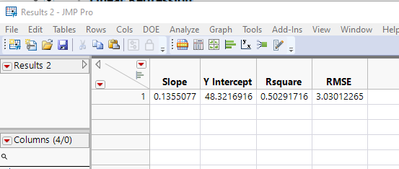
// Generate the required table by creating output tables
// and then manipulating them to get the results
Names Default To Here( 1 );

// Open Data Table: big class.jmp
// → Data Table( "big class" )
dt = Open( "$SAMPLE_DATA/big class.jmp" );

// Launch platform: Bivariate
biv = Bivariate( Y( :height ), X( :weight ), fit line );

// Output the Summary of Fit data and transfor the output table
// to a single row
rbiv = Report( biv );
bivsumfit = rbiv["Summary of Fit"][Table Box( 1 )] << make combined data table( invisible );
bivsumfit2 = bivsumfit << Split( Split By( :Column 1 ), Split( :Column 2 ), invisible );
Close( bivsumfit, nosave );

// Output the Parameter Estimate data and transfor the output table
// to a single row
bivparmest = rbiv["Parameter Estimates"][Table Box( 1 )] <<
make combined data table( invisible );
bivparmest2 = bivparmest << Split( Split By( :Term ), Split( :Estimate ) );
Close( bivparmest, nosave );

// Combine the 2 tables
bivparmest2 << Update( With( bivsumfit2 ), Match Columns( :X = :X, :Y = :Y ) );
Close( bivsumfit2, nosave );

// Clean up the final table
bivparmest2 << delete columns(
	{"X", "Y", "Table", "Mean of Response", "Observations (or Sum Wgts)", "RSquare Adj", "~Bias",
	"Std Error", "t Ratio", "Prob>|t|"}
);
bivparmest2:Intercept << set name( "Y Intercept" );
Column( bivparmest2, 2 ) << set name( "Slope" );
bivparmest2:Root Mean Square Error << set name( "RMSE" );
// Create the required ouput table by reading the results
// directly from the ouput report
names default to here(1);

// Open Data Table: big class.jmp
// → Data Table( "big class" )
dt = Open( "$SAMPLE_DATA/big class.jmp" );

// Launch platform: Bivariate
biv = Bivariate( Y( :height ), X( :weight ), fit line );

// Create the new table
dtOut = New Table("Results",
	Add Rows( 1 ),
	New Column( "Slope" ),
	New Column( "Y Intercept" ),
	New Column( "Rsquare" ),
	New Column( "RMSE" )
);

// Copy the table data to the output data table
rbiv = report( biv );
dtOut:Y Intercept[1] = rbiv["ParameterEstimates"][NumberColBox(1)][1];
dtOut:Slope[1] = rbiv["ParameterEstimates"][NumberColBox(1)][2];
dtOut:Rsquare[1] = rbiv["Summary of Fit"][NumberColBox(1)][1];
dtOut:RMSE[1] = rbiv["Summary of Fit"][NumberColBox(1)][3];
// Create the required ouput table using the Linear Regression
// function and adding in the RMSE
Names Default To Here( 1 );
// Open Data Table: big class.jmp
// → Data Table( "big class" )
dt = Open( "$SAMPLE_DATA/big class.jmp" );
// Calculate the linear regression
x = dt:weight << get values;
y = dt:height << get values;
{Estimates, Std_Error, Diagnostics} = Linear Regression( y, X );
// calculate the RMSE
p = x * estimates[2] + estimates[1];
d = y - p;
RMSE = Sqrt( Sum( d :* d ) / (N Rows( d ) - 2) );
// Create the new table
dtOut = New Table( "Results",
Add Rows( 1 ),
New Column( "Slope" ),
New Column( "Y Intercept" ),
New Column( "Rsquare" ),
New Column( "RMSE" )
);
// Copy the calculated values to the output data table
dtOut:Y Intercept[1] = Estimates[1];
dtOut:Slope[1] = Estimates[2];
dtOut:Rsquare[1] = Diagnostics["RSquare"];
dtOut:RMSE[1] = RMSE;
Jim
2 REPLIES 2
Super User
Solution
- Mark as New
- Bookmark
- Subscribe
- Mute
- Subscribe to RSS Feed
- Get Direct Link
- Report Inappropriate Content
Re: How to get Parameter Estimates and Summary of Fit
Created:
Jan 21, 2022 02:23 AM
| Last Modified: Jan 21, 2022 7:03 AM
(3403 views)
| Posted in reply to message from UserID16644 01-20-2022
Here are 3 methods to create the output table you want
// Generate the required table by creating output tables
// and then manipulating them to get the results
Names Default To Here( 1 );

// Open Data Table: big class.jmp
// → Data Table( "big class" )
dt = Open( "$SAMPLE_DATA/big class.jmp" );

// Launch platform: Bivariate
biv = Bivariate( Y( :height ), X( :weight ), fit line );

// Output the Summary of Fit data and transfor the output table
// to a single row
rbiv = Report( biv );
bivsumfit = rbiv["Summary of Fit"][Table Box( 1 )] << make combined data table( invisible );
bivsumfit2 = bivsumfit << Split( Split By( :Column 1 ), Split( :Column 2 ), invisible );
Close( bivsumfit, nosave );

// Output the Parameter Estimate data and transfor the output table
// to a single row
bivparmest = rbiv["Parameter Estimates"][Table Box( 1 )] <<
make combined data table( invisible );
bivparmest2 = bivparmest << Split( Split By( :Term ), Split( :Estimate ) );
Close( bivparmest, nosave );

// Combine the 2 tables
bivparmest2 << Update( With( bivsumfit2 ), Match Columns( :X = :X, :Y = :Y ) );
Close( bivsumfit2, nosave );

// Clean up the final table
bivparmest2 << delete columns(
	{"X", "Y", "Table", "Mean of Response", "Observations (or Sum Wgts)", "RSquare Adj", "~Bias",
	"Std Error", "t Ratio", "Prob>|t|"}
);
bivparmest2:Intercept << set name( "Y Intercept" );
Column( bivparmest2, 2 ) << set name( "Slope" );
bivparmest2:Root Mean Square Error << set name( "RMSE" );
// Create the required ouput table by reading the results
// directly from the ouput report
names default to here(1);

// Open Data Table: big class.jmp
// → Data Table( "big class" )
dt = Open( "$SAMPLE_DATA/big class.jmp" );

// Launch platform: Bivariate
biv = Bivariate( Y( :height ), X( :weight ), fit line );

// Create the new table
dtOut = New Table("Results",
	Add Rows( 1 ),
	New Column( "Slope" ),
	New Column( "Y Intercept" ),
	New Column( "Rsquare" ),
	New Column( "RMSE" )
);

// Copy the table data to the output data table
rbiv = report( biv );
dtOut:Y Intercept[1] = rbiv["ParameterEstimates"][NumberColBox(1)][1];
dtOut:Slope[1] = rbiv["ParameterEstimates"][NumberColBox(1)][2];
dtOut:Rsquare[1] = rbiv["Summary of Fit"][NumberColBox(1)][1];
dtOut:RMSE[1] = rbiv["Summary of Fit"][NumberColBox(1)][3];
// Create the required ouput table using the Linear Regression
// function and adding in the RMSE
Names Default To Here( 1 );
// Open Data Table: big class.jmp
// → Data Table( "big class" )
dt = Open( "$SAMPLE_DATA/big class.jmp" );
// Calculate the linear regression
x = dt:weight << get values;
y = dt:height << get values;
{Estimates, Std_Error, Diagnostics} = Linear Regression( y, X );
// calculate the RMSE
p = x * estimates[2] + estimates[1];
d = y - p;
RMSE = Sqrt( Sum( d :* d ) / (N Rows( d ) - 2) );
// Create the new table
dtOut = New Table( "Results",
Add Rows( 1 ),
New Column( "Slope" ),
New Column( "Y Intercept" ),
New Column( "Rsquare" ),
New Column( "RMSE" )
);
// Copy the calculated values to the output data table
dtOut:Y Intercept[1] = Estimates[1];
dtOut:Slope[1] = Estimates[2];
dtOut:Rsquare[1] = Diagnostics["RSquare"];
dtOut:RMSE[1] = RMSE;
Jim


Staff
- Mark as New
- Bookmark
- Subscribe
- Mute
- Subscribe to RSS Feed
- Get Direct Link
- Report Inappropriate Content
Re: How to get Parameter Estimates and Summary of Fit
The method Make Combined Data Table collects all the SAME tables in the platform window and makes a new data table. for example, if you had a variable in the By role with three levels, there would be three Parameter Estimates tables.
You want to get disparate tables from the report.
Recommended Articles
- © 2025 JMP Statistical Discovery LLC. All Rights Reserved.
- Terms of Use
- Privacy Statement
- Contact Us