- Don’t miss your chance to experience Discovery Summit Europe at our best available rate! Early bird registration through 31 Oct.
- Image to Table JMP extension imports single or batch images as data tables. Useful to extract curves from pictures or convert image data to curve data to use in analyses like Functional Data Explorer. Download and install the extension.
- Subscribe to RSS Feed
- Mark Topic as New
- Mark Topic as Read
- Float this Topic for Current User
- Bookmark
- Subscribe
- Mute
- Printer Friendly Page
Discussions
Solve problems, and share tips and tricks with other JMP users.- User Community
- :
- Discussions
- :
- How to find/extract the corresponding value on x axis for y max (peak) value ?

- Mark as New
- Bookmark
- Subscribe
- Mute
- Subscribe to RSS Feed
- Get Direct Link
- Report Inappropriate Content
How to find/extract the corresponding value on x axis for y max (peak) value ?
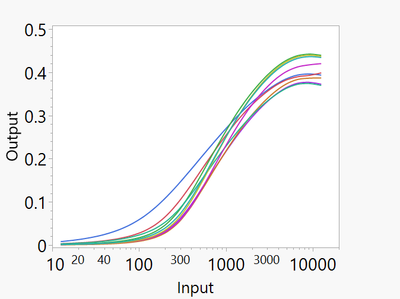
I need a quick way to extract the peak values of Y-axis and its corresponds on X-Axis.
The plot was performed in Graph Builder. X-axis is log scale.


- Mark as New
- Bookmark
- Subscribe
- Mute
- Subscribe to RSS Feed
- Get Direct Link
- Report Inappropriate Content
Re: How to find/extract the corresponding value on x axis for y max (peak) value ?


- Mark as New
- Bookmark
- Subscribe
- Mute
- Subscribe to RSS Feed
- Get Direct Link
- Report Inappropriate Content
Re: How to find/extract the corresponding value on x axis for y max (peak) value ?
Hello-
In addition to the graphic analysis, a formula column in the data table can identify the peak Y value of your column :Output,
- There are multiple traces shown on the graph, so assume an identifier we will call :Batch.
Make a new column, right click to edit formula: (assume column name Input_at_Peak)
If( Col Maximum( :Output, :Batch ) == :Output,
	:Input,
	.
)
This will determine the rows where the current value of :Output matches the maximum :Output
for that :Batch. In these peak rows, the value of the :Input value will be duplicated, otherwise the value will be missing.
Once there is a single value per :Batch, and the rest missing- any summarization function (e.g. mean, min, max) when given one value and the balance missing- will return the one value.
Depending on where you would like the result to appear:
- In a separate table- use Table Menu/Summary- calculate the Mean(Input_at_Peak), with group Batch
- Within the same data table- if you wanted the same value in all rows, a similar formula column approach of Col Mean( :Input_at_Peak, :Batch )
Recommended Articles
- © 2026 JMP Statistical Discovery LLC. All Rights Reserved.
- Terms of Use
- Privacy Statement
- Contact Us