Turn on suggestions
Auto-suggest helps you quickly narrow down your search results by suggesting possible matches as you type.
- Don’t miss your chance to experience Discovery Summit Europe at our best available rate! Early bird registration through 31 Oct.
- Graph Builder Toolbar streamlines interactive graphing. Creates shortcuts on Report and GraphBuilder Helpers toolbars. Download and install the extension.
Options
- Subscribe to RSS Feed
- Mark Topic as New
- Mark Topic as Read
- Float this Topic for Current User
- Bookmark
- Subscribe
- Mute
- Printer Friendly Page
Discussions
Solve problems, and share tips and tricks with other JMP users.- User Community
- :
- Discussions
- :
- How to change width of bars in histogram?

Level IV
- Mark as New
- Bookmark
- Subscribe
- Mute
- Subscribe to RSS Feed
- Get Direct Link
- Report Inappropriate Content
How to change width of bars in histogram?
Created:
Jul 2, 2020 08:09 AM
| Last Modified: Jun 11, 2023 4:03 AM
(6316 views)
Hello Everybody,
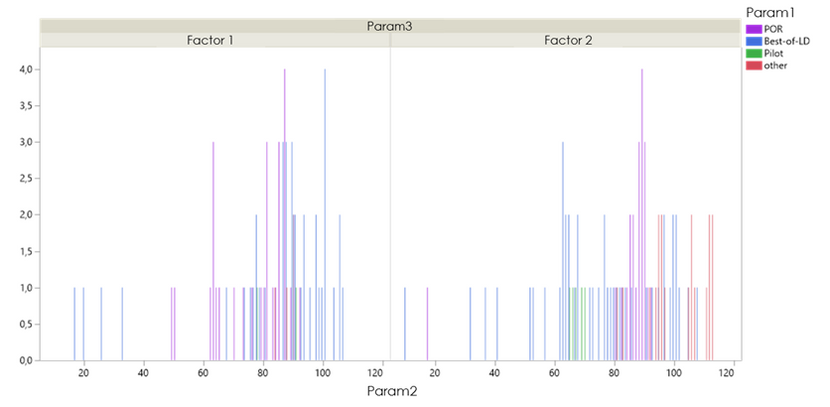
I created two histograms but bars shown are very thin and sometimes it can be difficult do differentiate colors of Param1. Is there any way (by scripting as well) to make those bars a bit thicker? Best regards
1 ACCEPTED SOLUTION
Accepted Solutions


Super User
Solution
- Mark as New
- Bookmark
- Subscribe
- Mute
- Subscribe to RSS Feed
- Get Direct Link
- Report Inappropriate Content
Re: How to change width of bars in histogram?
Hi,
Right click on the graph body and select Customize > Select the "Bar" item and increase the "Width Proportion". Note, you may need to bump that number to 100 or even larger values if you have a lot of data.
Best,
TS
Right click on the graph body and select Customize > Select the "Bar" item and increase the "Width Proportion". Note, you may need to bump that number to 100 or even larger values if you have a lot of data.
Best,
TS
Thierry R. Sornasse
2 REPLIES 2
Super User
Solution
- Mark as New
- Bookmark
- Subscribe
- Mute
- Subscribe to RSS Feed
- Get Direct Link
- Report Inappropriate Content
Re: How to change width of bars in histogram?
Hi,
Right click on the graph body and select Customize > Select the "Bar" item and increase the "Width Proportion". Note, you may need to bump that number to 100 or even larger values if you have a lot of data.
Best,
TS
Right click on the graph body and select Customize > Select the "Bar" item and increase the "Width Proportion". Note, you may need to bump that number to 100 or even larger values if you have a lot of data.
Best,
TS
Thierry R. Sornasse
Level IV
- Mark as New
- Bookmark
- Subscribe
- Mute
- Subscribe to RSS Feed
- Get Direct Link
- Report Inappropriate Content
Re: How to change width of bars in histogram?
Hello Thierry, Perfect! Thank you very much
Recommended Articles
- © 2026 JMP Statistical Discovery LLC. All Rights Reserved.
- Terms of Use
- Privacy Statement
- Contact Us