Turn on suggestions
Auto-suggest helps you quickly narrow down your search results by suggesting possible matches as you type.
- JMP Statement Regarding Critical PHP Remote Code Execution Vulnerabilities (CVE-2026-109618, CVE-2026-109619)
- Don’t miss your chance to experience Discovery Summit Europe at our best available rate! Early bird registration through 31 Oct.
- Graph Builder Toolbar streamlines interactive graphing. Creates shortcuts on Report and GraphBuilder Helpers toolbars. Download and install the extension.
Options
- Subscribe to RSS Feed
- Mark Topic as New
- Mark Topic as Read
- Float this Topic for Current User
- Bookmark
- Subscribe
- Mute
- Printer Friendly Page
Discussions
Solve problems, and share tips and tricks with other JMP users.- User Community
- :
- Discussions
- :
- How to change point color in a control chart based on stratification?

Level IV
- Mark as New
- Bookmark
- Subscribe
- Mute
- Subscribe to RSS Feed
- Get Direct Link
- Report Inappropriate Content
How to change point color in a control chart based on stratification?
Oct 26, 2017 06:34 PM
(9888 views)
By default I get a black marker colour for all plotted points on an individuals chart, as shown in attached file.
Supposed I want to stratify in some way and change the marker, or point, colour. In the attached this is the second column (column titled "Material").
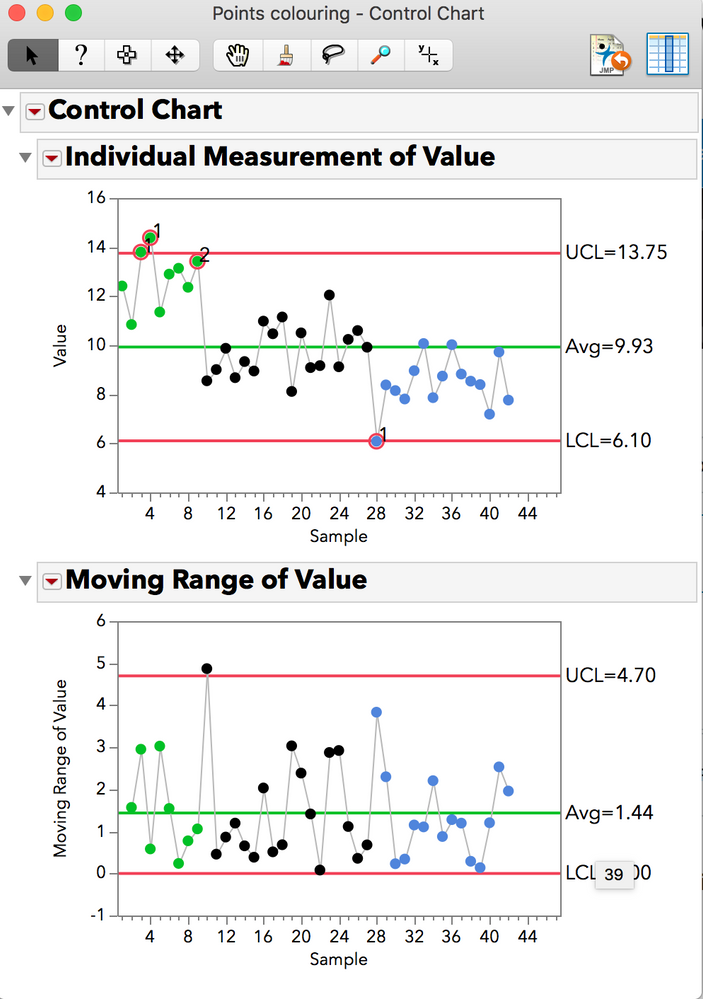
How could I do this? For example, make all the values on the chart associated with 'A' be green, the 'B' values black and the 'C' values another, different colour.
Thanks for any input,
Scott.
1 ACCEPTED SOLUTION
Accepted Solutions


Staff (Retired)
Solution
- Mark as New
- Bookmark
- Subscribe
- Mute
- Subscribe to RSS Feed
- Get Direct Link
- Report Inappropriate Content
Re: How to change point color in a control chart based on stratification?
Created:
Oct 26, 2017 07:51 PM
| Last Modified: Oct 26, 2017 4:53 PM
(10914 views)
| Posted in reply to message from scottahindle 10-26-2017
Try
Rows>Color or Mark by Column in conjunction with Column Properties>Value Colors for Material where I chose green, black and blue)
4 REPLIES 4
Staff (Retired)
Solution
- Mark as New
- Bookmark
- Subscribe
- Mute
- Subscribe to RSS Feed
- Get Direct Link
- Report Inappropriate Content
Re: How to change point color in a control chart based on stratification?
Created:
Oct 26, 2017 07:51 PM
| Last Modified: Oct 26, 2017 4:53 PM
(10915 views)
| Posted in reply to message from scottahindle 10-26-2017
Try
Rows>Color or Mark by Column in conjunction with Column Properties>Value Colors for Material where I chose green, black and blue)
Level IV
- Mark as New
- Bookmark
- Subscribe
- Mute
- Subscribe to RSS Feed
- Get Direct Link
- Report Inappropriate Content
Re: How to change point color in a control chart based on stratification?
Thanks!

Level III
- Mark as New
- Bookmark
- Subscribe
- Mute
- Subscribe to RSS Feed
- Get Direct Link
- Report Inappropriate Content
Re: How to change point color in a control chart based on stratification?
Hello,
Is there any script to di that ? Thank you very much !
Is there any script to di that ? Thank you very much !
Level III
- Mark as New
- Bookmark
- Subscribe
- Mute
- Subscribe to RSS Feed
- Get Direct Link
- Report Inappropriate Content
Re: How to change point color in a control chart based on stratification?
Hello,
Is there any way to script to do that ? Thank you very much !
Have a nice day,
Jean
Is there any way to script to do that ? Thank you very much !
Have a nice day,
Jean
Recommended Articles
- © 2026 JMP Statistical Discovery LLC. All Rights Reserved.
- Terms of Use
- Privacy Statement
- Contact Us