- Don’t miss your chance to experience Discovery Summit Europe at our best available rate! Early bird registration through 31 Oct.
- Graph Builder Toolbar streamlines interactive graphing. Creates shortcuts on Report and GraphBuilder Helpers toolbars. Download and install the extension.
- Subscribe to RSS Feed
- Mark Topic as New
- Mark Topic as Read
- Float this Topic for Current User
- Bookmark
- Subscribe
- Mute
- Printer Friendly Page
Discussions
Solve problems, and share tips and tricks with other JMP users.- User Community
- :
- Discussions
- :
- Re: How to change orders of grouping in graph builder?

- Mark as New
- Bookmark
- Subscribe
- Mute
- Subscribe to RSS Feed
- Get Direct Link
- Report Inappropriate Content
How to change orders of grouping in graph builder?
As shown in the attached picture, right now the "After" group is showing in front of the "Before", which doesn't make sense. How can I swap them? Tried sorting the Group column by Descending in the data table but didn't work.


- Mark as New
- Bookmark
- Subscribe
- Mute
- Subscribe to RSS Feed
- Get Direct Link
- Report Inappropriate Content
Re: How to change orders of grouping in graph builder?
To do this, what you do is to cjange the Value Order Column Property for your postan_jrlengh grouping column.
The easiest way to do this is to go to the header for the postan_jrlength column, and then right click and select "Value Order".
JMP will then use the order specified for the order

- Mark as New
- Bookmark
- Subscribe
- Mute
- Subscribe to RSS Feed
- Get Direct Link
- Report Inappropriate Content
Re: How to change orders of grouping in graph builder?
Hi @JZ,
Welcome in the Community !
In order to solve this problem, you can try to add in your "Group" column a "Value Order" property.
To do this, right-click in your "Group" column name, click on "Column Properties" and then "Value Order" :
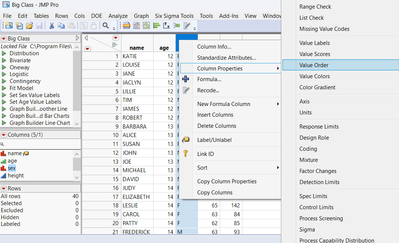
You can then in the new window indicate the order of the categories :
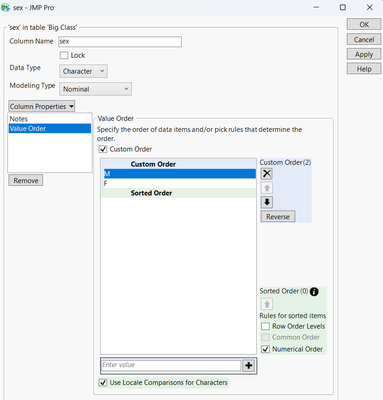
And this ordering will be kept in the graph builder :
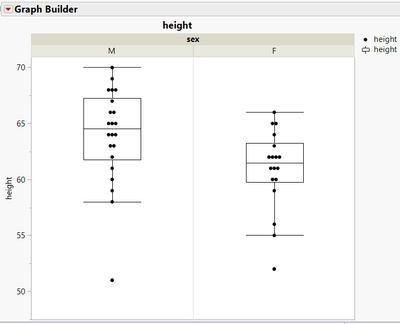
Hope this answer will help you,
"It is not unusual for a well-designed experiment to analyze itself" (Box, Hunter and Hunter)

- Mark as New
- Bookmark
- Subscribe
- Mute
- Subscribe to RSS Feed
- Get Direct Link
- Report Inappropriate Content
Re: How to change orders of grouping in graph builder?
Using Value Order column property is the preferred method and should be used, but there is other method. You can create new column, which will then have for example 1 for before and 2 for after. Then you can use Order By on the x-groups



- Mark as New
- Bookmark
- Subscribe
- Mute
- Subscribe to RSS Feed
- Get Direct Link
- Report Inappropriate Content
Re: How to change orders of grouping in graph builder?
Since Jmp 17, there is even another option:
If you just want to change the order for one plot - or use different orders in different plots: right click/Configure Levels:

then change the order:


Recommended Articles
- © 2026 JMP Statistical Discovery LLC. All Rights Reserved.
- Terms of Use
- Privacy Statement
- Contact Us