Don’t miss your chance to experience Discovery Summit Europe at our best available rate! Early bird registration through 31 Oct.
Image to Table JMP extension imports single or batch images as data tables. Useful to extract curves from pictures or convert image data to curve data to use in analyses like Functional Data Explorer. Download and install the extension.
How to change number of decimal places in Bar chart labels (Label by Percent of Total Values)
Created:
Jun 19, 2019 05:12 AM
| Last Modified: Jun 19, 2019 2:14 AM(6635 views)
Hi,
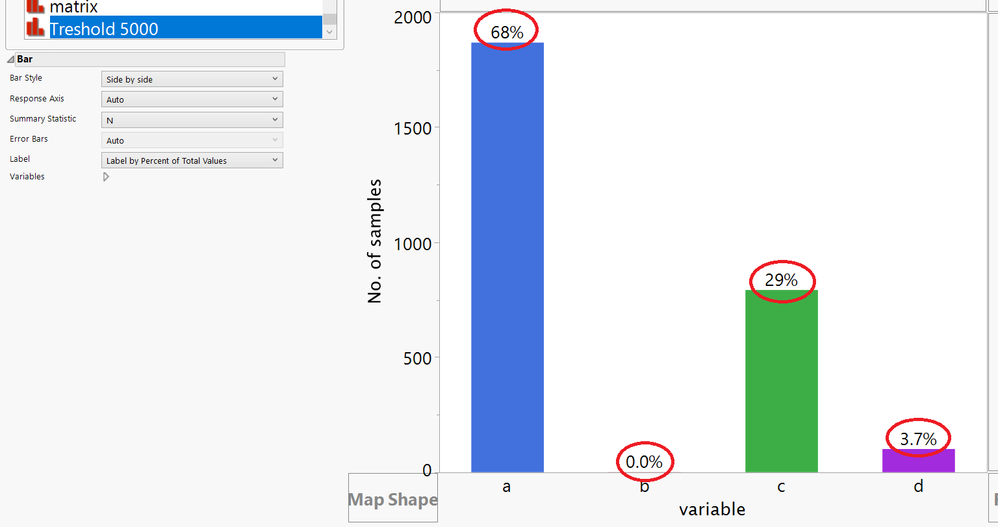
I am struggling with (what i believe is) a basic task of changing decimal places of labels shown on the Bar chart. I have a table with few around 3000 rows and a column that can have 4 distinct values. When using Label by Percent, some of the labels are shown with 0 decimal places, and some with 1. This results in sum of all values is different from 100%.
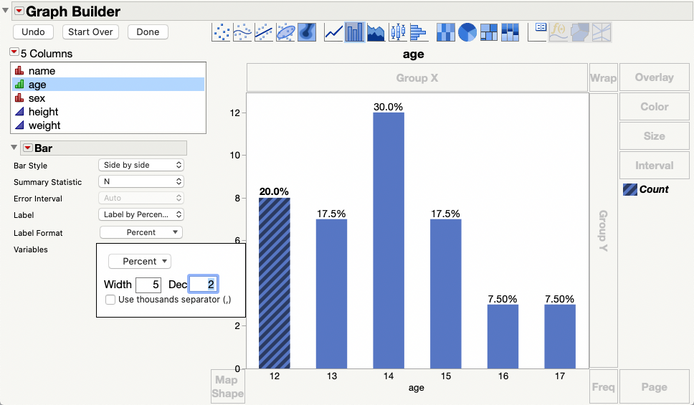
Unfortunately, this isn't easy to do in JMP 15 and earlier versions. However, JMP 16, which will be released in a couple of months, adds a format option for the bar labels in Graph Builder.
The format option for bar labels is new in JMP 16.