- Don’t miss your chance to experience Discovery Summit Europe at our best available rate! Early bird registration through 31 Oct.
- Graph Builder Toolbar streamlines interactive graphing. Creates shortcuts on Report and GraphBuilder Helpers toolbars. Download and install the extension.
- JMP will suspend normal business operations for our Rest and Recharge Day on Friday, October 2, 2026.
Regular business hours will resume on Monday, October 5, 2026.
- Subscribe to RSS Feed
- Mark Topic as New
- Mark Topic as Read
- Float this Topic for Current User
- Bookmark
- Subscribe
- Mute
- Printer Friendly Page
Discussions
Solve problems, and share tips and tricks with other JMP users.- User Community
- :
- Discussions
- :
- How to call multiple text file to extract data in a single data table?

- Mark as New
- Bookmark
- Subscribe
- Mute
- Subscribe to RSS Feed
- Get Direct Link
- Report Inappropriate Content
How to call multiple text file to extract data in a single data table?
I have extracted the useful data from one text file into a new data table using JMP script. But, how to extract data from 3-4 text file using script into a same new data table? Please suggest me.
Accepted Solutions


- Mark as New
- Bookmark
- Subscribe
- Mute
- Subscribe to RSS Feed
- Get Direct Link
- Report Inappropriate Content
Re: How to call multiple text file to extract data in a single data table?
If you used File->Open->TextFile to import a CSV, for example, there should be a script in the imported file that you can use/modify to import another file.
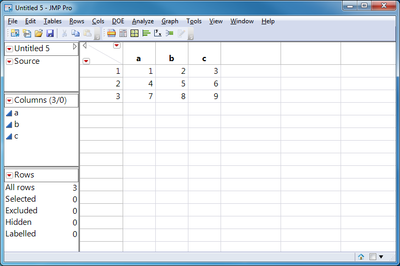
You can use JMP's Table->Concatenate to combine tables.
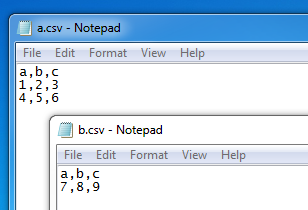
aa = Open( "C:\Users\User\Desktop\a.csv" );
bb = Open( "C:\Users\User\Desktop\b.csv" );
cc = aa << Concatenate( bb );
Close( aa, "nosave" );
Close( bb, "nosave" );
- Mark as New
- Bookmark
- Subscribe
- Mute
- Subscribe to RSS Feed
- Get Direct Link
- Report Inappropriate Content
Re: How to call multiple text file to extract data in a single data table?
If you used File->Open->TextFile to import a CSV, for example, there should be a script in the imported file that you can use/modify to import another file.
You can use JMP's Table->Concatenate to combine tables.
aa = Open( "C:\Users\User\Desktop\a.csv" );
bb = Open( "C:\Users\User\Desktop\b.csv" );
cc = aa << Concatenate( bb );
Close( aa, "nosave" );
Close( bb, "nosave" );
- Mark as New
- Bookmark
- Subscribe
- Mute
- Subscribe to RSS Feed
- Get Direct Link
- Report Inappropriate Content
Re: How to call multiple text file to extract data in a single data table?
Hello Craige,
Thanks for the previous answer.
I am running the following variability script, but it is not showing the result. Please check the code.
dt1 = open("C:\Users\llenovo\Desktop\RAW1.jmp");
dt2 = open("C:\Users\llenovo\Desktop\Parameters.jmp");
dt3 = dt1<<summary(group(ParameterId, USL, LSL));
for(i=1, i<=2, i++,
for(k = 2, k<=nrow(dt3), k++,
if(:column(dt2, 1)) == column(dt3, 1)
usl = column(dt3, 2)
lsl = column(dt3, 3)
));
dt1 << Variability Chart(
Y( :MeasuredValue ),
X( :EntryDate, :LotID, :WaferNo ),
Analysis Type( Name( "Choose best analysis (EMS REML Bayesian)" ) ),
Std Dev Chart( 0 ),
where(:ParameterId == Eval((char(column(dt2, 1))))),
SendToReport(
Dispatch(
{"Variability Chart for MeasuredValue"},
"",
NomAxisBox,
Rotated Tick Labels( 1 )
),
Dispatch(
{"Variability Chart for MeasuredValue"},
"",
NomAxisBox( 2 ),
Rotated Tick Labels( 1 )
),
Dispatch(
{"Variability Chart for MeasuredValue"},
"",
NomAxisBox( 3 ),
Rotated Tick Labels( 1 )
),
Dispatch(
{"Variability Chart for MeasuredValue"},
"2",
ScaleBox,
{Min( 10 ), Max( 500 ), Inc( 50 ),Minor Ticks( 2 ),
Add Ref Line( usl, Solid, {255, 0, 0}, "lsllabel" ),
Add Ref Line( lsl, Solid, {255, 0, 0}, "usllabel" ), Show Major Grid( 1 ),
Show Minor Grid( 1 )}
),
);
);
);
- Mark as New
- Bookmark
- Subscribe
- Mute
- Subscribe to RSS Feed
- Get Direct Link
- Report Inappropriate Content
Re: How to call multiple text file to extract data in a single data table?
Always check the log window for messages.
Add
Show(lsl, usl, i);
after the two nested for-loops and make sure the values make sense. I'm pretty sure "i" will be 3 and that might not make sense when used in the where statement. Does dt2 have at least 3 rows?
If that doesn't help, and no one else chimes in, call Tech Support. I'm out of my depth on the variability platform.
Recommended Articles
- © 2026 JMP Statistical Discovery LLC. All Rights Reserved.
- Terms of Use
- Privacy Statement
- Contact Us