- JMP Statement Regarding Critical PHP Remote Code Execution Vulnerabilities (CVE-2026-109618, CVE-2026-109619)
- Don’t miss your chance to experience Discovery Summit Europe at our best available rate! Early bird registration through 31 Oct.
- Graph Builder Toolbar streamlines interactive graphing. Creates shortcuts on Report and GraphBuilder Helpers toolbars. Download and install the extension.
- Subscribe to RSS Feed
- Mark Topic as New
- Mark Topic as Read
- Float this Topic for Current User
- Bookmark
- Subscribe
- Mute
- Printer Friendly Page
Discussions
Solve problems, and share tips and tricks with other JMP users.- User Community
- :
- Discussions
- :
- Re: How to calculate Z-score test for two population proportions

- Mark as New
- Bookmark
- Subscribe
- Mute
- Subscribe to RSS Feed
- Get Direct Link
- Report Inappropriate Content
How to calculate Z-score test for two population proportions
it's easy to carry out with on-line calculator, screenshot is an example. my question is how to calculate Z score and P value with JMP?

Accepted Solutions


- Mark as New
- Bookmark
- Subscribe
- Mute
- Subscribe to RSS Feed
- Get Direct Link
- Report Inappropriate Content
Re: How to calculate Z-score test for two population proportions
It is not a Pro feature. I do not have JMP 16 installed. I think it was about the same in JMP 17, which I have installed. Try the Sample Data Library command in the Help menu. Does it look at all like this:
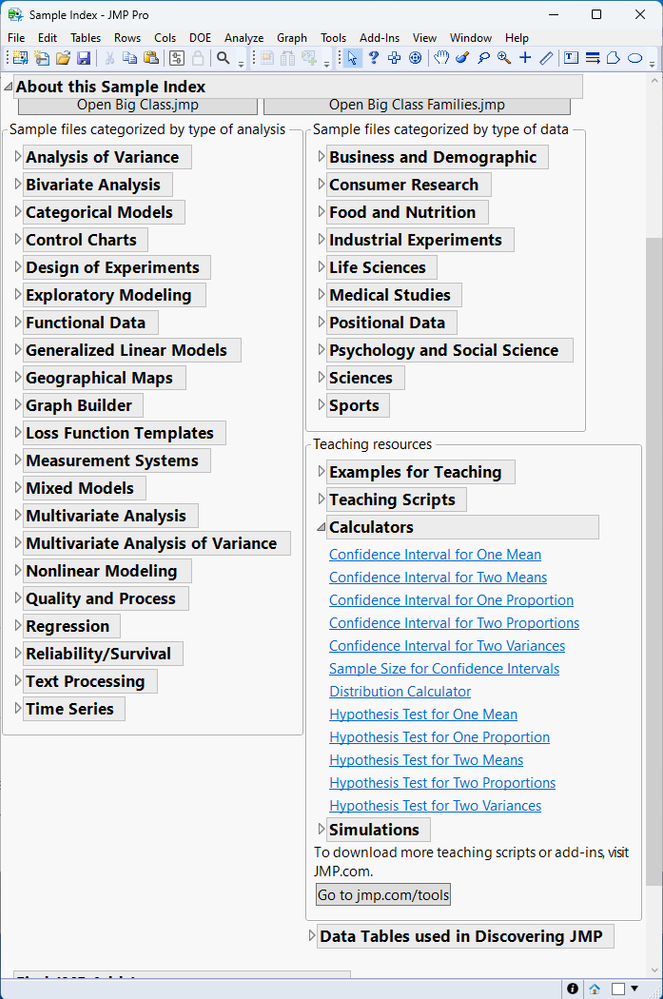
If so, notice the calculators in the lower right corner.
- Mark as New
- Bookmark
- Subscribe
- Mute
- Subscribe to RSS Feed
- Get Direct Link
- Report Inappropriate Content
Re: How to calculate Z-score test for two population proportions
Select Help > Sample Index. Select Tool for Content Type. Select Calculators for Tool Type.

- Mark as New
- Bookmark
- Subscribe
- Mute
- Subscribe to RSS Feed
- Get Direct Link
- Report Inappropriate Content
Re: How to calculate Z-score test for two population proportions
thank you for timely reply @Mark_Bailey my JMP version is 16.0.0, but it isn't pro version. I don't find sample index in my help menu...

- Mark as New
- Bookmark
- Subscribe
- Mute
- Subscribe to RSS Feed
- Get Direct Link
- Report Inappropriate Content
Re: How to calculate Z-score test for two population proportions
It is not a Pro feature. I do not have JMP 16 installed. I think it was about the same in JMP 17, which I have installed. Try the Sample Data Library command in the Help menu. Does it look at all like this:
If so, notice the calculators in the lower right corner.
Recommended Articles
- © 2026 JMP Statistical Discovery LLC. All Rights Reserved.
- Terms of Use
- Privacy Statement
- Contact Us