Turn on suggestions
Auto-suggest helps you quickly narrow down your search results by suggesting possible matches as you type.
- Don’t miss your chance to experience Discovery Summit Europe at our best available rate! Early bird registration through 31 Oct.
- Graph Builder Toolbar streamlines interactive graphing. Creates shortcuts on Report and GraphBuilder Helpers toolbars. Download and install the extension.
- JMP will suspend normal business operations for our Rest and Recharge Day on Friday, October 2, 2026.
Regular business hours will resume on Monday, October 5, 2026.
Options
- Subscribe to RSS Feed
- Mark Topic as New
- Mark Topic as Read
- Float this Topic for Current User
- Bookmark
- Subscribe
- Mute
- Printer Friendly Page
Discussions
Solve problems, and share tips and tricks with other JMP users.- User Community
- :
- Discussions
- :
- Re: How to automatically extract the column name used by the formula in the JSL ...
Level VIII
- Mark as New
- Bookmark
- Subscribe
- Mute
- Subscribe to RSS Feed
- Get Direct Link
- Report Inappropriate Content
How to automatically extract the column name used by the formula in the JSL code?
May 25, 2020 04:12 AM
(3473 views)
How to use JSL to automatically extract from a JSL formula the column names used by the formula, and group them into a combination.
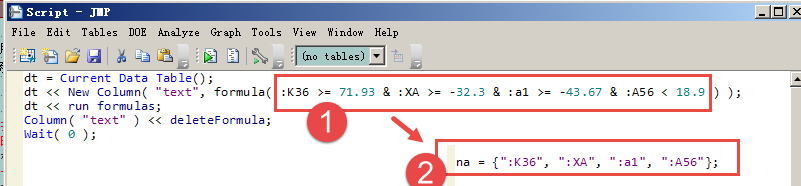
For example, in the image of 1, automatically extract the column name to get a combination of 2.
Thanks!
dt = Current Data Table();
dt << New Column( "text", formula( :K36 >= 71.93 & :XA >= -32.3 & :a1 >= -43.67 & :A56 < 18.9 ) );
dt << run formulas;
Column( "text" ) << deleteFormula;
1 ACCEPTED SOLUTION
Accepted Solutions

Level VII
Solution
- Mark as New
- Bookmark
- Subscribe
- Mute
- Subscribe to RSS Feed
- Get Direct Link
- Report Inappropriate Content
Re: How to automatically extract the column name used by the formula in the JSL code?
probably this script does the Job for you:
// generate a table
dt = New Table( "testdata",
	add rows( 3 ),
	New Column( "K36", Continuous, set values( [70, 80, 90] ) ),
	New Column( "XA", Continuous, set values( [30, 32, 33] ) ),
	New Column( "a1", Continuous, set values( [-50, -40, -30] ) ),
	New Column( "A56", Continuous, set values( [10, 20, 10] ) )
);

// add a formula
dt << New Column( "f1", formula( :K36 >= 71.93 & :XA >= -32.3 & :a1 >= -43.67 & :A56 < 18.9 ) );
dt << run formulas;

// get formula, convert to string and split words
formula = dt:f1 << get formula;
formula_txt_words = Words( Char( Name Expr( formula ) ) );

// search for column names in words and put it into list
columns_lst = {};
For( i = 1, i <= N Arg( formula_txt_words ), i++,
	If( Starts With( formula_txt_words[i], ":" ),
		Insert Into( columns_lst, Substitute( formula_txt_words[i], ":", "" ) )
	)
);
Show( columns_lst );

// Group columns
dt << group columns( "Cols used by f1", columns_lst );
// Column( "text" ) << deleteFormula;
Georg
2 REPLIES 2


Staff
- Mark as New
- Bookmark
- Subscribe
- Mute
- Subscribe to RSS Feed
- Get Direct Link
- Report Inappropriate Content
Re: How to automatically extract the column name used by the formula in the JSL code?
You would have to traverse the arguments of the expression used for the formula, identify the columns, and store them in a list.
Please see JMP Help > JMP Documentation Library > Scripting Guide > Chapter 8: Lists and Expressions >
Retrieve a Stored Expression Rather than its Result section. The concepts and the necessary and supporting functions are fully described and demonstrated.
Level VII
Solution
- Mark as New
- Bookmark
- Subscribe
- Mute
- Subscribe to RSS Feed
- Get Direct Link
- Report Inappropriate Content
Re: How to automatically extract the column name used by the formula in the JSL code?
probably this script does the Job for you:
// generate a table
dt = New Table( "testdata",
	add rows( 3 ),
	New Column( "K36", Continuous, set values( [70, 80, 90] ) ),
	New Column( "XA", Continuous, set values( [30, 32, 33] ) ),
	New Column( "a1", Continuous, set values( [-50, -40, -30] ) ),
	New Column( "A56", Continuous, set values( [10, 20, 10] ) )
);

// add a formula
dt << New Column( "f1", formula( :K36 >= 71.93 & :XA >= -32.3 & :a1 >= -43.67 & :A56 < 18.9 ) );
dt << run formulas;

// get formula, convert to string and split words
formula = dt:f1 << get formula;
formula_txt_words = Words( Char( Name Expr( formula ) ) );

// search for column names in words and put it into list
columns_lst = {};
For( i = 1, i <= N Arg( formula_txt_words ), i++,
	If( Starts With( formula_txt_words[i], ":" ),
		Insert Into( columns_lst, Substitute( formula_txt_words[i], ":", "" ) )
	)
);
Show( columns_lst );

// Group columns
dt << group columns( "Cols used by f1", columns_lst );
// Column( "text" ) << deleteFormula;
Georg
Recommended Articles
- © 2026 JMP Statistical Discovery LLC. All Rights Reserved.
- Terms of Use
- Privacy Statement
- Contact Us