- Don’t miss your chance to experience Discovery Summit Europe at our best available rate! Early bird registration through 31 Oct.
- Graph Builder Toolbar streamlines interactive graphing. Creates shortcuts on Report and GraphBuilder Helpers toolbars. Download and install the extension.
- Subscribe to RSS Feed
- Mark Topic as New
- Mark Topic as Read
- Float this Topic for Current User
- Bookmark
- Subscribe
- Mute
- Printer Friendly Page
Discussions
Solve problems, and share tips and tricks with other JMP users.- User Community
- :
- Discussions
- :
- How to assign a number for a repeated measurement

- Mark as New
- Bookmark
- Subscribe
- Mute
- Subscribe to RSS Feed
- Get Direct Link
- Report Inappropriate Content
How to assign a number for a repeated measurement
Hi,
I have a dt with measurements of vital signs repeated three times at a visit for each subject.:
| Subjects | Vital Signs | Result | visit | Repetition |
| 1 | Dias | 60 | 1 | a |
| 1 | Dias | 65 | 1 | b |
| 1 | Dias | 62 | 1 | c |
| 1 | Sys | 122 | 1 | a |
| 1 | Sys | 120 | 1 | b |
| 1 | Sys | 125 | 1 | c |
| 1 | Pul | 72 | 1 | a |
| 1 | Pul | 74 | 1 | b |
| 1 | Pul | 77 | 1 | c |
| 2 | Dias | 65 | 1 | a |
| .... | ... | .... | .... | .... |
I would like to write a formula that calculates repetitions for vital signs measurements in a new column (e.g. repetition a, b, c). What would be the best way to assign those values?
Thank you in advance forhelp.
Accepted Solutions


- Mark as New
- Bookmark
- Subscribe
- Mute
- Subscribe to RSS Feed
- Get Direct Link
- Report Inappropriate Content
Re: How to assign a number for a repeated measurement
If making the Repetition a numeric value is an option, then you could simply create the new column, and then go to Col Info, and under "Initialize Data" select "Sequence Data" and then specify a sequence of 1 to 3
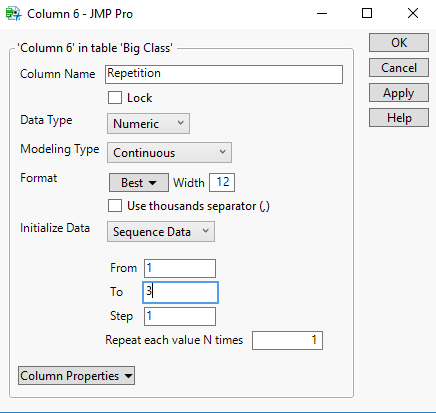
Or you could create the formula
theList = {"a", "b", "c"};
If( Mod( Row(), 3 ) > 0,
	theList[Mod( Row(), 3 )],
	theList[3]
);
Make sure the column is defined as a Character column to use the above formula
- Mark as New
- Bookmark
- Subscribe
- Mute
- Subscribe to RSS Feed
- Get Direct Link
- Report Inappropriate Content
Re: How to assign a number for a repeated measurement
If making the Repetition a numeric value is an option, then you could simply create the new column, and then go to Col Info, and under "Initialize Data" select "Sequence Data" and then specify a sequence of 1 to 3
Or you could create the formula
theList = {"a", "b", "c"};
If( Mod( Row(), 3 ) > 0,
	theList[Mod( Row(), 3 )],
	theList[3]
);
Make sure the column is defined as a Character column to use the above formula
- Mark as New
- Bookmark
- Subscribe
- Mute
- Subscribe to RSS Feed
- Get Direct Link
- Report Inappropriate Content
Re: How to assign a number for a repeated measurement
Thank you! It works perfectly. Have a nice day.


- Mark as New
- Bookmark
- Subscribe
- Mute
- Subscribe to RSS Feed
- Get Direct Link
- Report Inappropriate Content
Re: How to assign a number for a repeated measurement
Recommended Articles
- © 2026 JMP Statistical Discovery LLC. All Rights Reserved.
- Terms of Use
- Privacy Statement
- Contact Us