- Don’t miss your chance to experience Discovery Summit Europe at our best available rate! Early bird registration through 31 Oct.
- Graph Builder Toolbar streamlines interactive graphing. Creates shortcuts on Report and GraphBuilder Helpers toolbars. Download and install the extension.
- Subscribe to RSS Feed
- Mark Topic as New
- Mark Topic as Read
- Float this Topic for Current User
- Bookmark
- Subscribe
- Mute
- Printer Friendly Page
Discussions
Solve problems, and share tips and tricks with other JMP users.- User Community
- :
- Discussions
- :
- 回复: How to adjust level text settings in plots?

- Mark as New
- Bookmark
- Subscribe
- Mute
- Subscribe to RSS Feed
- Get Direct Link
- Report Inappropriate Content
How to adjust level text settings in plots?
Hi everyone,
I´ve been trying to adjust the text settings in my graphs (font size and type) of the X-Level and Y-Level names (Groups in the Graph Builder), but I haven´t been able to do so. I´ve tried even if change the font in the source Data Table, but it didn´t work. I wonder how could I do that. Thanks in advance.
- Tags:
- Mass Customization
Accepted Solutions

- Mark as New
- Bookmark
- Subscribe
- Mute
- Subscribe to RSS Feed
- Get Direct Link
- Report Inappropriate Content
回复: How to adjust level text settings in plots?
Hi
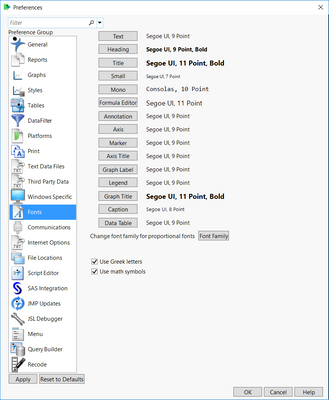
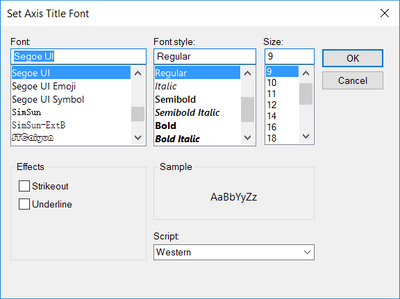
You can change The Font Size in Preference(Ctrl+K) --> Font --> Set Axis Title Font.
- Mark as New
- Bookmark
- Subscribe
- Mute
- Subscribe to RSS Feed
- Get Direct Link
- Report Inappropriate Content
回复: How to adjust level text settings in plots?
Hi
You can change The Font Size in Preference(Ctrl+K) --> Font --> Set Axis Title Font.
- Mark as New
- Bookmark
- Subscribe
- Mute
- Subscribe to RSS Feed
- Get Direct Link
- Report Inappropriate Content
回复: How to adjust level text settings in plots?
Hi Mr Frank, thank you for your answer!! I tried and it worked for axis titles (can also be modified directly in the graph builder). However, I wonder if it works for the text of axes level names (the ones which appear when you define them as the variables for X-groups and Y-groups in a plot). I´ve tried through the Preferences, but it seems there is no option available for axes level names.

- Mark as New
- Bookmark
- Subscribe
- Mute
- Subscribe to RSS Feed
- Get Direct Link
- Report Inappropriate Content
回复: How to adjust level text settings in plots?
Hi, I have the same question. Is there a solution in the meantime?


- Mark as New
- Bookmark
- Subscribe
- Mute
- Subscribe to RSS Feed
- Get Direct Link
- Report Inappropriate Content
回复: How to adjust level text settings in plots?
I think you have to change Text font to change those sizes. You can change them from preferences or with shortcut Ctrl+Shift and plus or minus depending on if you want to make text larger or smaller.

Remember to give kudos toRight-click to change Group font and font size
- Mark as New
- Bookmark
- Subscribe
- Mute
- Subscribe to RSS Feed
- Get Direct Link
- Report Inappropriate Content
回复: How to adjust level text settings in plots?
Thanks, thats it!

- Mark as New
- Bookmark
- Subscribe
- Mute
- Subscribe to RSS Feed
- Get Direct Link
- Report Inappropriate Content
回复: How to adjust level text settings in plots?
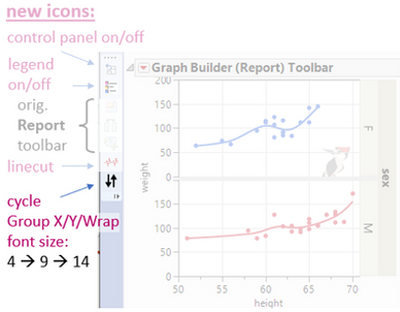
Till Right-click to change Group font and font size is available, you could try Graph Builder Toolbar:
Graph Builder Toolbar
It adds a shortcut icon to the Report Toolbar to cycle GroupX / Group Y / Wrap font size:
standard ➜ large ➜ minimum ➜
[quick and dirty via preferences settings]
Recommended Articles
- © 2026 JMP Statistical Discovery LLC. All Rights Reserved.
- Terms of Use
- Privacy Statement
- Contact Us