- Don’t miss your chance to experience Discovery Summit Europe at our best available rate! Early bird registration through 31 Oct.
- Graph Builder Toolbar streamlines interactive graphing. Creates shortcuts on Report and GraphBuilder Helpers toolbars. Download and install the extension.
- Subscribe to RSS Feed
- Mark Topic as New
- Mark Topic as Read
- Float this Topic for Current User
- Bookmark
- Subscribe
- Mute
- Printer Friendly Page
Discussions
Solve problems, and share tips and tricks with other JMP users.- User Community
- :
- Discussions
- :
- Re: How to Change a COL name of a SUMMARIZED table

- Mark as New
- Bookmark
- Subscribe
- Mute
- Subscribe to RSS Feed
- Get Direct Link
- Report Inappropriate Content
How to Change a COL name of a SUMMARIZED table
Hello JMP community,
I would like to know how can I rename a column name after executing the "SUMMARY" function in JMP.
My raw data table is as shown:
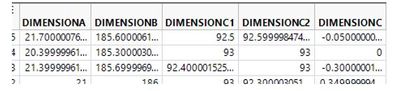
and I would require to Summarized this (get the average) and I will have the following data table:
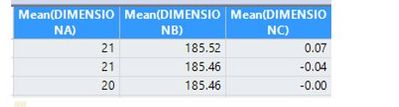
Now for my final table, I would want to rename the following:
Mean(DIMENSIONA) to "DIMENSIONA" only ,
Mean(DIMENSIONB) to "DIMENSIONB" only,
Mean(DIMENSIONC) to "DIMENSIONC" only and so on...
Im using the following code to do it but no to avail.

.
I am getting the following log. I dont know the work around, seems like the "Mean" is a function word so that's why I get this kind of error.

I hope someone can help find solution or do anything about it. Much appreciated everyone's help!
thanks in advance! :)
Accepted Solutions


- Mark as New
- Bookmark
- Subscribe
- Mute
- Subscribe to RSS Feed
- Get Direct Link
- Report Inappropriate Content
Re: How to Change a COL name of a SUMMARIZED table
You will not have to rename the columns in the summary output table if you use the
statistics column name format( "column" )
option in the Summary Platform. This is also a selection in the interactive dialog box on the lower left side, in an area titled "statistics column name format:
Here is a simple script illustrating what I am saying
Names Default To Here( 1 );
dt = Open( "$SAMPLE_DATA\Fitness.jmp" );

dtSum = dt << Summary(
	Mean( :Age ),
	Mean( :Weight ),
	Mean( :Oxy ),
	Mean( :Runtime ),
	Mean( :RunPulse ),
	Mean( :RstPulse ),
	Mean( :MaxPulse ),
	Freq( "None" ),
	Weight( "None" ),
	statistics column name format( "column" ),
	Link to original data table( 0 )
);
.
- Mark as New
- Bookmark
- Subscribe
- Mute
- Subscribe to RSS Feed
- Get Direct Link
- Report Inappropriate Content
Re: How to Change a COL name of a SUMMARIZED table
You will not have to rename the columns in the summary output table if you use the
statistics column name format( "column" )
option in the Summary Platform. This is also a selection in the interactive dialog box on the lower left side, in an area titled "statistics column name format:
Here is a simple script illustrating what I am saying
Names Default To Here( 1 );
dt = Open( "$SAMPLE_DATA\Fitness.jmp" );

dtSum = dt << Summary(
	Mean( :Age ),
	Mean( :Weight ),
	Mean( :Oxy ),
	Mean( :Runtime ),
	Mean( :RunPulse ),
	Mean( :RstPulse ),
	Mean( :MaxPulse ),
	Freq( "None" ),
	Weight( "None" ),
	statistics column name format( "column" ),
	Link to original data table( 0 )
);
.
- Mark as New
- Bookmark
- Subscribe
- Mute
- Subscribe to RSS Feed
- Get Direct Link
- Report Inappropriate Content
Re: How to Change a COL name of a SUMMARIZED table
Recommended Articles
- © 2026 JMP Statistical Discovery LLC. All Rights Reserved.
- Terms of Use
- Privacy Statement
- Contact Us