- JMP will suspend normal business operations for our Winter Holiday beginning on Wednesday, Dec. 24, 2025, at 5:00 p.m. ET (2:00 p.m. ET for JMP Accounts Receivable).
Regular business hours will resume at 9:00 a.m. EST on Friday, Jan. 2, 2026. - We’re retiring the File Exchange at the end of this year. The JMP Marketplace is now your destination for add-ins and extensions.
- Subscribe to RSS Feed
- Mark Topic as New
- Mark Topic as Read
- Float this Topic for Current User
- Bookmark
- Subscribe
- Mute
- Printer Friendly Page
Discussions
Solve problems, and share tips and tricks with other JMP users.- JMP User Community
- :
- Discussions
- :
- How does Random seed change when I click apply?

- Mark as New
- Bookmark
- Subscribe
- Mute
- Subscribe to RSS Feed
- Get Direct Link
- Report Inappropriate Content
How does Random seed change when I click apply?
I use the Random Reset function to set a random seed in a simulation. How does the random seed change when I click Apply on the random formula?
Here is an example script generating three random normal(0,1) numbers
NamesDefaultToHere(1);

Random Reset( 1234 );

dt=NewTable("test",
	AddRows(3),
	New Column( "X",
		Numeric,
		"Continuous",
		Formula( Random Normal( 0, 1 ) ),
	),
);
When running this script, I get the following random numbers

And when I click Apply to the Formula, I get these new random numbers
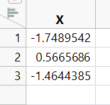
How does the random seed change when I click Apply? What seed would give me the three numbers above?


- Mark as New
- Bookmark
- Subscribe
- Mute
- Subscribe to RSS Feed
- Get Direct Link
- Report Inappropriate Content
Re: How does Random seed change when I click apply?
I would say it is random so you cannot really know which seed you have. If you have to always have same seed in a formula, I think you can use As Constant(Seed Reset()).
Names Default To Here(1);

dt = New Table("test",
	AddRows(3),
	New Column("X", Numeric, "Continuous", Formula(
		As Constant(
			Random Reset(1234);
		);
		Random Normal(0, 1));
	)
);
(I think this will reset the seed to your number every time that formula is evaluated so it will for example affect other formulas).
This might have some extra information https://www.jmp.com/support/help/en/18.0/#page/jmp/random-functions.shtml
- Mark as New
- Bookmark
- Subscribe
- Mute
- Subscribe to RSS Feed
- Get Direct Link
- Report Inappropriate Content
Re: How does Random seed change when I click apply?
Thanks for your reply. My problem is that it does not seem to be completely random because each time I run the above script and click Apply once, I will get exactly the same new "random" numbers. So to me it seems like the random seed is changed in a systematic way.
- Mark as New
- Bookmark
- Subscribe
- Mute
- Subscribe to RSS Feed
- Get Direct Link
- Report Inappropriate Content
Re: How does Random seed change when I click apply?
Yeah, it does seem so.
I think you can get the "random state" using
Random Seed State();function. So you could do some comparisons with that.
You might want to contact JMP Support, they will then ask the developers, if needed and get back to you. Please post the "solution" or explanation from support back here, so we can all learn ("randomness" might be explained in some documentation for JMP but I have no idea where to find that).
Recommended Articles
- © 2026 JMP Statistical Discovery LLC. All Rights Reserved.
- Terms of Use
- Privacy Statement
- Contact Us