- Don’t miss your chance to experience Discovery Summit Europe at our best available rate! Early bird registration through 31 Oct.
- Graph Builder Toolbar streamlines interactive graphing. Creates shortcuts on Report and GraphBuilder Helpers toolbars. Download and install the extension.
- Subscribe to RSS Feed
- Mark Topic as New
- Mark Topic as Read
- Float this Topic for Current User
- Bookmark
- Subscribe
- Mute
- Printer Friendly Page
Discussions
Solve problems, and share tips and tricks with other JMP users.- User Community
- :
- Discussions
- :
- Re: How do I use a variable inside the graph builder script?

- Mark as New
- Bookmark
- Subscribe
- Mute
- Subscribe to RSS Feed
- Get Direct Link
- Report Inappropriate Content
How do I use a variable inside the graph builder script with a loop?
Hi all. I am using a variable CD to keep track of several different products. I would like to use a for loop to run the graph builder and under the Variables function of the graph substitute my variable for the Y axis name.
I have this under graph builder script:
Graph Builder(
Variables( X( :DateTime ), Y( :BLU14031717111005_100_200 ) ),
Elements( Points( X, Y, Legend( 11 ), Jitter( 1 ), Error Bars( "Range" ) ) ),
{},
"BLU14031717111005_100_200",
ScaleBox,
{Add Ref Line( 2120, Solid, "Medium Light Red", "LCL", 2 ),
Add Ref Line( 2340, Solid, "Medium Light Red", "HCL", 2 )}
),
Dispatch( {}, "400", LegendBox, {Position( {0} )} )
I want to change the :blu14031717........ to a variable that will change depending on the for loop iteration. I would also like the graph title to change with each iteration. Any help would be most appreciated.
Accepted Solutions


- Mark as New
- Bookmark
- Subscribe
- Mute
- Subscribe to RSS Feed
- Get Direct Link
- Report Inappropriate Content
Re: How do I use a variable inside the graph builder script?
Here is an example - it uses the Eval function to evaluate the variable that contains the column reference:
dt = Open( "$SAMPLE_DATA/Big Class.jmp" );
For( i = 1, i <= N Cols( dt ), i++,
	yCol = Column( dt, i );
	strTitle = "Graph #" || Char( i );
	Graph Builder(
		Show Control Panel( 0 ),
		Variables( X( :weight ), Y( Eval( i ) ) ),
		Elements( Points( X, Y, Legend( 1 ) ) ),
		SendToReport( Dispatch( {}, "graph title", TextEditBox, {Set Text( strTitle )} ) )
	);
);
Unfortunately I still have no idea how to cut and paste JSL whilst maintaining its formatting - this is what it looks like:
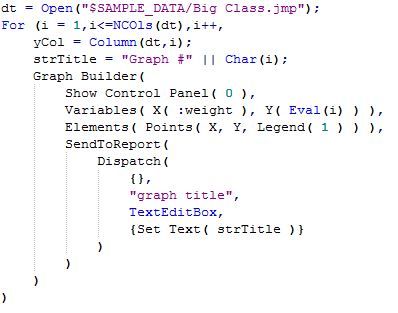
David Burnham
- Mark as New
- Bookmark
- Subscribe
- Mute
- Subscribe to RSS Feed
- Get Direct Link
- Report Inappropriate Content
Re: How do I use a variable inside the graph builder script?
Here is an example - it uses the Eval function to evaluate the variable that contains the column reference:
dt = Open( "$SAMPLE_DATA/Big Class.jmp" );
For( i = 1, i <= N Cols( dt ), i++,
	yCol = Column( dt, i );
	strTitle = "Graph #" || Char( i );
	Graph Builder(
		Show Control Panel( 0 ),
		Variables( X( :weight ), Y( Eval( i ) ) ),
		Elements( Points( X, Y, Legend( 1 ) ) ),
		SendToReport( Dispatch( {}, "graph title", TextEditBox, {Set Text( strTitle )} ) )
	);
);
Unfortunately I still have no idea how to cut and paste JSL whilst maintaining its formatting - this is what it looks like:
David Burnham
- Mark as New
- Bookmark
- Subscribe
- Mute
- Subscribe to RSS Feed
- Get Direct Link
- Report Inappropriate Content
Re: How do I use a variable inside the graph builder script?
David,
Thank you!
I just changed one line and now the name of the graph is the column name, you rock!
strTitle = Char( yCol )

- Mark as New
- Bookmark
- Subscribe
- Mute
- Subscribe to RSS Feed
- Get Direct Link
- Report Inappropriate Content
Re: How do I use a variable inside the graph builder script?
Dave - if you copy/paste the code from JMP to MS-Word, and then re-copy/paste from MS-Word to this forum, it will retain the formatting. Clunky but it works.
- Mark as New
- Bookmark
- Subscribe
- Mute
- Subscribe to RSS Feed
- Get Direct Link
- Report Inappropriate Content
Re: How do I use a variable inside the graph builder script?
Thanks Peter

- Mark as New
- Bookmark
- Subscribe
- Mute
- Subscribe to RSS Feed
- Get Direct Link
- Report Inappropriate Content
Re: How do I use a variable inside the graph builder script?
@Hi,
I have a quick question on this. (If someone sees this message, this comes roughly two years after the last reply).
The above code works perfectly fine for me, but I am not understanding why Eval(i) is used for Y variable in the Graph builder code in the line below. Shouldn't it be Eval(yCol(i)) ? Eval(i) will just give 1,2,3 ... etc ,then how does it work fine?
Variables( X( :weight ), Y( Eval(i) ) ),
Thanks,
-Ankur
- Mark as New
- Bookmark
- Subscribe
- Mute
- Subscribe to RSS Feed
- Get Direct Link
- Report Inappropriate Content
Re: How do I use a variable inside the graph builder script?
You are correct - I think it was a typo - it should be Eval( yCol )
Recommended Articles
- © 2026 JMP Statistical Discovery LLC. All Rights Reserved.
- Terms of Use
- Privacy Statement
- Contact Us