Turn on suggestions
Auto-suggest helps you quickly narrow down your search results by suggesting possible matches as you type.
- Don’t miss your chance to experience Discovery Summit Europe at our best available rate! Early bird registration through 31 Oct.
- Graph Builder Toolbar streamlines interactive graphing. Creates shortcuts on Report and GraphBuilder Helpers toolbars. Download and install the extension.
Options
- Subscribe to RSS Feed
- Mark Topic as New
- Mark Topic as Read
- Float this Topic for Current User
- Bookmark
- Subscribe
- Mute
- Printer Friendly Page
Discussions
Solve problems, and share tips and tricks with other JMP users.- User Community
- :
- Discussions
- :
- Re: How do I make to see two labels(N(count) & its %) at the same time on Pie ch...

Level II
- Mark as New
- Bookmark
- Subscribe
- Mute
- Subscribe to RSS Feed
- Get Direct Link
- Report Inappropriate Content
How do I make to see two labels(N(count) & its %) at the same time on Pie chart.
Nov 11, 2024 02:49 AM
(2654 views)
I just know that we can select an option for Label display to "value" & "percent" through the Label on the Graph.
but i would like to see both values at the same time on the chart.
3 REPLIES 3


Super User
- Mark as New
- Bookmark
- Subscribe
- Mute
- Subscribe to RSS Feed
- Get Direct Link
- Report Inappropriate Content
Re: How do I make to see two labels(N(count) & its %) at the same time on Pie chart.
Most likely there are other options but here are few (I'm using JMP's Big Class as example table).
One option is to overlay two identical pie charts and then use custom formatting for the "N" label (you could do that for % label, but it easier to do for N), in this case I added row change to the custom format
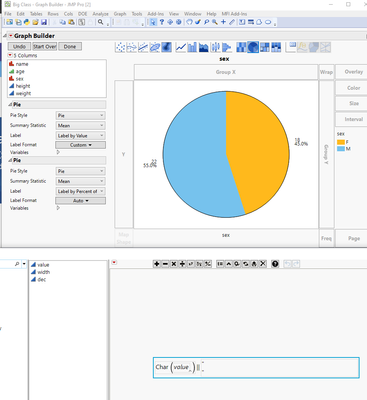
You could also create new column which has those "label" values and use that for your pie chart.
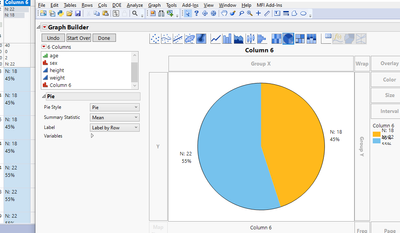
New Column("Column 6",
	Character,
	"Nominal",
	Formula(
		"N: " || Char(Col Number(:sex, :sex)) || "
" ||
		Char((100 * Col Number(:sex, :sex)) / Col Number(:sex)) || "%"
	),
	Set Selected
)
-Jarmo


Staff
- Mark as New
- Bookmark
- Subscribe
- Mute
- Subscribe to RSS Feed
- Get Direct Link
- Report Inappropriate Content
Re: How do I make to see two labels(N(count) & its %) at the same time on Pie chart.
You can check if the caption box option helps as well, setting location to group by factor and play with X/Y Position.
/****NeverStopLearning****/

Level I
- Mark as New
- Bookmark
- Subscribe
- Mute
- Subscribe to RSS Feed
- Get Direct Link
- Report Inappropriate Content
Re: How do I make to see two labels(N(count) & its %) at the same time on Pie chart.
Thank you so much.
Recommended Articles
- © 2026 JMP Statistical Discovery LLC. All Rights Reserved.
- Terms of Use
- Privacy Statement
- Contact Us