Turn on suggestions
Auto-suggest helps you quickly narrow down your search results by suggesting possible matches as you type.
- JMP Statement Regarding Critical PHP Remote Code Execution Vulnerabilities (CVE-2026-109618, CVE-2026-109619)
- Don’t miss your chance to experience Discovery Summit Europe at our best available rate! Early bird registration through 31 Oct.
- Graph Builder Toolbar streamlines interactive graphing. Creates shortcuts on Report and GraphBuilder Helpers toolbars. Download and install the extension.
Options
- Subscribe to RSS Feed
- Mark Topic as New
- Mark Topic as Read
- Float this Topic for Current User
- Bookmark
- Subscribe
- Mute
- Printer Friendly Page
Discussions
Solve problems, and share tips and tricks with other JMP users.- User Community
- :
- Discussions
- :
- Re: How do I get a list from an SQL query and let the user select the option fro...

Level II
- Mark as New
- Bookmark
- Subscribe
- Mute
- Subscribe to RSS Feed
- Get Direct Link
- Report Inappropriate Content
How do I get a list from an SQL query and let the user select the option from the list?
Created:
Feb 26, 2024 09:07 AM
| Last Modified: Feb 26, 2024 6:08 AM
(2643 views)
3 REPLIES 3


Super User
- Mark as New
- Bookmark
- Subscribe
- Mute
- Subscribe to RSS Feed
- Get Direct Link
- Report Inappropriate Content
Re: How do I get a list from an SQL query and let the user select the option from the list?
Do you have SQL query as a string? In Query Builder? SQL Query result in JMP data table? Or possibly something else?
-Jarmo
Level II
- Mark as New
- Bookmark
- Subscribe
- Mute
- Subscribe to RSS Feed
- Get Direct Link
- Report Inappropriate Content
Re: How do I get a list from an SQL query and let the user select the option from the list?
It is a column name with multiple parameters.
For example, I have a column named fruits and there are apple, mango and orange.
multiple data for each fruits and would like to filter the column where the user can select if he wants to see apple, mango or orange data
Super User
- Mark as New
- Bookmark
- Subscribe
- Mute
- Subscribe to RSS Feed
- Get Direct Link
- Report Inappropriate Content
Re: How do I get a list from an SQL query and let the user select the option from the list?
You can maybe use just data filter
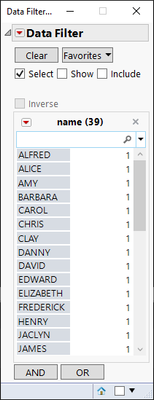
or build some more customized U using different options such as list box, check box, radio box...
Names Default To Here(1);

dt = Open("$SAMPLE_DATA/Big Class.jmp");

nw = New Window("Example",
	H List Box(
		lb = List Box(:name << get values),
		rb = Check Box(:name << get values),
		cb = Radio  Box(:name << get values)
	)
);
-Jarmo
Recommended Articles
- © 2026 JMP Statistical Discovery LLC. All Rights Reserved.
- Terms of Use
- Privacy Statement
- Contact Us