cancel
Showing results for 
Show  only  | Search instead for 
Did you mean: 
  • JMP will suspend normal business operations for our Winter Holiday beginning on Wednesday, Dec. 24, 2025, at 5:00 p.m. ET (2:00 p.m. ET for JMP Accounts Receivable).
    Regular business hours will resume at 9:00 a.m. EST on Friday, Jan. 2, 2026.
  • We’re retiring the File Exchange at the end of this year. The JMP Marketplace is now your destination for add-ins and extensions.

Discussions

Solve problems, and share tips and tricks with other JMP users.
%3CLINGO-SUB%20id%3D%22lingo-sub-626191%22%20slang%3D%22en-US%22%20mode%3D%22NONE%22%3EWie%20bekomme%20ich%20im%20Graph%20Builder%20einen%20Hintergrund%20mit%20Farbverlauf%3F%3C%2FLINGO-SUB%3E%3CLINGO-BODY%20id%3D%22lingo-body-626191%22%20slang%3D%22en-US%22%20mode%3D%22NONE%22%3E%3CP%3EIch%20m%C3%B6chte%20ein%20Streudiagramm%20mit%209%20Quadraten%20erstellen%2C%20das%20wie%20eine%20McKinsey-GE-Matrix%20aussieht%2C%20und%20Datenpunkte%20in%20diesen%20Quadraten%20darstellen.%20Wenn%20unten%20links%20die%20niedrigsten%20Werte%20und%20oben%20rechts%20die%20h%C3%B6chsten%20Werte%20sind%2C%20m%C3%B6chte%20ich%20einen%20diagonal%20verlaufenden%20Hintergrund%20haben%2C%20beginnend%20mit%20Rot%20in%20der%20unteren%20linken%20Ecke%20und%20Gr%C3%BCn%20oben%20rechts%20mit%20einem%20gelben%20Band%20in%20der%20Mitte%20(siehe%20beigef%C3%BCgtes%20jpg%20).%20In%20Excel%20kann%20ich%20dies%20in%20einem%20Streudiagramm%20tun.%20Wie%20erstelle%20ich%20diesen%20Hintergrund%20im%20Graph%20Builder%3F%3C%2FP%3E%3C%2FLINGO-BODY%3E%3CLINGO-LABS%20id%3D%22lingo-labs-626191%22%20slang%3D%22en-US%22%20mode%3D%22NONE%22%3E%3CLINGO-LABEL%3EGrafik%3C%2FLINGO-LABEL%3E%3C%2FLINGO-LABS%3E%3CLINGO-SUB%20id%3D%22lingo-sub-626266%22%20slang%3D%22en-US%22%20mode%3D%22NONE%22%3EBetreff%3A%20Wie%20bekomme%20ich%20im%20Graph%20Builder%20einen%20Hintergrund%20mit%20Farbverlauf%3F%3C%2FLINGO-SUB%3E%3CLINGO-BODY%20id%3D%22lingo-body-626266%22%20slang%3D%22en-US%22%20mode%3D%22NONE%22%3E%3CP%3EIch%20konnte%20den%20Farbverlauf%20als%20Hintergrundbild%20hinzuf%C3%BCgen%20und%20dann%20Daten%20dar%C3%BCber%20legen.Ich%20verwende%20die%20von%20Ihnen%20bereitgestellte%20.jpg-Datei.Sie%20m%C3%BCssten%20ein%20separates%20Image%20erstellen.Ich%20glaube%2C%20dass%20es%20mit%20einer%20Graphbox%20()%20in%20JMP%20erstellt%20werden%20k%C3%B6nnte.%3C%2FP%3E%0A%3CP%3E%3CSPAN%20class%3D%22lia-inline-image-display-wrapper%20lia-image-align-inline%22%20image-alt%3D%22txnelson_0-1682511472714.png%22%20style%3D%22width%3A%20640px%3B%22%3E%3CSPAN%20class%3D%22lia-inline-image-display-wrapper%22%20image-alt%3D%22txnelson_0-1682511472714.png%22%20style%3D%22width%3A%20640px%3B%22%3E%3Cspan%20class%3D%22lia-inline-image-display-wrapper%22%20image-alt%3D%22txnelson_0-1682511472714.png%22%20style%3D%22width%3A%20640px%3B%22%3E%3Cimg%20src%3D%22https%3A%2F%2Fcommunity.jmp.com%2Ft5%2Fimage%2Fserverpage%2Fimage-id%2F52369iE7C5EACA16F00EF1%2Fimage-dimensions%2F640x332%3Fv%3Dv2%22%20width%3D%22640%22%20height%3D%22332%22%20role%3D%22button%22%20title%3D%22txnelson_0-1682511472714.png%22%20alt%3D%22txnelson_0-1682511472714.png%22%20%2F%3E%3C%2Fspan%3E%3C%2FSPAN%3E%3C%2FSPAN%3E%3C%2FP%3E%0A%3CP%3EHier%20ist%20die%20JSL%3C%2FP%3E%0A%3CPRE%3E%3CCODE%20class%3D%22%20language-jsl%22%3ENames%20Default%20To%20Here(%201%20)%3B%0Adt%20%3D%20New%20Table(%20%22example%22%2C%0A%20Add%20Rows(%207%20)%2C%0A%20New%20Column(%20%22x%22%2C%0A%20%20Numeric%2C%0A%20%20%22Continuous%22%2C%0A%20%20Format(%20%22Best%22%2C%2012%20)%2C%0A%20%20Set%20Values(%20%5B0.655%2C%200.655%2C%200.655%2C%201.69%2C%201.69%2C%202.715%2C%202.715%5D%20)%2C%0A%20%20Set%20Display%20Width(%2038%20)%0A%20)%2C%0A%20New%20Column(%20%22y%22%2C%0A%20%20Numeric%2C%0A%20%20%22Continuous%22%2C%0A%20%20Format(%20%22Best%22%2C%2012%20)%2C%0A%20%20Set%20Values(%20%5B9.65%2C%205.6%2C%201.52%2C%205.6%2C%201.52%2C%205.6%2C%201.52%5D%20)%2C%0A%20%20Set%20Display%20Width(%2072%20)%0A%20)%2C%0A%20New%20Column(%20%22size%22%2C%0A%20%20Numeric%2C%0A%20%20%22Continuous%22%2C%0A%20%20Format(%20%22Best%22%2C%2012%20)%2C%0A%20%20Set%20Values(%20%5B20%2C%2020%2C%2020%2C%2020%2C%2020%2C%2020%2C%2020%5D%20)%0A%20)%2C%0A%20Set%20Row%20States(%20%5B8192%2C%208384%2C%208384%2C%208384%2C%208384%2C%208384%2C%208384%5D%20)%0A)%3B%0A%0Aop%20%3D%20Graph%20Builder(%0A%20Size(%201120%2C%20456%20)%2C%0A%20Show%20Control%20Panel(%200%20)%2C%0A%20Variables(%20X(%20%3Ax%20)%2C%20Y(%20%3Ay%20)%2C%20Size(%20%3Asize%20)%20)%2C%0A%20Elements(%20Points(%20X%2C%20Y%2C%20Legend(%207%20)%20)%20)%2C%0A%20SendToReport(%0A%20%20Dispatch(%20%7B%7D%2C%20%22x%22%2C%20ScaleBox%2C%20%7BMin(%200.15%20)%2C%20Max(%203.2%20)%2C%20Inc(%200.5%20)%2C%20Minor%20Ticks(%201%20)%7D%20)%2C%0A%20%20Dispatch(%0A%20%20%20%7B%7D%2C%0A%20%20%20%22y%22%2C%0A%20%20%20ScaleBox%2C%0A%20%20%20%7BMin(%20-0.635918367346939%20)%2C%20Max(%2011.6721345272803%20)%2C%20Inc(%202%20)%2C%20Minor%20Ticks(%201%20)%7D%0A%20%20)%2C%0A%20%20Dispatch(%20%7B%7D%2C%20%22400%22%2C%20LegendBox%2C%20%7BLegend%20Position(%20%7B7%2C%20%5B-1%2C%20-1%5D%7D%20)%7D%20)%0A%20)%0A)%3B%0Aopr1%20%3D%20op%20%26lt%3B%26lt%3B%20report%3B%0Aopr2%20%3D%20opr1%20%26lt%3B%26lt%3B%20Clone%20Box%3B%0Aopr1%20%26lt%3B%26lt%3B%20append(%20opr2%20)%3B%0Afb1%20%3D%20opr1%5BFrame%20Box(%201%20)%5D%3B%0Afb1%20%26lt%3B%26lt%3B%20Add%20Image(%0A%20Open(%20Convert%20File%20Path(%20%22%3CPATH%20to%3D%22%22%20the%3D%22%22%20image%3D%22%22%3E.jpg%22%20)%20)%2C%0A%20Transparency(%200.9%20)%2C%0A%20Bounds(%0A%20%20Left(%200.135416666666667%20)%2C%0A%20%20Right(%203.26041666666667%20)%2C%0A%20%20Top(%2011.8333333333333%20)%2C%0A%20%20Bottom(%20-1%20)%0A%20)%2C%0A%20SetSize(%20%7B300%2C%20210%7D%20)%0A)%3B%0Afb1%20%26lt%3B%26lt%3B%20Copy%20Picture%3B%0Afb2%20%3D%20opr2%5BFrame%20Box(%201%20)%5D%3B%0Afb2%20%26lt%3B%26lt%3B%20Paste%20Background%20Image%3B%3C%2FPATH%3E%3C%2FCODE%3E%3C%2FPRE%3E%3C%2FLINGO-BODY%3E
Choose Language Hide Translation Bar
MarcP
Level III

How do I get a gradient background in graph builder

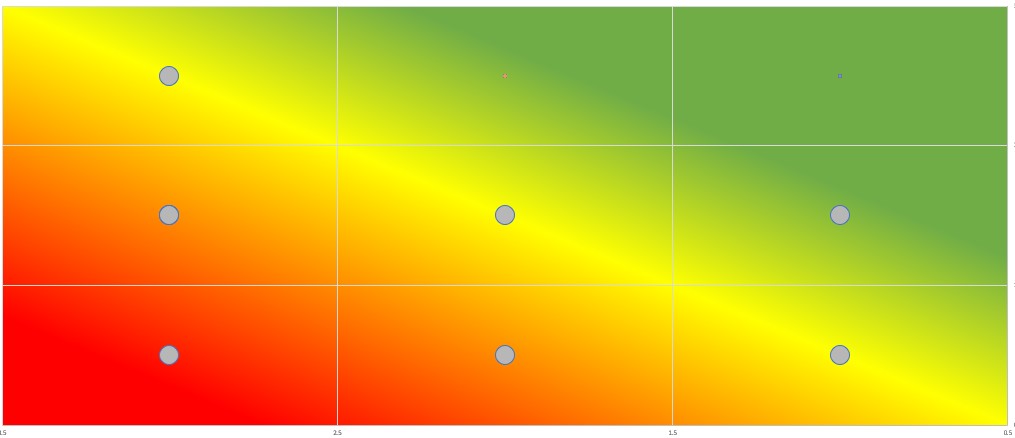
I want to create a scatter plot with 9 squares that looks like a McKinsey GE matrix, and plot data points in those squares. If the bottom left equals the lowest values and top right the highest value, I would like to have a gradient diagonal background, starting with red in the lower left corner and green in the top right with a yellow band in the middle (see attached jpg). In excel I can do this in a scatter plot. How do I create this background in graph builder?

2 REPLIES 2
txnelson
Super User

Re: How do I get a gradient background in graph builder

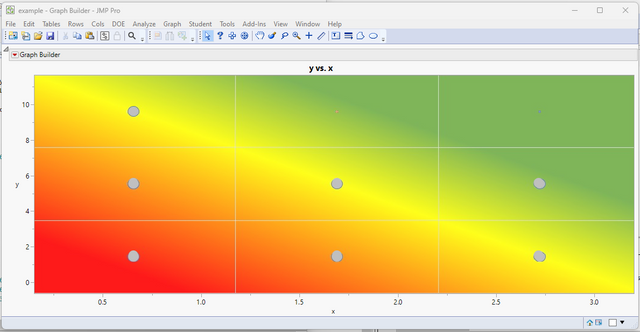
I was able to add the gradient as a background image, and then overlayed data on top of it.  I am using the .jpg that you supplied.  You would need to create a separate image.  I believe that it could be build using a graph box() in JMP.
txnelson_0-1682511472714.png

Here is the JSL

Names Default To Here( 1 );
dt = New Table( "example",
	Add Rows( 7 ),
	New Column( "x",
		Numeric,
		"Continuous",
		Format( "Best", 12 ),
		Set Values( [0.655, 0.655, 0.655, 1.69, 1.69, 2.715, 2.715] ),
		Set Display Width( 38 )
	),
	New Column( "y",
		Numeric,
		"Continuous",
		Format( "Best", 12 ),
		Set Values( [9.65, 5.6, 1.52, 5.6, 1.52, 5.6, 1.52] ),
		Set Display Width( 72 )
	),
	New Column( "size",
		Numeric,
		"Continuous",
		Format( "Best", 12 ),
		Set Values( [20, 20, 20, 20, 20, 20, 20] )
	),
	Set Row States( [8192, 8384, 8384, 8384, 8384, 8384, 8384] )
);

op = Graph Builder(
	Size( 1120, 456 ),
	Show Control Panel( 0 ),
	Variables( X( :x ), Y( :y ), Size( :size ) ),
	Elements( Points( X, Y, Legend( 7 ) ) ),
	SendToReport(
		Dispatch( {}, "x", ScaleBox, {Min( 0.15 ), Max( 3.2 ), Inc( 0.5 ), Minor Ticks( 1 )} ),
		Dispatch(
			{},
			"y",
			ScaleBox,
			{Min( -0.635918367346939 ), Max( 11.6721345272803 ), Inc( 2 ), Minor Ticks( 1 )}
		),
		Dispatch( {}, "400", LegendBox, {Legend Position( {7, [-1, -1]} )} )
	)
);
opr1 = op << report;
opr2 = opr1 << Clone Box;
opr1 << append( opr2 );
fb1 = opr1[Frame Box( 1 )];
fb1 << Add Image(
	Open( Convert File Path( "<path to the image>.jpg" ) ),
	Transparency( 0.9 ),
	Bounds(
		Left( 0.135416666666667 ),
		Right( 3.26041666666667 ),
		Top( 11.8333333333333 ),
		Bottom( -1 )
	),
	SetSize( {300, 210} )
);
fb1 << Copy Picture;
fb2 = opr2[Frame Box( 1 )];
fb2 << Paste Background Image;
Jim
MarcP
Level III

Re: How do I get a gradient background in graph builder

Thanks Jim,


Apparently a bit more complex than excel.


Marc

Recommended Articles