- Subscribe to RSS Feed
- Mark Topic as New
- Mark Topic as Read
- Float this Topic for Current User
- Bookmark
- Subscribe
- Mute
- Printer Friendly Page
Discussions
Solve problems, and share tips and tricks with other JMP users.- JMP User Community
- :
- Discussions
- :
- How do I edit a text that is auto-generated on the plot?

- Mark as New
- Bookmark
- Subscribe
- Mute
- Subscribe to RSS Feed
- Get Direct Link
- Report Inappropriate Content
How do I edit a text that is auto-generated on the plot?
Specifically clicking a mean & std dev option, it generates the 2 numbers and puts it in the middle of my plot.
These numbers are tiny like size 2.
I would like to learn how to:
1. go into the code script and manually edit text size and other features.
2. change the default preference if possible for larger text sizes.
Accepted Solutions


 Community Manager
- Mark as New
- Bookmark
- Subscribe
- Mute
- Subscribe to RSS Feed
- Get Direct Link
- Report Inappropriate Content
Re: How do I edit a text that is auto-generated on the plot?
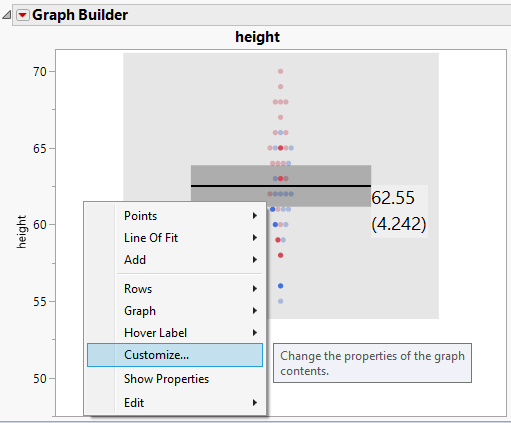
Another way to set the font is to right click and choose "Customize..." from the popup menu ...
... then click on "Means add ... Deviations", then click on "Font..." and choose the size you would like to use.
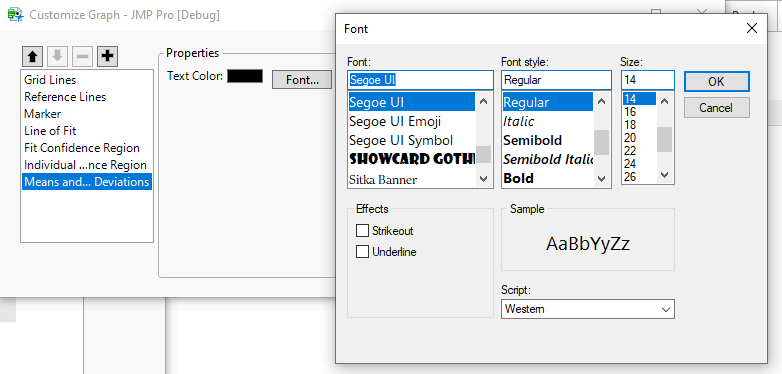
Unlike a preference change, this will only affect the current graph.
~John



- Mark as New
- Bookmark
- Subscribe
- Mute
- Subscribe to RSS Feed
- Get Direct Link
- Report Inappropriate Content
Re: How do I edit a text that is auto-generated on the plot?
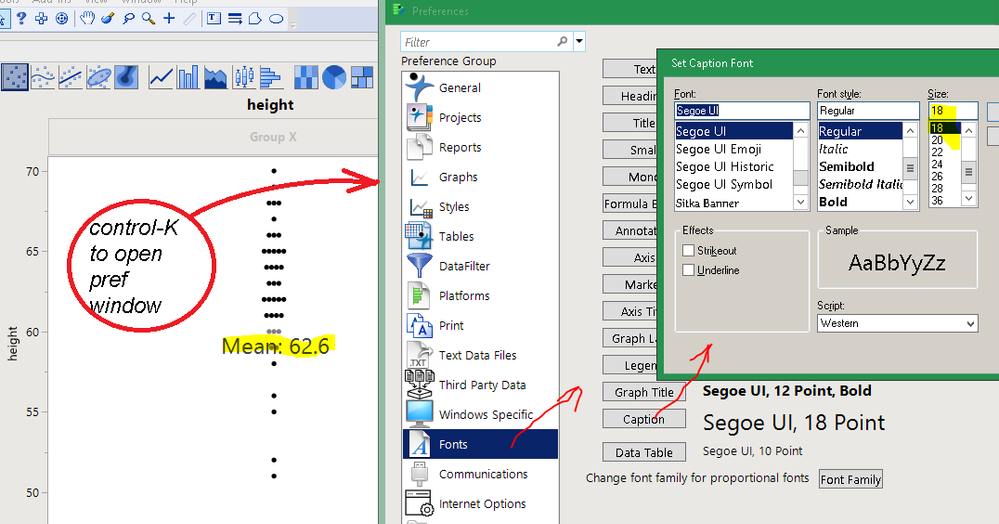
I think you are using graph builder and adding a caption. Preferences has a caption font that controls it.
Community Manager
- Mark as New
- Bookmark
- Subscribe
- Mute
- Subscribe to RSS Feed
- Get Direct Link
- Report Inappropriate Content
Re: How do I edit a text that is auto-generated on the plot?
Another way to set the font is to right click and choose "Customize..." from the popup menu ...
... then click on "Means add ... Deviations", then click on "Font..." and choose the size you would like to use.
Unlike a preference change, this will only affect the current graph.
~John
- Mark as New
- Bookmark
- Subscribe
- Mute
- Subscribe to RSS Feed
- Get Direct Link
- Report Inappropriate Content
Re: How do I edit a text that is auto-generated on the plot?
Much better!
- Mark as New
- Bookmark
- Subscribe
- Mute
- Subscribe to RSS Feed
- Get Direct Link
- Report Inappropriate Content
Re: How do I edit a text that is auto-generated on the plot?
Thanks everyone!
Recommended Articles
- © 2026 JMP Statistical Discovery LLC. All Rights Reserved.
- Terms of Use
- Privacy Statement
- Contact Us