- Subscribe to RSS Feed
- Mark Topic as New
- Mark Topic as Read
- Float this Topic for Current User
- Bookmark
- Subscribe
- Mute
- Printer Friendly Page
Discussions
Solve problems, and share tips and tricks with other JMP users.- JMP User Community
- :
- Discussions
- :
- How do I define spec limits by data category in variability chart

- Mark as New
- Bookmark
- Subscribe
- Mute
- Subscribe to RSS Feed
- Get Direct Link
- Report Inappropriate Content
How do I define spec limits by data category in variability chart
Hi,
How can I draw spec limits(red line) by data category in variability chart as below example? The red line was done by manual in pptx.
Attach jmp file data for reference. Appreciate for your reply. Thanks.

- Tags:
- windows
Accepted Solutions


- Mark as New
- Bookmark
- Subscribe
- Mute
- Subscribe to RSS Feed
- Get Direct Link
- Report Inappropriate Content
Re: How do I define spec limits by data category in variability chart
Names Default To Here(1);

dt1 = Open("$DOWNLOADS/sample data.jmp");
dt = dt1 << Stack( // stack to get proper data format
	columns(:A10, :A20, :A30),
	Source Label Column("SampleGroup"),
	Output Table("Stack")
);

// Add limits as they were not provided
dt << New Column("LSL", Numeric, Continuous, Values([10, 10, 10, 10, 10, 10, 10, 10, 10, 20, 20, 20, 20, 20, 20, 20, 20, 20]));
dt << New Column("Target", Numeric, Continuous, Values([20, 20, 20, 20, 20, 20, 20, 20, 20, 40, 40, 40, 40, 40, 40, 40, 40, 40]));
dt << New Column("USL", Numeric, Continuous, Values([30, 30, 30, 30, 30, 30, 30, 30, 30, 50, 50, 50, 50, 50, 50, 50, 50, 50]));

var = dt << Variability Chart(Y(:Data), X(:Phase, :SampleGroup));

dt_summary = dt << Summary(
	Group(:Phase),
	Max(:LSL),
	Mean(:Target),
	Min(:USL),
	N Categories(:SampleGroup),
	Freq("None"),
	Weight("None"),
	statistics column name format("column"),
	Link to original data table(0)
);
dt_summary << Delete Columns("N Rows");

// We need access to the framebox
fb = Report(var)[Outline Box("Variability Chart for Data"), Frame Box(1)];

//Get phases count (this was missing)
Summarize(dt, phases = By(:Phase));

// Using graphic scripts most likely easiest option
xidx = 0;
For(i = 1, i <= N Items(phases), i++,
	curphase = dt_summary[i, "Phase"];
	curlsl = dt_summary[i, "LSL"];
	curusl = dt_summary[i, "USL"];
	curtarget = dt_summary[i, "Target"];
	curcount = dt_summary[i, "SampleGroup"];

	xend = xidx + curcount;

	lslstart = Eval List({xidx, curlsl});
	lslend = Eval List({xend, curlsl});

	uslstart = Eval List({xidx, curusl});
	uslend = Eval List({xend, curusl});

	targetstart = Eval List({xidx, curtarget});
	targetend = Eval List({xend, curtarget});

	xidx = xend;

	Eval(EvalExpr(
			fb << Add Graphics Script(
			Pen Color("Red");
			Pen Size(1);
			Line(Expr(lslstart), Expr(lslend)); // {x1, y1}, {x2, y2}
			Line(Expr(uslstart), Expr(uslend)); // {x1, y1}, {x2, y2}
			Pen Color("Blue");
			Line(Expr(targetstart), Expr(targetend)); // {x1, y1}, {x2, y2}
		);
	));
);

fb << Y Axis(Max(1.1*Max(Col Max(Column(dt, "Data")), Col Max(Column(dt_summary, "USL"))))); // adjust yaxis- Mark as New
- Bookmark
- Subscribe
- Mute
- Subscribe to RSS Feed
- Get Direct Link
- Report Inappropriate Content
Re: How do I define spec limits by data category in variability chart
You have to calculate the group counts in different manner. One quite simple option could be to add new column to your dt which combines leg and layer
dt << new column("LEGLAYER", Character, Nominal, Formula(:Leg ||:Layer));
then use that in the summary
dt_summary = dt << Summary(
	Group(:SampleGroup),
	Max(:LSL),
	//Mean(:Target),
	Min(:USL),
	N Categories(:LEGLAYER),
	Freq("None"),
	Weight("None"),
	statistics column name format("column"),
	Link to original data table(0)
);
and get the curcount from that
curcount = Sum(dt_summary[i, {"LEGLAYER"}]);
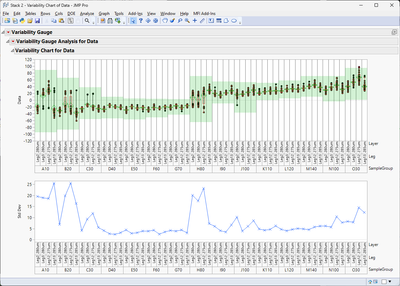
- Mark as New
- Bookmark
- Subscribe
- Mute
- Subscribe to RSS Feed
- Get Direct Link
- Report Inappropriate Content
Re: How do I define spec limits by data category in variability chart
Does Varying spec limits by data category in variability chart give some ideas?
- Mark as New
- Bookmark
- Subscribe
- Mute
- Subscribe to RSS Feed
- Get Direct Link
- Report Inappropriate Content
Re: How do I define spec limits by data category in variability chart
Hi jthi,
I checked and followed steps, but it still didn't work, even directly used its attachment file and script.
- Mark as New
- Bookmark
- Subscribe
- Mute
- Subscribe to RSS Feed
- Get Direct Link
- Report Inappropriate Content
Re: How do I define spec limits by data category in variability chart
Using your data (+ adding limits) and making small fix to the script from that thread

- Mark as New
- Bookmark
- Subscribe
- Mute
- Subscribe to RSS Feed
- Get Direct Link
- Report Inappropriate Content
Re: How do I define spec limits by data category in variability chart
Hi jthi,
You did indeed draw the chart I wanted, but I still don't know how to modify the script. Anyway, thanks for your reply
- Mark as New
- Bookmark
- Subscribe
- Mute
- Subscribe to RSS Feed
- Get Direct Link
- Report Inappropriate Content
Re: How do I define spec limits by data category in variability chart
Names Default To Here(1);

dt1 = Open("$DOWNLOADS/sample data.jmp");
dt = dt1 << Stack( // stack to get proper data format
	columns(:A10, :A20, :A30),
	Source Label Column("SampleGroup"),
	Output Table("Stack")
);

// Add limits as they were not provided
dt << New Column("LSL", Numeric, Continuous, Values([10, 10, 10, 10, 10, 10, 10, 10, 10, 20, 20, 20, 20, 20, 20, 20, 20, 20]));
dt << New Column("Target", Numeric, Continuous, Values([20, 20, 20, 20, 20, 20, 20, 20, 20, 40, 40, 40, 40, 40, 40, 40, 40, 40]));
dt << New Column("USL", Numeric, Continuous, Values([30, 30, 30, 30, 30, 30, 30, 30, 30, 50, 50, 50, 50, 50, 50, 50, 50, 50]));

var = dt << Variability Chart(Y(:Data), X(:Phase, :SampleGroup));

dt_summary = dt << Summary(
	Group(:Phase),
	Max(:LSL),
	Mean(:Target),
	Min(:USL),
	N Categories(:SampleGroup),
	Freq("None"),
	Weight("None"),
	statistics column name format("column"),
	Link to original data table(0)
);
dt_summary << Delete Columns("N Rows");

// We need access to the framebox
fb = Report(var)[Outline Box("Variability Chart for Data"), Frame Box(1)];

//Get phases count (this was missing)
Summarize(dt, phases = By(:Phase));

// Using graphic scripts most likely easiest option
xidx = 0;
For(i = 1, i <= N Items(phases), i++,
	curphase = dt_summary[i, "Phase"];
	curlsl = dt_summary[i, "LSL"];
	curusl = dt_summary[i, "USL"];
	curtarget = dt_summary[i, "Target"];
	curcount = dt_summary[i, "SampleGroup"];

	xend = xidx + curcount;

	lslstart = Eval List({xidx, curlsl});
	lslend = Eval List({xend, curlsl});

	uslstart = Eval List({xidx, curusl});
	uslend = Eval List({xend, curusl});

	targetstart = Eval List({xidx, curtarget});
	targetend = Eval List({xend, curtarget});

	xidx = xend;

	Eval(EvalExpr(
			fb << Add Graphics Script(
			Pen Color("Red");
			Pen Size(1);
			Line(Expr(lslstart), Expr(lslend)); // {x1, y1}, {x2, y2}
			Line(Expr(uslstart), Expr(uslend)); // {x1, y1}, {x2, y2}
			Pen Color("Blue");
			Line(Expr(targetstart), Expr(targetend)); // {x1, y1}, {x2, y2}
		);
	));
);

fb << Y Axis(Max(1.1*Max(Col Max(Column(dt, "Data")), Col Max(Column(dt_summary, "USL"))))); // adjust yaxis- Mark as New
- Bookmark
- Subscribe
- Mute
- Subscribe to RSS Feed
- Get Direct Link
- Report Inappropriate Content
Re: How do I define spec limits by data category in variability chart
Hi jthi,
Thanks for your script, it's worked successfully.
Regarding the limit setting below, if I have up to 100 data and only add limit line on dedicated "Phase", are there any solutions to optimize the following script? Thanks
// Add limits as they were not provided
dt << New Column("LSL", Numeric, Continuous, Values([10, 10, 10, 10, 10, 10, 10, 10, 10, 20, 20, 20, 20, 20, 20, 20, 20, 20]));
dt << New Column("Target", Numeric, Continuous, Values([20, 20, 20, 20, 20, 20, 20, 20, 20, 40, 40, 40, 40, 40, 40, 40, 40, 40]));
dt << New Column("USL", Numeric, Continuous, Values([30, 30, 30, 30, 30, 30, 30, 30, 30, 50, 50, 50, 50, 50, 50, 50, 50, 50]));- Mark as New
- Bookmark
- Subscribe
- Mute
- Subscribe to RSS Feed
- Get Direct Link
- Report Inappropriate Content
Re: How do I define spec limits by data category in variability chart
You could create spec limit table or if you don't have too many parameters, associative array for that
Names Default To Here(1);

dt1 = Open("$DOWNLOADS/sample data.jmp");
dt = dt1 << Stack( // stack to get proper data format
	columns(:A10, :A20, :A30),
	Source Label Column("SampleGroup"),
	Output Table("Stack")
);

aa_specs = [
	"L1" => ["LSL" => 10, "USL" => 30, "Target" => 20],
	"L2" => ["LSL" => 30, "USL" => 50, "Target" => 40]
];

// Add limits as they were not provided
dt << New Column("LSL", Numeric, Continuous);
dt << New Column("Target", Numeric, Continuous);
dt << New Column("USL", Numeric, Continuous);

For Each Row(dt,
	:LSL = aa_specs[:Phase]["LSL"];
	:USL = aa_specs[:Phase]["USL"];
	:Target = aa_specs[:Phase]["Target"];
);
Or using spec table
Names Default To Here(1);

dt1 = Open("$DOWNLOADS/sample data.jmp");
dt = dt1 << Stack( // stack to get proper data format
	columns(:A10, :A20, :A30),
	Source Label Column("SampleGroup"),
	Output Table("Stack")
);

dt_specs = New Table("Specs",
	Add Rows(2),
	Compress File When Saved(1),
	New Column("Variable", Character, "Nominal", Set Values({"L1", "L2"})),
	New Column("LSL", Numeric, "Continuous", Format("Best", 12), Set Values([10, 30])),
	New Column("Target", Numeric, "Continuous", Format("Best", 12), Set Values([20, 40])),
	New Column("USL", Numeric, "Continuous", Format("Best", 12), Set Values([30, 50]))
);

dt << Update(
	With(dt_specs),
	Match Columns(:Phase = :Variable)
);

Close(dt_specs, no save);- Mark as New
- Bookmark
- Subscribe
- Mute
- Subscribe to RSS Feed
- Get Direct Link
- Report Inappropriate Content
Re: How do I define spec limits by data category in variability chart
Hi jthi,
It worked when I used method1.
Assuming I want L2 to not have USL/LSL, how can I optimize it?
I tried setting value= 0, but a red line will show at the Y-zero position.
I put //"L2" => ["LSL" => 0, "USL" => 0, //"Target" => 40], it's not work.
aa_specs = [
	"L1" => ["LSL" => 10, "USL" => 30, "Target" => 20],
	"L2" => ["LSL" => 0, "USL" => 0, //"Target" => 40]
];
- Mark as New
- Bookmark
- Subscribe
- Mute
- Subscribe to RSS Feed
- Get Direct Link
- Report Inappropriate Content
Re: How do I define spec limits by data category in variability chart
I would set the value as missing if you don't wish to have it and I think it should work with the script.
Names Default To Here(1);

dt1 = Open("$DOWNLOADS/sample data.jmp");
dt = dt1 << Stack( // stack to get proper data format
	columns(:A10, :A20, :A30),
	Source Label Column("SampleGroup"),
	Output Table("Stack")
);

aa_specs = [
	"L1" => ["LSL" => 10, "USL" => 30, "Target" => 20],
	"L2" => ["LSL" => 30, "USL" => ., "Target" => .]
];

// Add limits as they were not provided
dt << New Column("LSL", Numeric, Continuous);
dt << New Column("Target", Numeric, Continuous);
dt << New Column("USL", Numeric, Continuous);

For Each Row(dt,
	:LSL = aa_specs[:Phase]["LSL"];
	:USL = aa_specs[:Phase]["USL"];
	:Target = aa_specs[:Phase]["Target"];
);

var = dt << Variability Chart(Y(:Data), X(:Phase, :SampleGroup));

dt_summary = dt << Summary(
	Group(:Phase),
	Max(:LSL),
	Mean(:Target),
	Min(:USL),
	N Categories(:SampleGroup),
	Freq("None"),
	Weight("None"),
	statistics column name format("column"),
	Link to original data table(0)
);
dt_summary << Delete Columns("N Rows");

// We need access to the framebox
fb = Report(var)[Outline Box("Variability Chart for Data"), Frame Box(1)];

//Get phases count (this was missing)
Summarize(dt, phases = By(:Phase));

// Using graphic scripts most likely easiest option
xidx = 0;
For(i = 1, i <= N Items(phases), i++,
	curphase = dt_summary[i, "Phase"];
	curlsl = dt_summary[i, "LSL"];
	curusl = dt_summary[i, "USL"];
	curtarget = dt_summary[i, "Target"];
	curcount = dt_summary[i, "SampleGroup"];

	xend = xidx + curcount;

	lslstart = Eval List({xidx, curlsl});
	lslend = Eval List({xend, curlsl});

	uslstart = Eval List({xidx, curusl});
	uslend = Eval List({xend, curusl});

	targetstart = Eval List({xidx, curtarget});
	targetend = Eval List({xend, curtarget});

	xidx = xend;

	Eval(EvalExpr(
			fb << Add Graphics Script(
			Pen Color("Red");
			Pen Size(1);
			Line(Expr(lslstart), Expr(lslend)); // {x1, y1}, {x2, y2}
			Line(Expr(uslstart), Expr(uslend)); // {x1, y1}, {x2, y2}
			Pen Color("Blue");
			Line(Expr(targetstart), Expr(targetend)); // {x1, y1}, {x2, y2}
		);
	));
);

fb << Y Axis(Max(1.1*Max(Col Max(Column(dt, "Data")), Col Max(Column(dt_summary, "USL"))))); // adjust yaxis
You could also modify the script slightly and make sure it ignores those which have missing values, but it might not be necessary
Recommended Articles
- © 2026 JMP Statistical Discovery LLC. All Rights Reserved.
- Terms of Use
- Privacy Statement
- Contact Us