- Subscribe to RSS Feed
- Mark Topic as New
- Mark Topic as Read
- Float this Topic for Current User
- Bookmark
- Subscribe
- Mute
- Printer Friendly Page
Discussions
Solve problems, and share tips and tricks with other JMP users.- JMP User Community
- :
- Discussions
- :
- How do I KEEP the order of variables in a data set when graphing?

- Mark as New
- Bookmark
- Subscribe
- Mute
- Subscribe to RSS Feed
- Get Direct Link
- Report Inappropriate Content
How do I KEEP the order of variables in a data set when graphing?
I understand that I can reorder by using the value ordering dropdown menu under column properties ( as indicated in other posts and videos). However this is needlessly time consuming for 50- 100 values that are already IN the correct order in the data set. So I am just interested in keeping the data in the order in which it currently is.
Thanks so much for your help!
Jennifer
Accepted Solutions


- Mark as New
- Bookmark
- Subscribe
- Mute
- Subscribe to RSS Feed
- Get Direct Link
- Report Inappropriate Content
Re: How do I KEEP the order of variables in a data set when graphing?
If the data are in the order you want to use for the order of the graph, then just specify the Column Property "Row Order Levels" and it will use the order the data are found in the data table as the order to use in the graphic and other platforms
- Mark as New
- Bookmark
- Subscribe
- Mute
- Subscribe to RSS Feed
- Get Direct Link
- Report Inappropriate Content
Re: How do I KEEP the order of variables in a data set when graphing?
If the data are in the order you want to use for the order of the graph, then just specify the Column Property "Row Order Levels" and it will use the order the data are found in the data table as the order to use in the graphic and other platforms
- Mark as New
- Bookmark
- Subscribe
- Mute
- Subscribe to RSS Feed
- Get Direct Link
- Report Inappropriate Content
Re: How do I KEEP the order of variables in a data set when graphing?
Jim,
That worked and is exactly what I was looking for. Thank you SO much for your help!
Jennifer
- Mark as New
- Bookmark
- Subscribe
- Mute
- Subscribe to RSS Feed
- Get Direct Link
- Report Inappropriate Content
Re: How do I KEEP the order of variables in a data set when graphing?
dts:Tamb_Est << setProperty( "Row Order Levels");
and I tried
dts:Tamb_Est << setProperty( "Value Order","Row Order Levels");
Neither had the desired effect, please answer the question with an example.
Thanks!
- Mark as New
- Bookmark
- Subscribe
- Mute
- Subscribe to RSS Feed
- Get Direct Link
- Report Inappropriate Content
Re: How do I KEEP the order of variables in a data set when graphing?
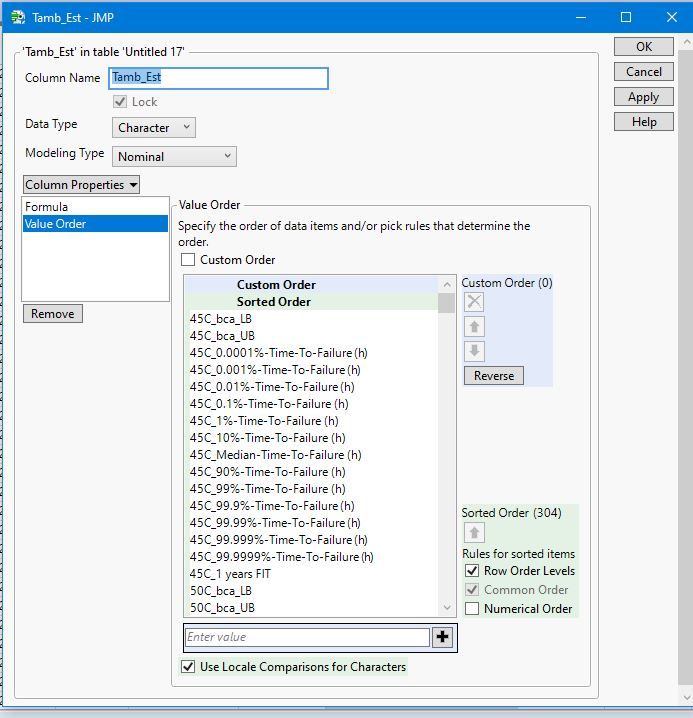
I want to set the column properties for Value Order like below in the GUI, but I want to do it in JSL.
- Mark as New
- Bookmark
- Subscribe
- Mute
- Subscribe to RSS Feed
- Get Direct Link
- Report Inappropriate Content
Re: How do I KEEP the order of variables in a data set when graphing?
I figured out the syntax...
id_values = dts:Tamb_Est << get values;
dts:Tamb_Est << setProperty("Value Ordering", id_values);- Mark as New
- Bookmark
- Subscribe
- Mute
- Subscribe to RSS Feed
- Get Direct Link
- Report Inappropriate Content
Re: How do I KEEP the order of variables in a data set when graphing?
Great job. I would like to add one fine point.
Your syntax does generate Value Order in the order of the values found in the current data table, it does not set Row Level Order. The fine point is that if you would sort the data, and then perform an analysis or create a chart, the order of the values for your Tamb_Est would remain the same order as before the sort. If you had set Row Order Levels, the data would be displayed in the new sorted order.
- Mark as New
- Bookmark
- Subscribe
- Mute
- Subscribe to RSS Feed
- Get Direct Link
- Report Inappropriate Content
Re: How do I KEEP the order of variables in a data set when graphing?
- The structure of the Value Order/Row Order Levels column properties changed in JMP 15.
- The easiest way to figure out what you need to do in JSL for any of the Column Properties, is to set them interactively, and then to use "Get Property" for the column property you are interested in. The results will show the input structure you need to use to set the column property.
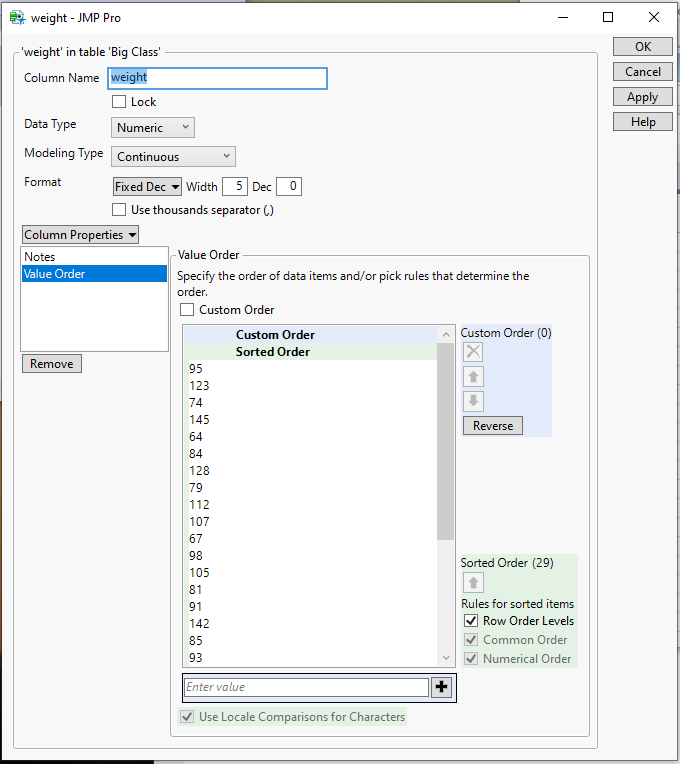
- I took the Big Class sample data table and set the Value Order to Row Order Levels
- I then ran this little script
names default to here(1); dt=current data table(); order = dt:weight << get property("value order") - It showed in the log file the structure of the Value Order column property that needs to be used
{Row Order Levels( 1 )} - This shows that to have set the Row Order Levels for the Weight column it would be
dt:weight << set property( "Value Order", {Row Order Levels( 1 )};
- Mark as New
- Bookmark
- Subscribe
- Mute
- Subscribe to RSS Feed
- Get Direct Link
- Report Inappropriate Content
Re: How do I KEEP the order of variables in a data set when graphing?
Recommended Articles
- © 2026 JMP Statistical Discovery LLC. All Rights Reserved.
- Terms of Use
- Privacy Statement
- Contact Us