Turn on suggestions
Auto-suggest helps you quickly narrow down your search results by suggesting possible matches as you type.
- JMP Statement Regarding Critical PHP Remote Code Execution Vulnerabilities (CVE-2026-109618, CVE-2026-109619)
- Don’t miss your chance to experience Discovery Summit Europe at our best available rate! Early bird registration through 31 Oct.
- Graph Builder Toolbar streamlines interactive graphing. Creates shortcuts on Report and GraphBuilder Helpers toolbars. Download and install the extension.
Options
- Subscribe to RSS Feed
- Mark Topic as New
- Mark Topic as Read
- Float this Topic for Current User
- Bookmark
- Subscribe
- Mute
- Printer Friendly Page
Discussions
Solve problems, and share tips and tricks with other JMP users.- User Community
- :
- Discussions
- :
- Re: How can display the specified label on a 3D scatter plot?

Level IX
- Mark as New
- Bookmark
- Subscribe
- Mute
- Subscribe to RSS Feed
- Get Direct Link
- Report Inappropriate Content
How can display the specified label on a 3D scatter plot?
Created:
Feb 27, 2024 03:10 AM
| Last Modified: Feb 27, 2024 12:12 AM
(2733 views)
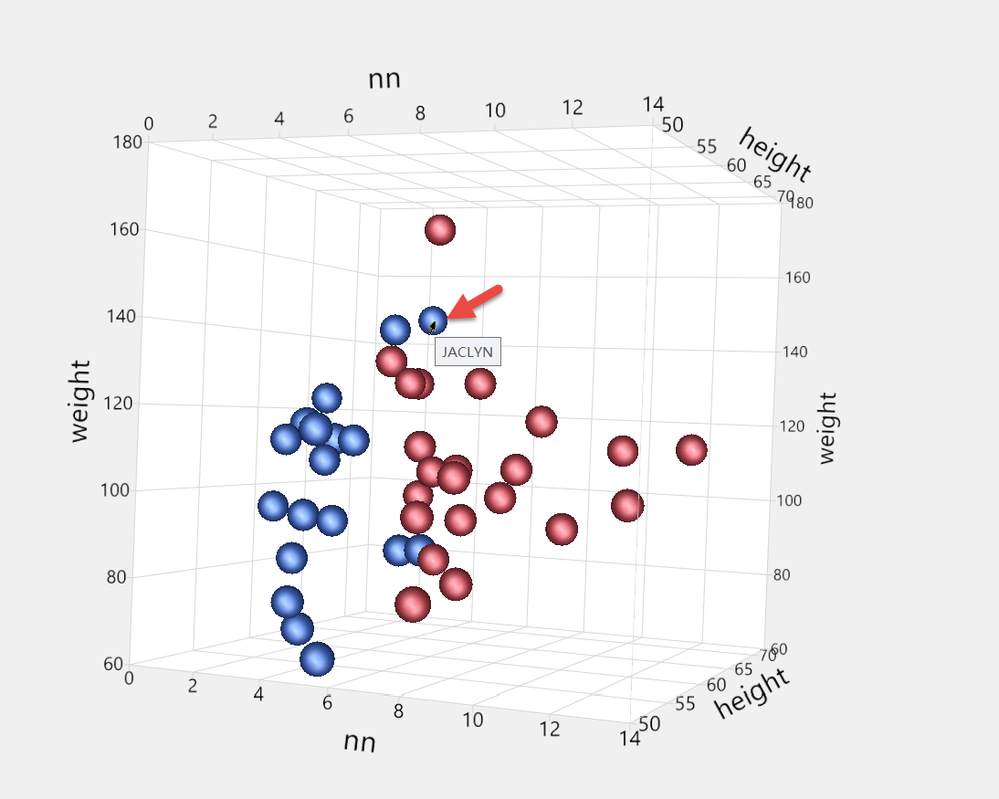
For example, generate the following 3D graph in Big Class.jmp. How do you make each point display its own age label?
dt = Open( "$SAMPLE_DATA/Big Class.jmp" );
dt << Sort( By( age ), Order( Ascending ), replace table );
ca = "nn";
New Column( ca );
Column( ca ) << Formula(
	If( Row() == 1 | age != Lag( age, 1 ),
		r = Row();
		1;
	,
		Row() - r + 1
	)
);
dt << run formulas;
Column( ca ) << deleteFormula;
p1 = dt << Scatterplot 3D(
	Y( :height, :weight, :nn ),
	Weight( :age ),
	Coloring( :sex ),
	Sized Points( 1 ),
	Legend( 9 ),
	Frame3D(
		Set Graph Size( 1066, 741 ),
		Legend( 1 ),
		Set Grab Handles( 0 ),
		Set Rotation( 5.79529088089731, 66.3611426483183, -5.39187559662059 ),
		Set Marker Quality( 1 )
	)
);
Thanks!
3 REPLIES 3


Super User
- Mark as New
- Bookmark
- Subscribe
- Mute
- Subscribe to RSS Feed
- Get Direct Link
- Report Inappropriate Content
Re: How can display the specified label on a 3D scatter plot?
Remove Label column property from name, add label property to age, add label row state to all rows and select those rows
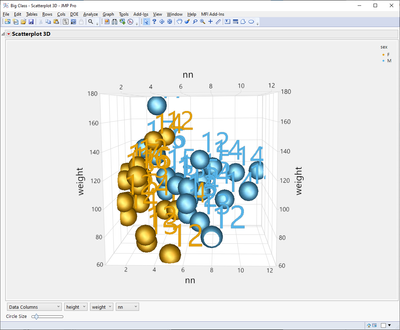
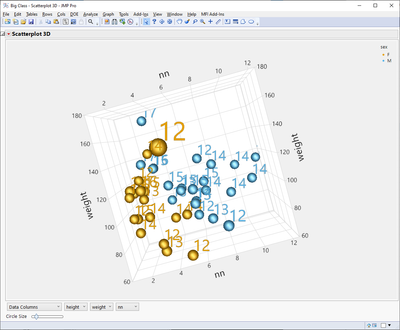
you could also select something from 3d scatterplot to make them appear
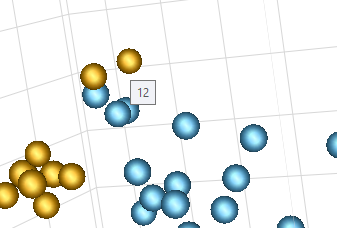
If you just want to see those on hover over, skip row states
-Jarmo
Level IX
- Mark as New
- Bookmark
- Subscribe
- Mute
- Subscribe to RSS Feed
- Get Direct Link
- Report Inappropriate Content
Re: How can display the specified label on a 3D scatter plot?
How to adjust the circle size in 3D Scatterplot using JSL?There is no recording in the recorded source code.
Thanks!

Super User
- Mark as New
- Bookmark
- Subscribe
- Mute
- Subscribe to RSS Feed
- Get Direct Link
- Report Inappropriate Content
Re: How can display the specified label on a 3D scatter plot?
If nothing else, you can get the reference to the slider box and use <<Set
Names Default To Here(1);
dt = Open("$SAMPLE_DATA/Iris.jmp");
obj = dt << Scatterplot 3D(
	Y(:Sepal length, :Sepal width, :Petal length, :Petal width)
);
wait(1);
Report(obj)[SliderBox(1)] << Set(0.01);
but there is also Frame3D(Set Marker Scale)
Names Default To Here(1);
dt = Open("$SAMPLE_DATA/Iris.jmp");
obj = Scatterplot 3D(
	Y(:Sepal length, :Sepal width, :Petal length, :Petal width)
);
wait(1);
obj << Frame3D(Set Marker Scale(10));
-Jarmo
Recommended Articles
- © 2026 JMP Statistical Discovery LLC. All Rights Reserved.
- Terms of Use
- Privacy Statement
- Contact Us