Turn on suggestions
Auto-suggest helps you quickly narrow down your search results by suggesting possible matches as you type.
- Discovery Summit 2026: Early User Edition - September 23-24.Register. It's free.
- Graph Builder Toolbar streamlines interactive graphing. Creates shortcuts on Report and GraphBuilder Helpers toolbars. Download and install the extension.
Options
- Subscribe to RSS Feed
- Mark Topic as New
- Mark Topic as Read
- Float this Topic for Current User
- Bookmark
- Subscribe
- Mute
- Printer Friendly Page
Discussions
Solve problems, and share tips and tricks with other JMP users.- User Community
- :
- Discussions
- :
- Re: How can I use a column formula to return the value of a specific row in anot...

Level III
- Mark as New
- Bookmark
- Subscribe
- Mute
- Subscribe to RSS Feed
- Get Direct Link
- Report Inappropriate Content
How can I use a column formula to return the value of a specific row in another column?
Dec 4, 2019 05:56 PM
(4631 views)
Here is an example data table with the 4th column "Desired Formula Column" showing the outcome I am trying to get.
| Group | Sample Number | Data Value | Desired Formula Column |
| A | 1 | 35 | 35 |
| A | 2 | 2 | 35 |
| A | 3 | 1 | 35 |
| B | 1 | 22 | 22 |
| B | 2 | 4 | 22 |
| B | 3 | 2 | 22 |
| C | 1 | 40 | 40 |
| C | 2 | 2 | 40 |
| C | 3 | 3 | 40 |
I am looking for a column formula that will enter the data value for sample 1 for each group.
Any help appreciated!
1 ACCEPTED SOLUTION
Accepted Solutions


Super User
Solution
- Mark as New
- Bookmark
- Subscribe
- Mute
- Subscribe to RSS Feed
- Get Direct Link
- Report Inappropriate Content
Re: How can I use a column formula to return the value of a specific row in another column?
Created:
Dec 4, 2019 06:20 PM
| Last Modified: Dec 5, 2019 6:05 AM
(4627 views)
| Posted in reply to message from user8421 12-04-2019
Hi,
Here is a simple formula that I use all the time:
If( Row() == 1,
	:Data Value,
	If( Lag( :Group, 1 ) != :Group,
		:Data Value,
		Lag( :Desired Formula Column, 1 )
	)
)
Thierry R. Sornasse
2 REPLIES 2
Super User
Solution
- Mark as New
- Bookmark
- Subscribe
- Mute
- Subscribe to RSS Feed
- Get Direct Link
- Report Inappropriate Content
Re: How can I use a column formula to return the value of a specific row in another column?
Created:
Dec 4, 2019 06:20 PM
| Last Modified: Dec 5, 2019 6:05 AM
(4628 views)
| Posted in reply to message from user8421 12-04-2019
Hi,
Here is a simple formula that I use all the time:
If( Row() == 1,
	:Data Value,
	If( Lag( :Group, 1 ) != :Group,
		:Data Value,
		Lag( :Desired Formula Column, 1 )
	)
)
Thierry R. Sornasse


Super User (Alumni)
- Mark as New
- Bookmark
- Subscribe
- Mute
- Subscribe to RSS Feed
- Get Direct Link
- Report Inappropriate Content
Re: How can I use a column formula to return the value of a specific row in another column?
Created:
Dec 4, 2019 06:25 PM
| Last Modified: Dec 4, 2019 3:26 PM
(4626 views)
| Posted in reply to message from user8421 12-04-2019
Hi @user8421
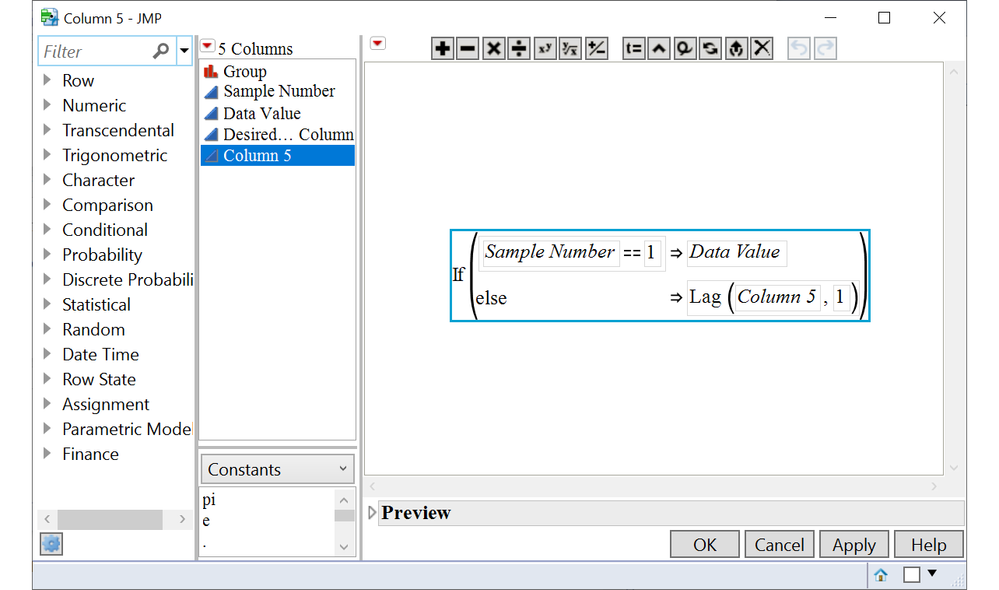
this is a fun question try adding a column to the table with this formula.
If( :Sample Number == 1,
	:Data Value,
	Lag( :Column 5, 1 )
)
this is not robust but if you do not change row order you should be fine. otherwise just delete the formula once you have the numbers where you want them.
Recommended Articles
- © 2026 JMP Statistical Discovery LLC. All Rights Reserved.
- Terms of Use
- Privacy Statement
- Contact Us