- JMP will suspend normal business operations for our Winter Holiday beginning on Wednesday, Dec. 24, 2025, at 5:00 p.m. ET (2:00 p.m. ET for JMP Accounts Receivable).
Regular business hours will resume at 9:00 a.m. EST on Friday, Jan. 2, 2026. - We’re retiring the File Exchange at the end of this year. The JMP Marketplace is now your destination for add-ins and extensions.
- Subscribe to RSS Feed
- Mark Topic as New
- Mark Topic as Read
- Float this Topic for Current User
- Bookmark
- Subscribe
- Mute
- Printer Friendly Page
Discussions
Solve problems, and share tips and tricks with other JMP users.- JMP User Community
- :
- Discussions
- :
- Graph line of fit for all values and ellipse by group

- Mark as New
- Bookmark
- Subscribe
- Mute
- Subscribe to RSS Feed
- Get Direct Link
- Report Inappropriate Content
Graph line of fit for all values and ellipse by group
I'm trying to figure out if it's possible to create a graph in JMP which draws a Line of Fit relative to all points in the graph along with 95% ellipse curves over individual groups.
For example if this is my data:
| X Value | Y Value | Group |
| 3 | 3 | A |
| 2 | 6 | A |
| 4 | 2 | A |
| 1 | 6 | A |
| 1 | 3 | B |
| 2 | 2 | B |
| 3 | 2 | B |
| 4 | 1 | B |
If I do Graph Builder - X Value to X - Y Value to Y - Group to Color - Click Line of Fit. I want to keep the color for each group and the regression line fit based on points from both groups.
Then if I do this in another Graph Builder - X Value to X - Y Value to Y - Group to Overlay - Click Ellipse. I want to keep the separate ellipses over each group without removing the regression line or color from above.
I've tried various methods (copying Frame Contents, scripts, etc) for accomplishing this without any luck.
Accepted Solutions


- Mark as New
- Bookmark
- Subscribe
- Mute
- Subscribe to RSS Feed
- Get Direct Link
- Report Inappropriate Content
Re: Graph line of fit for all values and ellipse by group
Maybe try this without Graph Builder.
Use Fit Y by X. Put your X and Y values in the proper roles.
In the resulting graph, click the red triangle and choose Fit Line.
Now go back to the red popup and choose Group By... and specify your Group column.
One more trip to the red popup and choose Density Ellipse > 0.95.
To make things prettier you will likely want to right-click the graph and add a Row Legend with the Group column to establish the marker colors.
You will also want to click red popups associated with each density ellipse to shade them, if you like the shading.
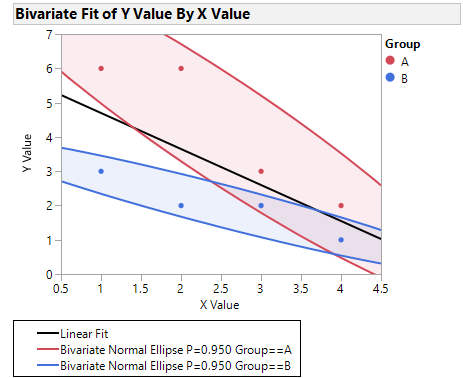
I've included my result for your sample data.
- Mark as New
- Bookmark
- Subscribe
- Mute
- Subscribe to RSS Feed
- Get Direct Link
- Report Inappropriate Content
Re: Graph line of fit for all values and ellipse by group
Maybe try this without Graph Builder.
Use Fit Y by X. Put your X and Y values in the proper roles.
In the resulting graph, click the red triangle and choose Fit Line.
Now go back to the red popup and choose Group By... and specify your Group column.
One more trip to the red popup and choose Density Ellipse > 0.95.
To make things prettier you will likely want to right-click the graph and add a Row Legend with the Group column to establish the marker colors.
You will also want to click red popups associated with each density ellipse to shade them, if you like the shading.
I've included my result for your sample data.


- Mark as New
- Bookmark
- Subscribe
- Mute
- Subscribe to RSS Feed
- Get Direct Link
- Report Inappropriate Content
Re: Graph line of fit for all values and ellipse by group
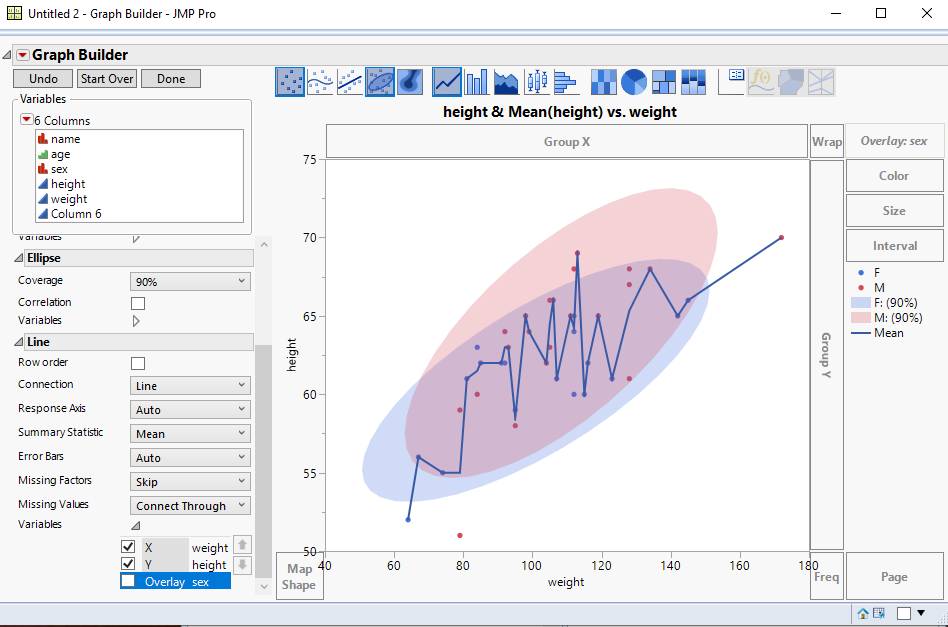
Is this what you want......overall line, but separate ellipses? If so, just specify under the variables for Line, to not Overlay
Recommended Articles
- © 2026 JMP Statistical Discovery LLC. All Rights Reserved.
- Terms of Use
- Privacy Statement
- Contact Us