cancel
Showing results for 
Show  only  | Search instead for 
Did you mean: 
  • JMP will suspend normal business operations for our Winter Holiday beginning on Wednesday, Dec. 24, 2025, at 5:00 p.m. ET (2:00 p.m. ET for JMP Accounts Receivable).
    Regular business hours will resume at 9:00 a.m. EST on Friday, Jan. 2, 2026.
  • We’re retiring the File Exchange at the end of this year. The JMP Marketplace is now your destination for add-ins and extensions.

Discussions

Solve problems, and share tips and tricks with other JMP users.
Choose Language Hide Translation Bar
PhamBao
Level III

Graph changes when switching to JMP14

Dear all users,
I just install JMP14 and experience a slight difference compared to JMP12

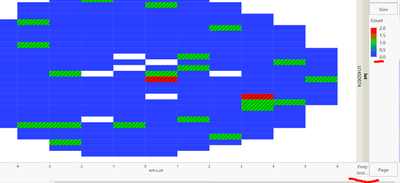
For example,  the image below is from JMP12
PhamBao_2-1636547385750.png


When I use JM14 and drag the parameter in Freg, all the cell with 0 is transparent . This means that the graph only illustrates number 1 and 2. 
Do you know how to make the graph to display number 0 as JMP 12 did.

Sincerely

1 REPLY 1
XanGregg
Staff

Re: Graph changes when switching to JMP14

I suspect Graph Builder was aligning with stat platforms where freq==0 values are ignored. You should be able to get the old view by putting the variable into the color role instead of the freq role,

Recommended Articles