- Don’t miss your chance to experience Discovery Summit Europe at our best available rate! Early bird registration through 31 Oct.
- Graph Builder Toolbar streamlines interactive graphing. Creates shortcuts on Report and GraphBuilder Helpers toolbars. Download and install the extension.
- Subscribe to RSS Feed
- Mark Topic as New
- Mark Topic as Read
- Float this Topic for Current User
- Bookmark
- Subscribe
- Mute
- Printer Friendly Page
Discussions
Solve problems, and share tips and tricks with other JMP users.- User Community
- :
- Discussions
- :
- Graph Builder Page Option Horizontal instead of Vertical

- Mark as New
- Bookmark
- Subscribe
- Mute
- Subscribe to RSS Feed
- Get Direct Link
- Report Inappropriate Content
Graph Builder Page Option Horizontal instead of Vertical
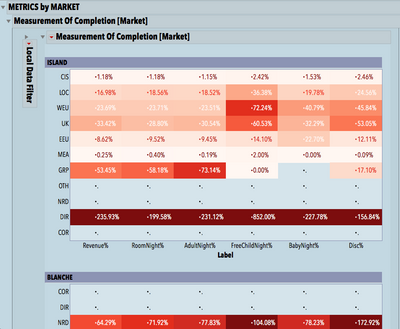
Is there a way to display Graph Builder Page Output horizontal instead of vertical? Or anything like "arrange in rows" option?
Thank you all in advance!
Graph Builder(
Size( 748, 933 ),
Show Control Panel( 0 ),
Y Group Edge( "Left" ),
Back Color( {183, 207, 219} ),
Title Fill Color( {178, 34, 36} ),
Title Frame Color( {178, 34, 36} ),
Level Fill Color( {202, 129, 130} ),
Level Frame Color( {178, 34, 36} ),
Level Underline( 1 ),
Page Level Fill Color( {122, 129, 165} ),
Page Level Frame Color( "Medium Light Gray" ),
Page Level Underline( 1 ),
Variables(
X( :Label ),
Y( :Contract ),
Page( :Resort, Show Title( 0 ) ),
Color( :Data )
),
Elements( Heatmap( X, Y, Legend( 41 ) ), Points( X, Y, Legend( 40 ) ) ),
Local Data Filter(
Mode( Show( 0 ) ),
Add Filter(
columns( :Resort ),
Where( :Resort == {"ISLAND", "BLANCHE"} ),
Display( :Resort, Size( 112, 40 ), Check Box Display )
)
),
SendToReport(
Dispatch(
{},
"Graph Builder",
OutlineBox,
{Set Title( "Measurement Of Completion [Market]" )}
),
Dispatch(
{},
"Contract",
ScaleBox,
{Reversed Scale, Label Row( Tick Mark Style( "Long Divider" ) )}
),
Dispatch( {}, "Contract", ScaleBox( 2 ), {Reversed Scale} ),
Dispatch(
{},
"400",
ScaleBox,
{Legend Model(
41,
Properties(
0,
{gradient(
{Color Theme( "White to Red" ), Scale Values( [0 0.5 1] ),
Width( 9 )}
)}
)
), Legend Model(
40,
Properties(
0,
{gradient(
{Color Theme( "White to Red" ),
Scale Values( [0 0.3 0.007] ), Width( 9 ),
Reverse Gradient( 1 )}
)}
)
)}
),
Dispatch( {}, "graph title", TextEditBox, {Set Text( "" )} ),
Dispatch( {}, "400", LegendBox, {Position( {0, 1, 2} )} ),
Dispatch( {}, "Y title", TextEditBox, {Set Text( "" )} )
)
);


- Mark as New
- Bookmark
- Subscribe
- Mute
- Subscribe to RSS Feed
- Get Direct Link
- Report Inappropriate Content
Re: Graph Builder Page Option Horizontal instead of Vertical
There's no horizontal layout option for the Page role. If it's a question of graph size, you can turn off Fit to Window and use a Group X variable for horizontal layout.

- Mark as New
- Bookmark
- Subscribe
- Mute
- Subscribe to RSS Feed
- Get Direct Link
- Report Inappropriate Content
Re: Graph Builder Page Option Horizontal instead of Vertical
it's available now :)
Graph Builder - align 'pages' next to each other
Recommended Articles
- © 2026 JMP Statistical Discovery LLC. All Rights Reserved.
- Terms of Use
- Privacy Statement
- Contact Us