- Don’t miss your chance to experience Discovery Summit Europe at our best available rate! Early bird registration through 31 Oct.
- Graph Builder Toolbar streamlines interactive graphing. Creates shortcuts on Report and GraphBuilder Helpers toolbars. Download and install the extension.
- JMP will suspend normal business operations for our Rest and Recharge Day on Friday, October 2, 2026.
Regular business hours will resume on Monday, October 5, 2026.
- Subscribe to RSS Feed
- Mark Topic as New
- Mark Topic as Read
- Float this Topic for Current User
- Bookmark
- Subscribe
- Mute
- Printer Friendly Page
Discussions
Solve problems, and share tips and tricks with other JMP users.- User Community
- :
- Discussions
- :
- Re: Graph Builder - Change the Drawing Order when using a Group Y variable

- Mark as New
- Bookmark
- Subscribe
- Mute
- Subscribe to RSS Feed
- Get Direct Link
- Report Inappropriate Content
Graph Builder - Change the Drawing Order when using a Group Y variable
Hello everybody,
I would like to know how we can uniformize the customization of graphical elements when we use a Grouping column.
Let's take an exemple using the Big Class.jmp table.
I choose "height" as Y variable and "age" as Group Y variable. I display the histogram in addition to the points.
After that, I change the order of elements using the Customize menu so that points are now over histogram.
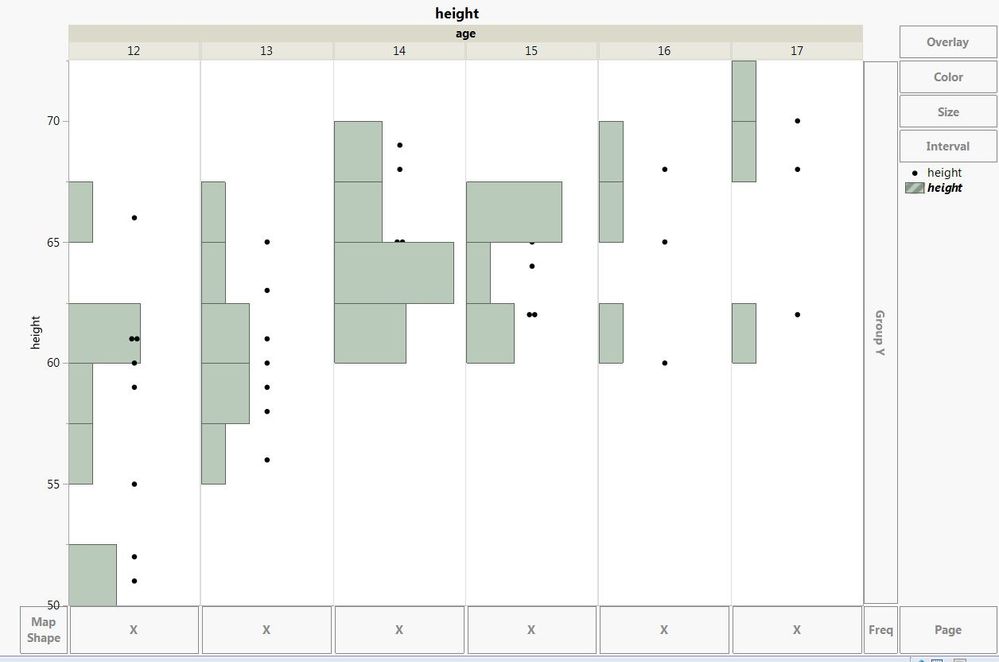
The modification only impacts the first graph however I would like to have the same think for all the levels of "age" without redoing six times the same action. I tried to copy paste Cuztomisations but it didn't work.
Any idea of how we could do that ?
Thanks in advance for your help.


 Community Manager
- Mark as New
- Bookmark
- Subscribe
- Mute
- Subscribe to RSS Feed
- Get Direct Link
- Report Inappropriate Content
Re: Graph Builder - Change the Drawing Order when using a Group Y variable
Unfortunately, I don't see any way to affect that for all the groups at the same time.
I'll make a note and we'll see if we can address this in a future release.
Community Manager
- Mark as New
- Bookmark
- Subscribe
- Mute
- Subscribe to RSS Feed
- Get Direct Link
- Report Inappropriate Content
Re: Graph Builder - Change the Drawing Order when using a Group Y variable
Unfortunately, I don't see any way to affect that for all the groups at the same time.
I'll make a note and we'll see if we can address this in a future release.


- Mark as New
- Bookmark
- Subscribe
- Mute
- Subscribe to RSS Feed
- Get Direct Link
- Report Inappropriate Content
Re: Graph Builder - Change the Drawing Order when using a Group Y variable
When using GraphBuider (GB), either from the user interface (UI) or using JSL (scripting), order matters.
- Open Big Class.jmp
- Start GraphBuilder
- Drag height to the Y axis and age to the Group X area
- Right click on any frame and select Points > Change To > Histograms
- Right click again, select Add > Points
Now Points are last specified GB element and are on top. If you save the script, note the elements order
Graph Builder(
	Size( 528, 454 ),
	Show Control Panel( 0 ),
	Variables( Y( :height ), Group X( :age ) ),
	Elements( Histogram( Y, Legend( 4 ) ), Points( Y, Legend( 5 ) ) )
)
Changing order for all Frame Box would be a nice future option, but until then, keep the elements order in mind when using GB.
- Mark as New
- Bookmark
- Subscribe
- Mute
- Subscribe to RSS Feed
- Get Direct Link
- Report Inappropriate Content
Re: Graph Builder - Change the Drawing Order when using a Group Y variable
Thanks both of you for your answer.
Indeed it would be a great feature for a future release! :)
Recommended Articles
- © 2026 JMP Statistical Discovery LLC. All Rights Reserved.
- Terms of Use
- Privacy Statement
- Contact Us