Turn on suggestions
Auto-suggest helps you quickly narrow down your search results by suggesting possible matches as you type.
- JMP will suspend normal business operations for our Winter Holiday beginning on Wednesday, Dec. 24, 2025, at 5:00 p.m. ET (2:00 p.m. ET for JMP Accounts Receivable).
Regular business hours will resume at 9:00 a.m. EST on Friday, Jan. 2, 2026. - We’re retiring the File Exchange at the end of this year. The JMP Marketplace is now your destination for add-ins and extensions.
Options
- Subscribe to RSS Feed
- Mark Topic as New
- Mark Topic as Read
- Float this Topic for Current User
- Bookmark
- Subscribe
- Mute
- Printer Friendly Page
Discussions
Solve problems, and share tips and tricks with other JMP users.- JMP User Community
- :
- Discussions
- :
- Graph Builder - Box plot with groups of columns ?

Level I
- Mark as New
- Bookmark
- Subscribe
- Mute
- Subscribe to RSS Feed
- Get Direct Link
- Report Inappropriate Content
Graph Builder - Box plot with groups of columns ?
Created:
Aug 13, 2020 09:59 PM
| Last Modified: Jun 11, 2023 4:04 AM
(3242 views)
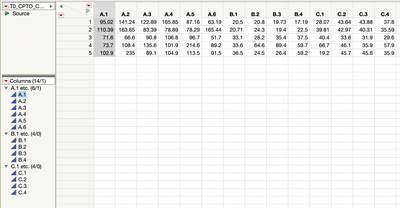
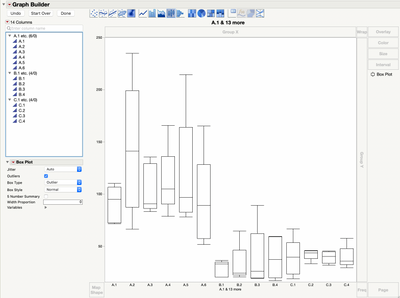
I have a small dataset with multiple columns.
Some of these columns are grouped. In the graph builder, can I create single box plot with data per-group, instead of individual columns ?
2 REPLIES 2


Super User
- Mark as New
- Bookmark
- Subscribe
- Mute
- Subscribe to RSS Feed
- Get Direct Link
- Report Inappropriate Content
Re: Graph Builder - Box plot with groups of columns ?
I might be misinterpreting your question, and in the future if you attach the JMP data table it might be easier to show you, but I you can stack the A, B and C columns so you have now three columns of data with A, B and C labels.
"All models are wrong, some are useful" G.E.P. Box

Super User
- Mark as New
- Bookmark
- Subscribe
- Mute
- Subscribe to RSS Feed
- Get Direct Link
- Report Inappropriate Content
Re: Graph Builder - Box plot with groups of columns ?
The way to do this is to simply
- Stack the columns
- Make a new column that groups the data
- Run the Graph Builder with the Grouping column as the X axis
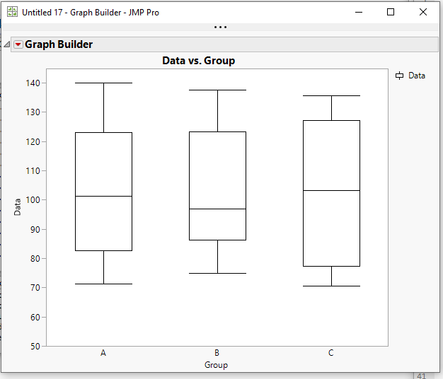
Below is an example using JSL, however each step in the script can be easily done interactively. See the script below
names default to here(1);

// Create a sample data table for illustration
dt=new table("TO_CPTO_C",
	add rows(5),
	new column("A.1", formula(randomuniform(70,140)),format("fixed dec",6,2)),
	new column("A.2", formula(randomuniform(70,140)),format("fixed dec",6,2)),
	new column("A.3", formula(randomuniform(70,140)),format("fixed dec",6,2)),
	new column("A.4", formula(randomuniform(70,140)),format("fixed dec",6,2)),
	new column("A.5", formula(randomuniform(70,140)),format("fixed dec",6,2)),
	new column("A.6", formula(randomuniform(70,140)),format("fixed dec",6,2)),
	new column("B.1", formula(randomuniform(70,140)),format("fixed dec",6,2)),
	new column("B.2", formula(randomuniform(70,140)),format("fixed dec",6,2)),
	new column("B.3", formula(randomuniform(70,140)),format("fixed dec",6,2)),
	new column("B.4", formula(randomuniform(70,140)),format("fixed dec",6,2)),
	new column("C.1", formula(randomuniform(70,140)),format("fixed dec",6,2)),
	new column("C.2", formula(randomuniform(70,140)),format("fixed dec",6,2)),
	new column("C.3", formula(randomuniform(70,140)),format("fixed dec",6,2)),
	new column("C.4", formula(randomuniform(70,140)),format("fixed dec",6,2))
);

// Pause so one can see initial data table before moving on
Wait( 5 );

// Stack the columns
// Tables==>Stack
dtStack = dt << Stack(
	columns(
		:A.1,
		:A.2,
		:A.3,
		:A.4,
		:A.5,
		:A.6,
		:B.1,
		:B.2,
		:B.3,
		:B.4,
		:C.1,
		:C.2,
		:C.3,
		:C.4
	),
	Source Label Column( "Label" ),
	Stacked Data Column( "Data" )
);

// Pause so one can see stacked data table before moving on
Wait( 5 );

// Create a grouping column
dtStack << New Column("Group", character, formula( left(:Label,1 )));

// Pause so one can see new column before moving on
Wait( 5 );

// Create the Graph, using the Group column as the X axis and Data as the Y axis
dtStack << Graph Builder(
	Size( 534, 450 ),
	Show Control Panel( 0 ),
	Variables( X( :Group ), Y( :Data ) ),
	Elements( Box Plot( X, Y, Legend( 3 ) ) )
);
Jim
Recommended Articles
- © 2026 JMP Statistical Discovery LLC. All Rights Reserved.
- Terms of Use
- Privacy Statement
- Contact Us