- Don’t miss your chance to experience Discovery Summit Europe at our best available rate! Early bird registration through 31 Oct.
- Graph Builder Toolbar streamlines interactive graphing. Creates shortcuts on Report and GraphBuilder Helpers toolbars. Download and install the extension.
- Subscribe to RSS Feed
- Mark Topic as New
- Mark Topic as Read
- Float this Topic for Current User
- Bookmark
- Subscribe
- Mute
- Printer Friendly Page
Discussions
Solve problems, and share tips and tricks with other JMP users.- User Community
- :
- Discussions
- :
- Re: Global Data Filter not working - guidance appreciated

- Mark as New
- Bookmark
- Subscribe
- Mute
- Subscribe to RSS Feed
- Get Direct Link
- Report Inappropriate Content
Global Data Filter not working - guidance appreciated
So here's my challenge. Let's say a product is tested for levels of Fat, Protein, Moisture, etc. before selling to a customer. All product is deemed Premium. We want to know what % of our product meets the highest customer specifications, i.e. excellent Protein and excellent Fat and excellent Moisture, etc. Such product could be deemed Super Premium. We are predominantly interested in knowing the % Premium v %Super Premium that we had last year for certain products. Process Capability is useful, but it is standalone for each parameter. Also, we want to play with the data and understand our level of flexibility (or not), and consider 'what-if' scenarios..
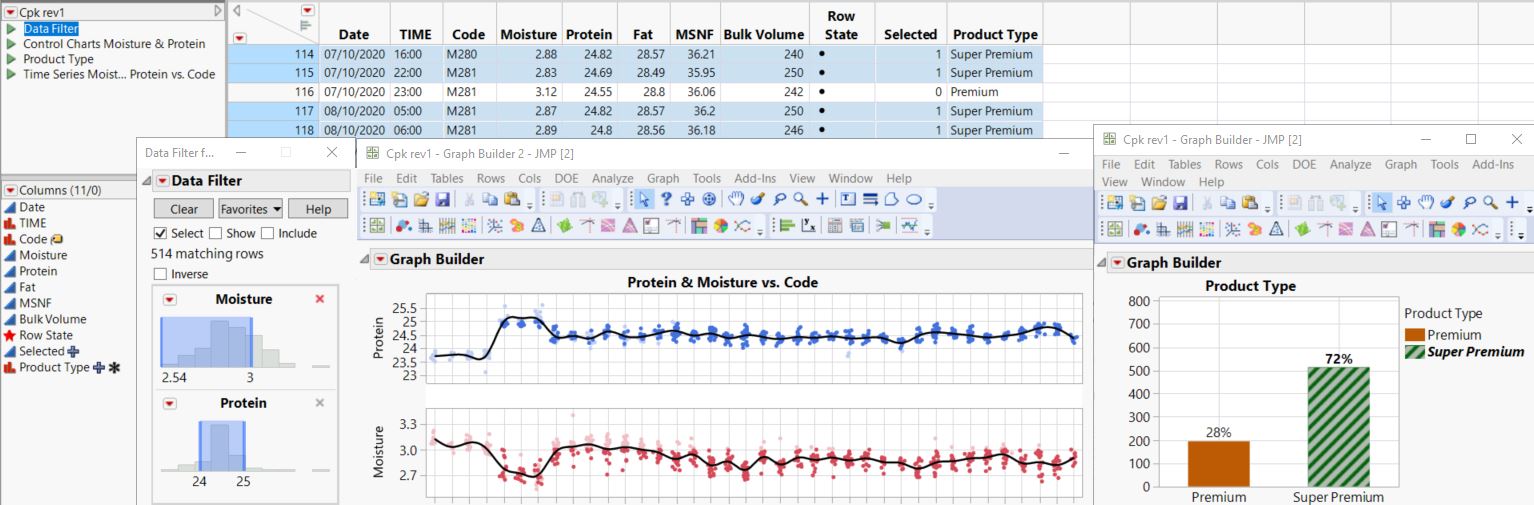
In messing about for a 'proof of concept' I eventually figured out how to create a dynamic bar chart in Graph Builder that leverages off of rows that are selected via Global Data Filter. As per screenshot below, when I select a range for Moisture and a range for Protein in the filter, the associated cells in column 'Product Type' are automatically populated with 'Super Premium' and a simple bar chart quantifies the percentage of same.
I was happy with my progress until I hit a wall by not being able to put the Global Data filter into a Dashboard. Am I doing something wrong, or am I right in saying that Dashboard only takes a Local Data Filter? If so, any workarounds (or alternative ideas)? Any advice or suggestions would be more than appreciated. I'm not a coder, so if thinking along those lines I'd need the Fisher Price version! :)
Accepted Solutions


 Community Manager
- Mark as New
- Bookmark
- Subscribe
- Mute
- Subscribe to RSS Feed
- Get Direct Link
- Report Inappropriate Content
Re: Global Data Filter not working - guidance appreciated
Hi @kom,
Okay, I've got something for you. Here's what it can look like:
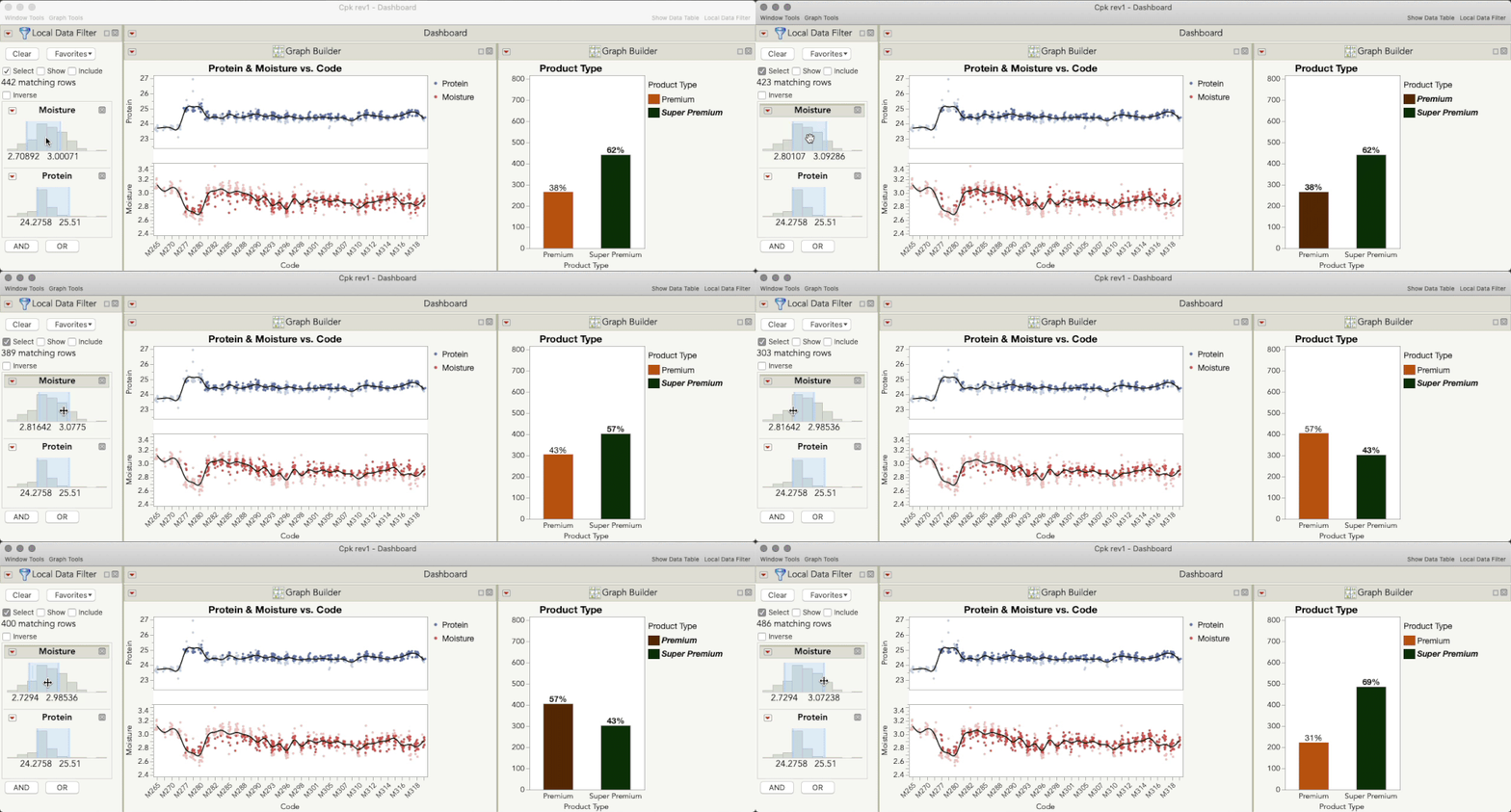
It might say "Local Data Filter," but that's actually a Global Data Filter in that dashboard, and as such, will update row states (selections) when it's modified so that your selection formula operates. How did I do this? One tiny change in the script that JMP generates. But first, I built the dashboard as that video showed:
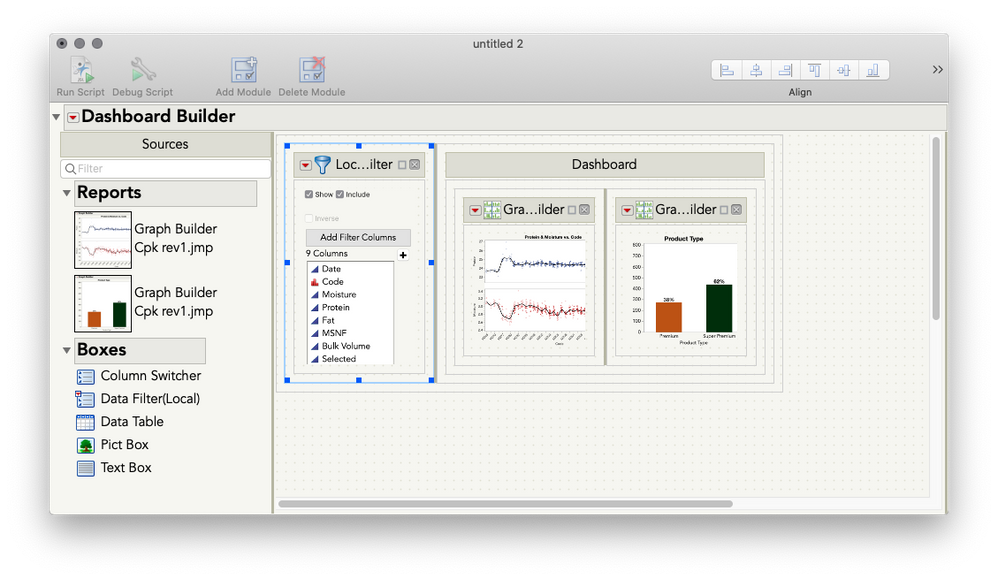
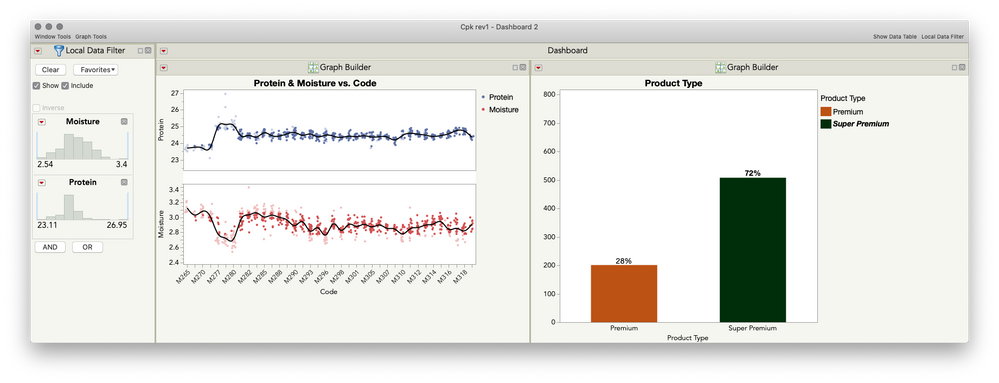
Next, I ran that dashboard to make your almost-there version with a local data filter:
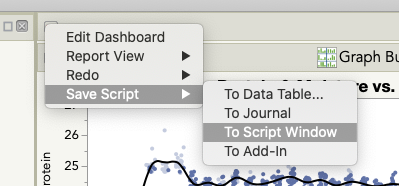
Next, I saved the script of this dashboard to a script window, by using the Red Triangle for the dashboard:
On line 47, you will see the filter being defined:
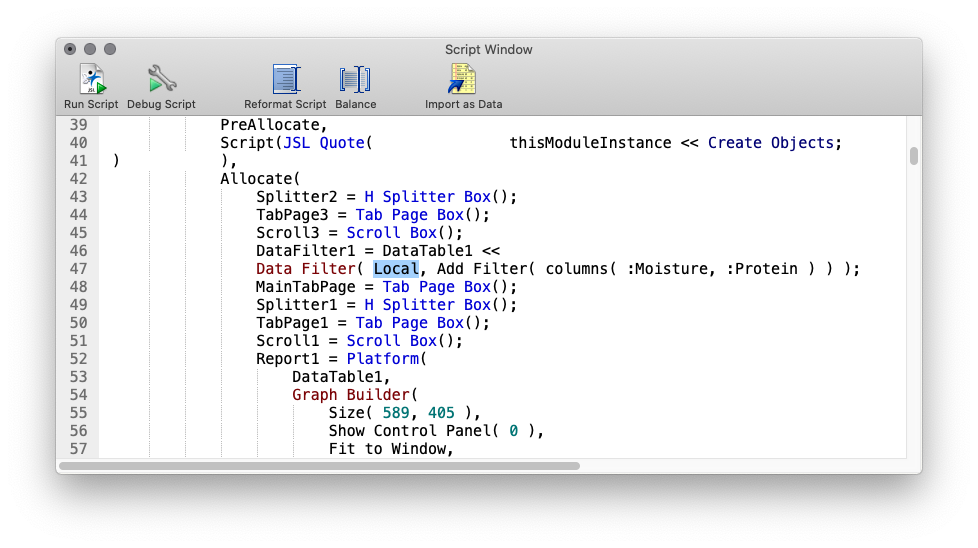
Change Local to Global, and you're done!

I've attached your table here with the full script saved to the table. *Almost* no coding required :)
Community Manager
- Mark as New
- Bookmark
- Subscribe
- Mute
- Subscribe to RSS Feed
- Get Direct Link
- Report Inappropriate Content
Re: Global Data Filter not working - guidance appreciated
Hi @kom,
Yes, there's a straightforward way to add a Data Filter to a dashboard that will affect multiple elements (like what a Global Data Filter does across reports in JMP), and no coding is required! In order to do this, you will build the dashboard using the Dashboard Builder, and then you will drag in a Data Filter to the left side of the dashboard that filters for all the dashboard elements. Here's a short video demonstrating this:
I hope this helps!
- Mark as New
- Bookmark
- Subscribe
- Mute
- Subscribe to RSS Feed
- Get Direct Link
- Report Inappropriate Content
Re: Global Data Filter not working - guidance appreciated
Hi Julian. Thanks for your reply. I only wish it were that simple. I had tried this previously, hence the reason for specifying Global v Local data filter in my query. It doesn't work (as per attached screenshot ) because the LOCAL data filter in Dashboard will simply include or exclude points on the chart for the range of values chosen; it does not 'SELECT' corresponding rows in the data table. As a result, the bar chart will always stay static at 100%.
However, when I use a GLOBAL data filter outside of Dashboard, the filter selects & deselects rows in the dataset. It also keeps ALL data points on the run chart and only 'ghosts' those that are not selected by the filter. Also, for the data ranges selected in the filters, the corresponding rows are 'selected' in the dataset - this makes the bar chart real-time dynamic. I attach the dataset in case I'm not explaining it clearly.
Regards,
Kieran

 Community Manager
- Mark as New
- Bookmark
- Subscribe
- Mute
- Subscribe to RSS Feed
- Get Direct Link
- Report Inappropriate Content
Re: Global Data Filter not working - guidance appreciated
Community Manager
- Mark as New
- Bookmark
- Subscribe
- Mute
- Subscribe to RSS Feed
- Get Direct Link
- Report Inappropriate Content
Re: Global Data Filter not working - guidance appreciated
Hi @kom,
Okay, I've got something for you. Here's what it can look like:
It might say "Local Data Filter," but that's actually a Global Data Filter in that dashboard, and as such, will update row states (selections) when it's modified so that your selection formula operates. How did I do this? One tiny change in the script that JMP generates. But first, I built the dashboard as that video showed:
Next, I ran that dashboard to make your almost-there version with a local data filter:
Next, I saved the script of this dashboard to a script window, by using the Red Triangle for the dashboard:
On line 47, you will see the filter being defined:
Change Local to Global, and you're done!
I've attached your table here with the full script saved to the table. *Almost* no coding required :)
- Mark as New
- Bookmark
- Subscribe
- Mute
- Subscribe to RSS Feed
- Get Direct Link
- Report Inappropriate Content
Re: Global Data Filter not working - guidance appreciated
That is excellent Julian - I'm very grateful that you took the time to figure this one out. As if I hadn't already learned a huge amount about JMP's capabilities from you via your online videos! I also saw your excellent presentation at Discovery in Copenhagen - I'm presenting a paper this year on 10th March (so wish me luck)!
I also appreciate you giving me the Sesame Street explanation - this is so important, especially for anyone new to JMP that is trying to gain confidence; having such guidance in these repositories is gold. I understand that Super Users cannot always know what level to pitch answers at, so here's an idea: if there was a little check box for those making queries to select their experience level (before submitting queries), it may facilitate the responder and avoid unnecessary back & forth?
Now that this 'proof of concept' is working, I must scale it and finesse it into a more polished working model. Many thanks again.
Kieran
Community Manager
- Mark as New
- Bookmark
- Subscribe
- Mute
- Subscribe to RSS Feed
- Get Direct Link
- Report Inappropriate Content
Re: Global Data Filter not working - guidance appreciated
Hi Kieran,
You're so very welcome! I'm so glad this will work for your proof of concept, and I really appreciate all your kind words.
That's a great suggestion to have some kind of "experience level" indication to help guide the kind of responses. I'll make sure the folks who work on the discussion submission part of the community hear it. That said, I hope you recognize that what you've done here is really quite inventive, even if it didn't involve scripting! It's important to remember that we have the most advanced and seasoned jmp users and scripters in the world casually answering questions on this community, so be sure to evaluate your own work accordingly. One person's "Sesame Street" is another person's "Mr. Wizard."
Best of luck in all your preparations for your Discovery presentation!
Recommended Articles
- © 2026 JMP Statistical Discovery LLC. All Rights Reserved.
- Terms of Use
- Privacy Statement
- Contact Us