- Don’t miss your chance to experience Discovery Summit Europe at our best available rate! Early bird registration through 31 Oct.
- Graph Builder Toolbar streamlines interactive graphing. Creates shortcuts on Report and GraphBuilder Helpers toolbars. Download and install the extension.
- Subscribe to RSS Feed
- Mark Topic as New
- Mark Topic as Read
- Float this Topic for Current User
- Bookmark
- Subscribe
- Mute
- Printer Friendly Page
Discussions
Solve problems, and share tips and tricks with other JMP users.- User Community
- :
- Discussions
- :
- Re: Find new spec limits by adjusting the CpK value

- Mark as New
- Bookmark
- Subscribe
- Mute
- Subscribe to RSS Feed
- Get Direct Link
- Report Inappropriate Content
Find new spec limits by adjusting the CpK value
Hi,
I was curious that if JMP has a built in ability to where I could adjust the spec limits to various values (for like 100 parameters in my dataset) and see how it would change their CpK values in my dataset?
If it is not currently available in jmp what would be the best way to do it?
Thanks,
Anchal


- Mark as New
- Bookmark
- Subscribe
- Mute
- Subscribe to RSS Feed
- Get Direct Link
- Report Inappropriate Content
Re: Find new spec limits by adjusting the CpK value
Your idea is going in the opposite direction; it seems to me. You first set specifications based on customer requirements and a determination of where the outcome is unacceptable. There might be different specifications for different customers or applications. Then you establish that your process is in control and finally estimate the process capability. You adjust process factor settings, perhaps based on a model of the process, to achieve the desired mean and long-term variance if the capability index is unacceptable.
- Mark as New
- Bookmark
- Subscribe
- Mute
- Subscribe to RSS Feed
- Get Direct Link
- Report Inappropriate Content
Re: Find new spec limits by adjusting the CpK value
Thanks for replying and explaining. I think I did not do a good job in explaining my question. Please see following
I am measuring various features (or size lengths) on my part and each one of those features have some tolerance limits (upper and lower) to them. When I analyzed process capability of the process that produced several of these parts in the "Process Screening" option of JMP16, then each feature had a unique CpK value. I was curious if JMP could help me go in the reverse direction i.e. if I could tell JMP that I need to hit a certain CpK value (for example 1.33) for each of the part features and as a consequence JMP could tell me what should be the new tolerance limits for each of the part features?
The idea behind this exercise is to go back to the customer with a request to modify the tolerance limits that were set in past.
Hope this explains my original question better.
Appreciate all the help I get in the JMP community.
Thanks,
Anchal

- Mark as New
- Bookmark
- Subscribe
- Mute
- Subscribe to RSS Feed
- Get Direct Link
- Report Inappropriate Content
Re: Find new spec limits by adjusting the CpK value
Have you tried the Interactive capability plot? In the distribution process capability output, look at the red triangle with the name of your variable and capability, and the last option is Interactive Capability Plot. This will allow you to adjust the centering and variability and your spec limits and it will calculate the capability indices and ppm values.

- Mark as New
- Bookmark
- Subscribe
- Mute
- Subscribe to RSS Feed
- Get Direct Link
- Report Inappropriate Content
Re: Find new spec limits by adjusting the CpK value
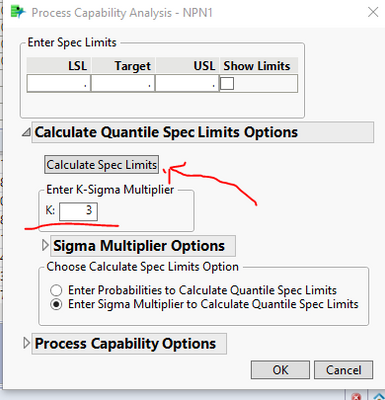
Hey @monu_maverick, I do the exact thing you are talking about. Try this, go into Distribution platform, fit a distribution, then in the distributions red arrow options choose capability analysis. From there change the spec limit fit from probability to K sigma. 3 will equal a ppk of 1 and 4 will equal 1.33. It will then output a spec limit and capability analysis for that K sigma level. If this works for you let me know and I'll post a script that will allow you to do this for multiple columns.
Here is the flow using the Semiconductor sample dataset
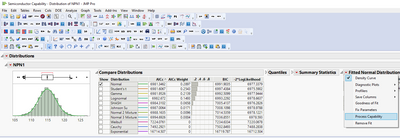
Make sure to press the "calculate spec limits" button before you press okay (note I removed the spec limits that were loaded from the column property)
Here are the suggested spec limits.
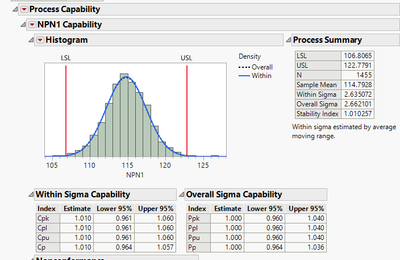
The nice thing about using the "fit best" distribution option is that this method works for normal or non-normal distributions!
Hope this helps
Steve

- Mark as New
- Bookmark
- Subscribe
- Mute
- Subscribe to RSS Feed
- Get Direct Link
- Report Inappropriate Content
Re: Find new spec limits by adjusting the CpK value
Do you have JMP 17 yet? If so, the new Design Space Profiler could be very helpful with this, but from a slightly different direction. Assuming you have a model that includes the features/size lengths, you can visualize what the spec limits need to be for the inputs to achieve a required process output. The profiler has a lot of usability in exploring how the process capability of inputs affects outputs, especially when used with the built-in Monte Carlo simulator (red triangle...Send Limits to Simulator, for example).
Here's a brief video overview of the Design Space Profiler.
Recommended Articles
- © 2026 JMP Statistical Discovery LLC. All Rights Reserved.
- Terms of Use
- Privacy Statement
- Contact Us