- Don’t miss your chance to experience Discovery Summit Europe at our best available rate! Early bird registration through 31 Oct.
- Image to Table JMP extension imports single or batch images as data tables. Useful to extract curves from pictures or convert image data to curve data to use in analyses like Functional Data Explorer. Download and install the extension.
- Subscribe to RSS Feed
- Mark Topic as New
- Mark Topic as Read
- Float this Topic for Current User
- Bookmark
- Subscribe
- Mute
- Printer Friendly Page
Discussions
Solve problems, and share tips and tricks with other JMP users.- User Community
- :
- Discussions
- :
- Filtering and plotting data

- Mark as New
- Bookmark
- Subscribe
- Mute
- Subscribe to RSS Feed
- Get Direct Link
- Report Inappropriate Content
Filtering and plotting data
Hello,
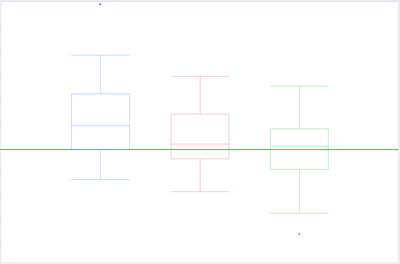
I would like to plot and identify outliers within say three different batches. Each batch contains about 80 values. What would be a good way to plot and highlight the outliers between these 3 batches?
I thought maybe using the Animation feature in the local data filter to walk through the comparison would work, but I have a feeling that there's a better way. Here is an image that I was attempting to use. Those box plots will move up or down around the threshold. The idea was that as the Animation runs I could stop it to check which batch had a high or low outlier. But I wonder if there's a simpler way to show more data at once to capture the outliers between the batches.
Thanks so much for your help!


- Mark as New
- Bookmark
- Subscribe
- Mute
- Subscribe to RSS Feed
- Get Direct Link
- Report Inappropriate Content
Re: Filtering and plotting data
I would first take a look at the Outlier Analysis in
Analysis=>Screening=>Explore Outliers
- Mark as New
- Bookmark
- Subscribe
- Mute
- Subscribe to RSS Feed
- Get Direct Link
- Report Inappropriate Content
Re: Filtering and plotting data
Thank you so much! I've never used that function! I'm looking into that now. Will need to educate m'self a bit more about K Sigma, PCA outliers...etc. But I'm excited to learn if this would help.

- Mark as New
- Bookmark
- Subscribe
- Mute
- Subscribe to RSS Feed
- Get Direct Link
- Report Inappropriate Content
Re: Filtering and plotting data
Also checkout Understanding Outliers blog series by @JerryFish . In some of the episodes (2 and 3) he does the use Explore Outliers which @txnelson already mentioned
Recommended Articles
- © 2026 JMP Statistical Discovery LLC. All Rights Reserved.
- Terms of Use
- Privacy Statement
- Contact Us