- Don’t miss your chance to experience Discovery Summit Europe at our best available rate! Early bird registration through 31 Oct.
- Graph Builder Toolbar streamlines interactive graphing. Creates shortcuts on Report and GraphBuilder Helpers toolbars. Download and install the extension.
- Subscribe to RSS Feed
- Mark Topic as New
- Mark Topic as Read
- Float this Topic for Current User
- Bookmark
- Subscribe
- Mute
- Printer Friendly Page
Discussions
Solve problems, and share tips and tricks with other JMP users.- User Community
- :
- Discussions
- :
- Factor combinations in Graph Builder

- Mark as New
- Bookmark
- Subscribe
- Mute
- Subscribe to RSS Feed
- Get Direct Link
- Report Inappropriate Content
Factor combinations in Graph Builder
Hello everybody,
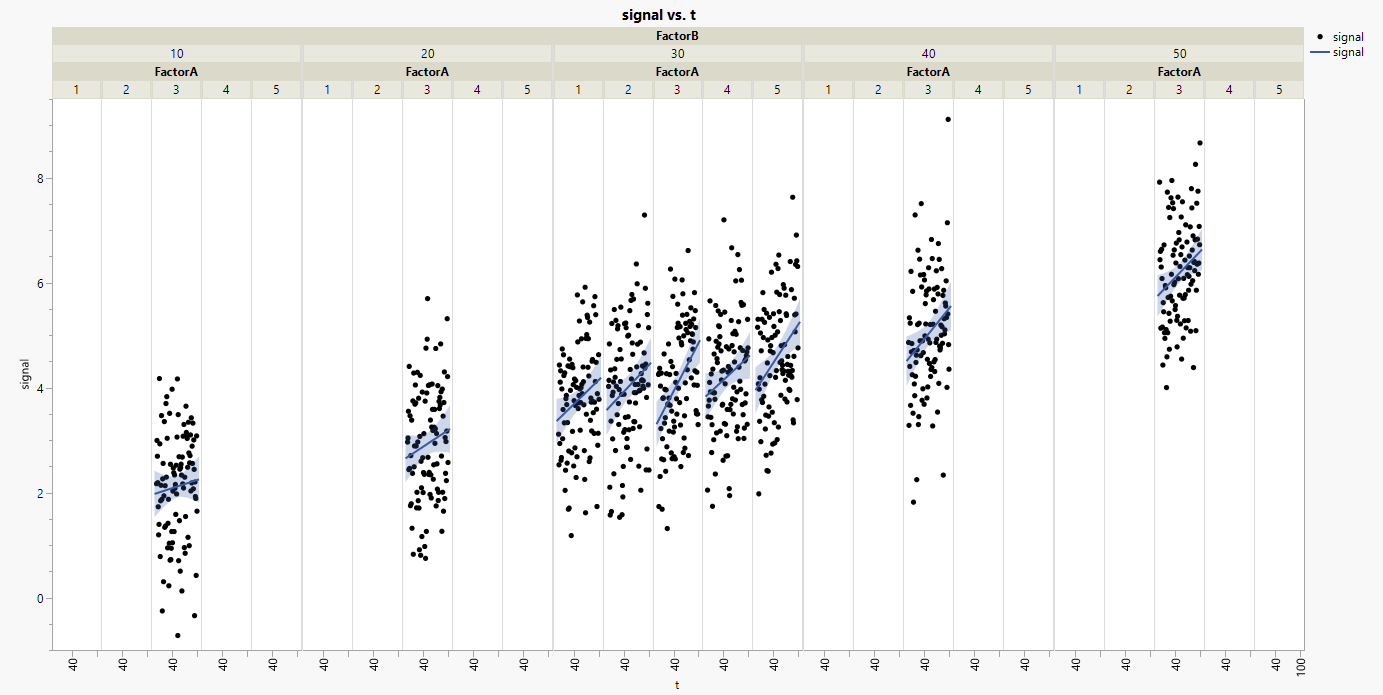
so, I have the following relationship, looking at a timeseries (t,y), which is affected by additional variables A and B, as well as noise. My workflow is now: Design a DoE for variables A and B, measure, visualize, estimate/calculate effects of A and B. For this, we would like to plot and visually assess the data and the "disturbed" timeseries (t,y) depending on the factors.
This question is especially on the visualization of combined factors in GraphBuilder. See especially "plot2.png" produced by R and the corresponding "plot_jmp.png" produced by JMP. Please see how JMP keeps a space for non-existing groups, e.g. (FactorA,FactorB)=(1,10), (2,10), etc. whereas R reduces the plot automatically to the existing groups.
How would I do this the best way in JMP? I don't want to create a new column as a combination from factors A+B...
Example data given by the R-script.
Formula from my example:
Accepted Solutions

- Mark as New
- Bookmark
- Subscribe
- Mute
- Subscribe to RSS Feed
- Get Direct Link
- Report Inappropriate Content
Re: Factor combinations in Graph Builder
a common issue in JMP:
Remove empty subplots in Group X graph
related: X group: restrict the values on the axis to the respective group
A workaround:
In R, there is no nesting of the X Groups.
As you said, a column which combines the 2 levels can be used to generate this design.
you don't have to add it as a column to the data table, a dummy transform column (just inside the plot) is sufficient.
Best: use newline to reproduce the "hierarchy".
"empty white space" was identified as an issue and developers might work on it.
e.g. Help shape the future of JMP: Take this year’s Wish List Prioritization Survey! :

- Mark as New
- Bookmark
- Subscribe
- Mute
- Subscribe to RSS Feed
- Get Direct Link
- Report Inappropriate Content
Re: Factor combinations in Graph Builder



Names Default To Here( 1 );
dt = Open( "$SAMPLE_DATA/Big Class Families.jmp" );
Data Table( "Big Class Families" ) << Select where( :age > 13 & :sex == "F" ) << Exclude;
Graph Builder(
	Transform Column( "Concatenate[age,sex]", Character, Nominal, Formula( :sex || "
" || Char( :age ) ) ),
	Variables(
		X( :height ),
		Y( :weight ),
		Group X( :"Concatenate[age,sex]"n, Size( 52 ) ),
		Overlay( :sex, Overlay Encoding( "Style" ) ),
		Color( :age )
	),
	Elements( Points( X, Y ), Smoother( X, Y ) )
);
- Mark as New
- Bookmark
- Subscribe
- Mute
- Subscribe to RSS Feed
- Get Direct Link
- Report Inappropriate Content
Re: Factor combinations in Graph Builder
a common issue in JMP:
Remove empty subplots in Group X graph
related: X group: restrict the values on the axis to the respective group
A workaround:
In R, there is no nesting of the X Groups.
As you said, a column which combines the 2 levels can be used to generate this design.
you don't have to add it as a column to the data table, a dummy transform column (just inside the plot) is sufficient.
Best: use newline to reproduce the "hierarchy".
"empty white space" was identified as an issue and developers might work on it.
e.g. Help shape the future of JMP: Take this year’s Wish List Prioritization Survey! :
- Mark as New
- Bookmark
- Subscribe
- Mute
- Subscribe to RSS Feed
- Get Direct Link
- Report Inappropriate Content
Re: Factor combinations in Graph Builder
Names Default To Here( 1 );
dt = Open( "$SAMPLE_DATA/Big Class Families.jmp" );
Data Table( "Big Class Families" ) << Select where( :age > 13 & :sex == "F" ) << Exclude;
Graph Builder(
	Transform Column( "Concatenate[age,sex]", Character, Nominal, Formula( :sex || "
" || Char( :age ) ) ),
	Variables(
		X( :height ),
		Y( :weight ),
		Group X( :"Concatenate[age,sex]"n, Size( 52 ) ),
		Overlay( :sex, Overlay Encoding( "Style" ) ),
		Color( :age )
	),
	Elements( Points( X, Y ), Smoother( X, Y ) )
);
Recommended Articles
- © 2026 JMP Statistical Discovery LLC. All Rights Reserved.
- Terms of Use
- Privacy Statement
- Contact Us