cancel
Showing results for 
Show  only  | Search instead for 
Did you mean: 
  • New to JMP? Join us Sept. 23-24 for the Early User Edition of Discovery Summit, tailor-made for new users. Register now for free!
  • Use World Cup data to build models, explore spatial relationships, and create informative visualizations in JMP. Register. July 17, 2 pm US Eastern Time.
  • Your voice matters! Tell us how you prefer to receive JMP updates, so we can tailor our communication to your needs. Take short survey.

Discussions

Solve problems, and share tips and tricks with other JMP users.
Choose Language Hide Translation Bar
fizzy
Level II

Edit Effect Summary and Interaction Profiles

Hello all,


I have two trivial questions. 


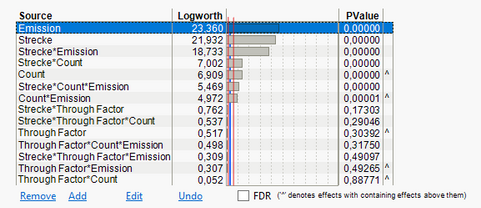
  • Is there an option to add two blue lines to the effect summary plot? I want there to be a line at p=0,05 and p=0,001 beside the one at p=0,01. Like this:


fizzy_0-1690363005642.png


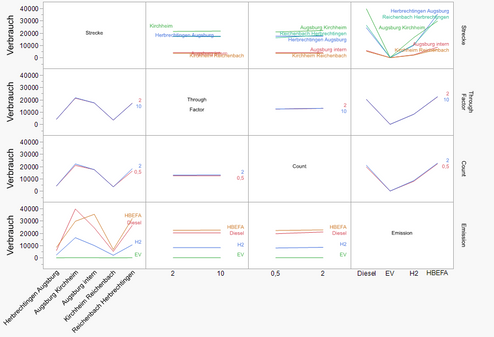
  • Is there a way to copy the interaction profiles to the graph builder?  I don't like the format and want to change things, like the legend or the order of the x Labels

fizzy_1-1690363308817.png


Thanks in advance!

1 REPLY 1
BHarris
Level VII

Re: Edit Effect Summary and Interaction Profiles

Re. the Graph Builder question, you can change the ordering of the x-labels using the "Value Order" property of columns, i.e. right-click the column header, select "Column Properties" -> "Value Order".  Or you can reorder them by some other variable by right clicking the axis labels and selecting "Order By"...

Recommended Articles