- Don’t miss your chance to experience Discovery Summit Europe at our best available rate! Early bird registration through 31 Oct.
- Graph Builder Toolbar streamlines interactive graphing. Creates shortcuts on Report and GraphBuilder Helpers toolbars. Download and install the extension.
- Subscribe to RSS Feed
- Mark Topic as New
- Mark Topic as Read
- Float this Topic for Current User
- Bookmark
- Subscribe
- Mute
- Printer Friendly Page
Discussions
Solve problems, and share tips and tricks with other JMP users.- User Community
- :
- Discussions
- :
- Distorted Images when pasting in PowerPoint

- Mark as New
- Bookmark
- Subscribe
- Mute
- Subscribe to RSS Feed
- Get Direct Link
- Report Inappropriate Content
Distorted Images when pasting in PowerPoint
Hi,
I have a sporatic problem when pasting images into PowerPoint using the paste special command and selecting picture. Attached is one image I copied from JMP V12.2.2.0 on a Mac. The normal looking image I pasted in Preview using the new from clipboard command, the skewed one I did in PowerPoint using the paste special.
Is anyone else seeing this? I have sent this to support but they had no ideas.
Accepted Solutions


- Mark as New
- Bookmark
- Subscribe
- Mute
- Subscribe to RSS Feed
- Get Direct Link
- Report Inappropriate Content
Re: Distorted Images when pasting in PowerPoint
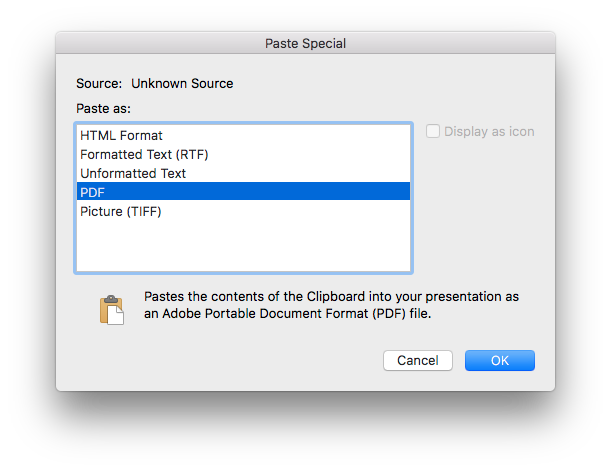
When you paste special on the Mac version of PPT, what options are you given? I'm using PPT 15.31 and if I do Paste Special, it's as PDF so as to provide a vector image that can be re-sized and re-scaled as needed. I have not run into the skewing issue using this method either (direct copy -> paste special in PPT on Mac or using the Preview workflow I suggested in the previous post).
Attached is a screenshot of paste special on my version of PPT.
- Mark as New
- Bookmark
- Subscribe
- Mute
- Subscribe to RSS Feed
- Get Direct Link
- Report Inappropriate Content
Re: Distorted Images when pasting in PowerPoint
Hello @Hegedus -- I often on the Mac will use the Selection tool (shortcut key S), grab the graph that I want to output as a high-quality image and then open Apple Preview. Since the graph is already on the clipboard you can File > New from Clipboard or just CMD-N. This will create a vector PDF, which can then be dragged into your PPT slide.
I'd be curious to know if you still get the same distortion/skewing that you are seeing in PPT with the JMP -> Preview -> PPT graphical output workflow.
- Mark as New
- Bookmark
- Subscribe
- Mute
- Subscribe to RSS Feed
- Get Direct Link
- Report Inappropriate Content
Re: Distorted Images when pasting in PowerPoint
Two issues: Coworkers on Windows often get errors if I include images in pdf format, so that is a non-starter. Second I really want to avoid having to include another application into the work flow.
I don't think copy paste of an image is a request outside of the mainstream.
- Mark as New
- Bookmark
- Subscribe
- Mute
- Subscribe to RSS Feed
- Get Direct Link
- Report Inappropriate Content
Re: Distorted Images when pasting in PowerPoint
When you paste special on the Mac version of PPT, what options are you given? I'm using PPT 15.31 and if I do Paste Special, it's as PDF so as to provide a vector image that can be re-sized and re-scaled as needed. I have not run into the skewing issue using this method either (direct copy -> paste special in PPT on Mac or using the Preview workflow I suggested in the previous post).
Attached is a screenshot of paste special on my version of PPT.
Recommended Articles
- © 2026 JMP Statistical Discovery LLC. All Rights Reserved.
- Terms of Use
- Privacy Statement
- Contact Us