Turn on suggestions
Auto-suggest helps you quickly narrow down your search results by suggesting possible matches as you type.
- Don’t miss your chance to experience Discovery Summit Europe at our best available rate! Early bird registration through 31 Oct.
- Graph Builder Toolbar streamlines interactive graphing. Creates shortcuts on Report and GraphBuilder Helpers toolbars. Download and install the extension.
Options
- Subscribe to RSS Feed
- Mark Topic as New
- Mark Topic as Read
- Float this Topic for Current User
- Bookmark
- Subscribe
- Mute
- Printer Friendly Page
Discussions
Solve problems, and share tips and tricks with other JMP users.- User Community
- :
- Discussions
- :
- Display Text at center of the Page in Journal

Level V
- Mark as New
- Bookmark
- Subscribe
- Mute
- Subscribe to RSS Feed
- Get Direct Link
- Report Inappropriate Content
Display Text at center of the Page in Journal
Created:
Jun 23, 2020 04:26 AM
| Last Modified: Jun 9, 2023 4:30 PM
(3634 views)
How do i able to display Text at center of the page in Journal?
Names Default To Here( 1 );
Clear Symbols();
Clear Log();
Close All( Data Tables, NoSave );
Close All( Journals, NoSave );

nw = New Window( "Reports",
	<<Journal,
	hlb = H List Box(
		lub = Lineup Box( N Col( 1 ) )
	)
);

lub << Append( tb = Text Box( "Updated on : " || Short Date( Today() ) ));
tb << Set Font Size( 50 ) << Set Font Style( "Bold" ) << Justify Text( "Center" );
tb << set width(1000) << set wrap(1000);

Reports = Current Journal();
Reports << Set page setup( margins( 0.1, 0.1, 0.1, 0.1 ), scale( 0.8 ), portrait( 0 ), paper size( "A4" ) );

Reports << get page setup();
Reports << SavePDF("DSA_report.pdf");
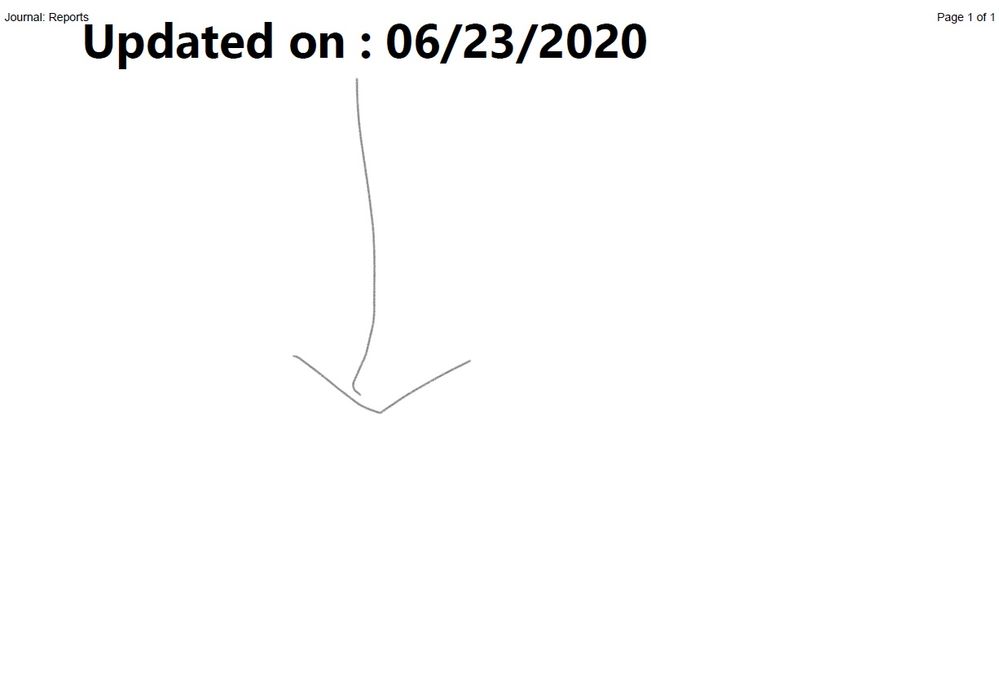
The layout that i intended like picture below.
1 ACCEPTED SOLUTION
Accepted Solutions

Level V
Solution
- Mark as New
- Bookmark
- Subscribe
- Mute
- Subscribe to RSS Feed
- Get Direct Link
- Report Inappropriate Content
Re: Display Text at center of the Page in Journal
//With colors for better understanding
nw = New Window( "Reports",
	<<Journal,
	hlb = H List Box( Spacer Box(<<Color(red)), V List Box( Spacer Box(<<Color(blue)), hlb2 = H Center Box(), Spacer Box(<<Color(green)) ), Spacer Box(<<Color(yellow)) )
);

hlb2 << Append( tb = Text Box( "Updated on : " || Short Date( Today() ) ) );
tb << Set Font Size( 10 ) << Set Font Style( "Bold" );


//Without colors
nw = New Window( "Reports",
	<<Journal,
	hlb = H List Box( Spacer Box(), V List Box( Spacer Box(), hlb2 = H Center Box(), Spacer Box() ), Spacer Box() )
);

hlb2 << Append( tb = Text Box( "Updated on : " || Short Date( Today() ) ) );
tb << Set Font Size( 10 ) << Set Font Style( "Bold" );
2 REPLIES 2
Level V
Solution
- Mark as New
- Bookmark
- Subscribe
- Mute
- Subscribe to RSS Feed
- Get Direct Link
- Report Inappropriate Content
Re: Display Text at center of the Page in Journal
//With colors for better understanding
nw = New Window( "Reports",
	<<Journal,
	hlb = H List Box( Spacer Box(<<Color(red)), V List Box( Spacer Box(<<Color(blue)), hlb2 = H Center Box(), Spacer Box(<<Color(green)) ), Spacer Box(<<Color(yellow)) )
);

hlb2 << Append( tb = Text Box( "Updated on : " || Short Date( Today() ) ) );
tb << Set Font Size( 10 ) << Set Font Style( "Bold" );


//Without colors
nw = New Window( "Reports",
	<<Journal,
	hlb = H List Box( Spacer Box(), V List Box( Spacer Box(), hlb2 = H Center Box(), Spacer Box() ), Spacer Box() )
);

hlb2 << Append( tb = Text Box( "Updated on : " || Short Date( Today() ) ) );
tb << Set Font Size( 10 ) << Set Font Style( "Bold" );
Level V
- Mark as New
- Bookmark
- Subscribe
- Mute
- Subscribe to RSS Feed
- Get Direct Link
- Report Inappropriate Content
Re: Display Text at center of the Page in Journal
So, we can make use of the spacer box and adjust it manually. I thought there are other way to do it. Thanks for input.
Recommended Articles
- © 2026 JMP Statistical Discovery LLC. All Rights Reserved.
- Terms of Use
- Privacy Statement
- Contact Us