Turn on suggestions
Auto-suggest helps you quickly narrow down your search results by suggesting possible matches as you type.
- Don’t miss your chance to experience Discovery Summit Europe at our best available rate! Early bird registration through 31 Oct.
- Graph Builder Toolbar streamlines interactive graphing. Creates shortcuts on Report and GraphBuilder Helpers toolbars. Download and install the extension.
Options
- Subscribe to RSS Feed
- Mark Topic as New
- Mark Topic as Read
- Float this Topic for Current User
- Bookmark
- Subscribe
- Mute
- Printer Friendly Page
Discussions
Solve problems, and share tips and tricks with other JMP users.- User Community
- :
- Discussions
- :
- Difficulties opening jmpaddin stored on sharepoint site with scripting

Level IV
- Mark as New
- Bookmark
- Subscribe
- Mute
- Subscribe to RSS Feed
- Get Direct Link
- Report Inappropriate Content
Difficulties opening jmpaddin stored on sharepoint site with scripting
Created:
Mar 1, 2021 10:55 AM
| Last Modified: Jun 9, 2023 3:07 PM
(3102 views)
When I manually open an add-in stored on a sharepoint site I get the following warning, but the add-in will install successfully.
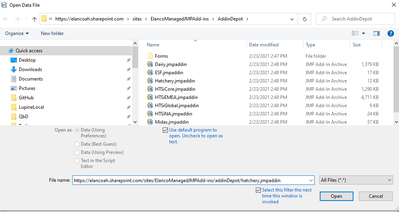
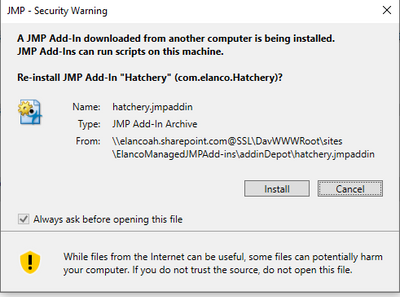
However, when I try to do the same from JSL, I get the following error. Any ideas how I could get around this?
open("https://elancoah.sharepoint.com/sites/ElancoManagedJMPAdd-ins/addinDepot/hatchery.jmpaddin");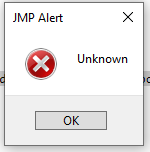
2 REPLIES 2


Super User (Alumni)
- Mark as New
- Bookmark
- Subscribe
- Mute
- Subscribe to RSS Feed
- Get Direct Link
- Report Inappropriate Content
Re: Difficulties opening jmpaddin stored on sharepoint site with scripting
You might need to authenticate with sharepoint first first before opening the file, maybe these two posts will help:
Level IV
- Mark as New
- Bookmark
- Subscribe
- Mute
- Subscribe to RSS Feed
- Get Direct Link
- Report Inappropriate Content
Re: Difficulties opening jmpaddin stored on sharepoint site with scripting
Thanks for the reply. I authenticate by opening the site in a web browser box and then closing the box. So far I am not having this issue with data files, just the add-in files.
Recommended Articles
- © 2026 JMP Statistical Discovery LLC. All Rights Reserved.
- Terms of Use
- Privacy Statement
- Contact Us