- Don’t miss your chance to experience Discovery Summit Europe at our best available rate! Early bird registration through 31 Oct.
- Graph Builder Toolbar streamlines interactive graphing. Creates shortcuts on Report and GraphBuilder Helpers toolbars. Download and install the extension.
- JMP will suspend normal business operations for our Rest and Recharge Day on Friday, October 2, 2026.
Regular business hours will resume on Monday, October 5, 2026.
- Subscribe to RSS Feed
- Mark Topic as New
- Mark Topic as Read
- Float this Topic for Current User
- Bookmark
- Subscribe
- Mute
- Printer Friendly Page
Discussions
Solve problems, and share tips and tricks with other JMP users.- User Community
- :
- Discussions
- :
- Design Evaluation of a Manually Built DoE

- Mark as New
- Bookmark
- Subscribe
- Mute
- Subscribe to RSS Feed
- Get Direct Link
- Report Inappropriate Content
Design Evaluation of a Manually Built DoE
Hello,
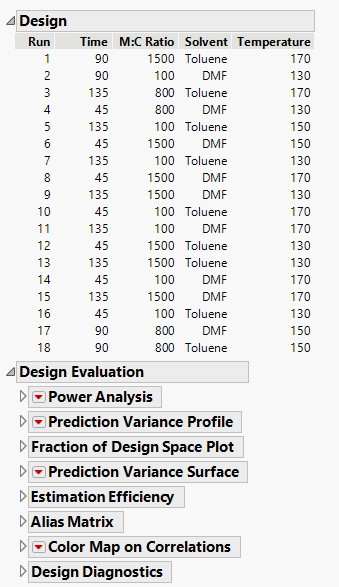
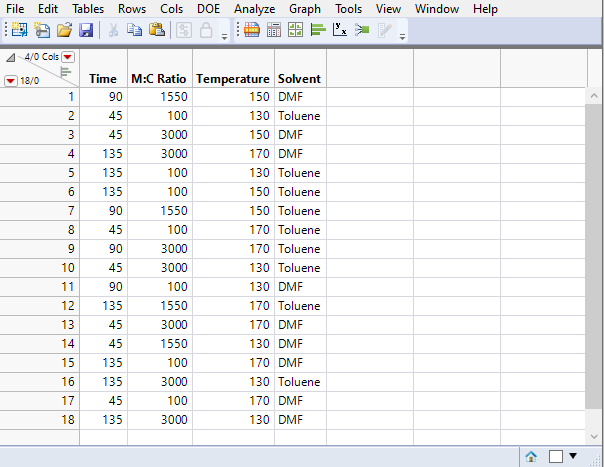
I was wondering if it was possible to get to the design evaluation page (picture 1) of a manually built DoE in JMP (picture 2)?
Thank you!
Accepted Solutions

- Mark as New
- Bookmark
- Subscribe
- Mute
- Subscribe to RSS Feed
- Get Direct Link
- Report Inappropriate Content
Re: Design Evaluation of a Manually Built DoE
Yes, think so, you simply can run >> DOE >> Design Diagnostics >> Evaluate Design,
input your X and run.
- Mark as New
- Bookmark
- Subscribe
- Mute
- Subscribe to RSS Feed
- Get Direct Link
- Report Inappropriate Content
Re: Design Evaluation of a Manually Built DoE
Yes, think so, you simply can run >> DOE >> Design Diagnostics >> Evaluate Design,
input your X and run.
- Mark as New
- Bookmark
- Subscribe
- Mute
- Subscribe to RSS Feed
- Get Direct Link
- Report Inappropriate Content
Re: Design Evaluation of a Manually Built DoE
Thank you!

- Mark as New
- Bookmark
- Subscribe
- Mute
- Subscribe to RSS Feed
- Get Direct Link
- Report Inappropriate Content
Re: Design Evaluation of a Manually Built DoE
The only action I'd add to @Georg 's recommendation is since the design may have originated in a non JMP application I'd spend just a few minutes examining each column's column properties dialogue to insure the data type and modeling type for each column are as desired. Last thing you want is a numeric/continuous column being treated as something else or any other undesired combination. JMP relies on these column property specifications for LOTS of behind the scenes analysis/visualization/workflow actions.
Recommended Articles
- © 2026 JMP Statistical Discovery LLC. All Rights Reserved.
- Terms of Use
- Privacy Statement
- Contact Us