- JMP Statement Regarding Critical PHP Remote Code Execution Vulnerabilities (CVE-2026-109618, CVE-2026-109619)
- Don’t miss your chance to experience Discovery Summit Europe at our best available rate! Early bird registration through 31 Oct.
- Graph Builder Toolbar streamlines interactive graphing. Creates shortcuts on Report and GraphBuilder Helpers toolbars. Download and install the extension.
- Subscribe to RSS Feed
- Mark Topic as New
- Mark Topic as Read
- Float this Topic for Current User
- Bookmark
- Subscribe
- Mute
- Printer Friendly Page
Discussions
Solve problems, and share tips and tricks with other JMP users.- User Community
- :
- Discussions
- :
- Creating a report makes my fit groups non-interactive

- Mark as New
- Bookmark
- Subscribe
- Mute
- Subscribe to RSS Feed
- Get Direct Link
- Report Inappropriate Content
Creating a report makes my fit groups non-interactive
Good morning/afternoon/evening everyone,
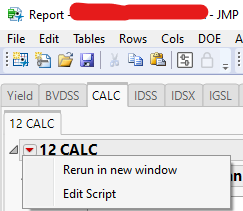
Having this strange issue where when I report a fit group I made to a tabbed report it makes the plots non-interactive (red triangle not doing the usual stuff). Screen shot here shows what happens when I click on the red triangle.
Here is where I make the tabbed report:
////////////////////////Show graphs for each test//////////////////
			Tests = db_Tests:Test << Get Values;
			Testset = Associative Array( Tests );//get unique set of fail names
			Tests = Testset << Get Keys;
			Try( Remove From( Tests, As List( Loc( Tests, "WAIT" ) ) ) );
			Try( Remove From( Tests, As List( Loc( Tests, "RAMP" ) ) ) );
			Try( Remove From( Tests, As List( Loc( Tests, "-CALC" ) ) ) );

	//run through each test type, make category tab for each
			For( i = 1, i <= N Items( Tests ), i++,
				Report << Append( Tests[i], TestCategory = Tab Box() );
		/////////loop through all test of that name and make charts
				db_Tests << Select Where( :Test == Tests[i] );
				TestNums = db_Tests:TestNum[(db_Tests << get selected rows)];
				TestNumsSet = Associative Array( TestNums );//get unique set of fail names
				TestNums = TestNumsSet << Get Keys;
Here is the portion of my script that generates the fit groups:
ow = probeSummary << Fit Group(
							Oneway(
								Y( :("Median" || " " || TestNums[j] || " " || Tests[i]) ),
								X( probeSummary:analysisCol ),
								Quantiles( 1 ),
								Means( 1 ),
								Means and Std Dev( 1 ),
								t Test( 1 ),
								Box Plots( 1 ),
								Mean Diamonds( 1 ),
								Mean Error Bars( 1 ),
								Std Dev Lines( 1 ),
								X Axis Proportional( 0 ),
								Points Jittered( 1 ),
								Grand Mean( 0 ),
								SendToReport(
									Dispatch( {}, "Oneway Anova", OutlineBox, {Close( 1 )} ),
									Dispatch( {"Oneway Anova"}, "Analysis of Variance", OutlineBox, {Close( 1 )} )
								)
							),
							Oneway(
								Y( :("Interquartile Range" || " " || TestNums[j] || " " || Tests[i]) ),
								X( probeSummary:analysisCol ),
								Quantiles( 1 ),
								Means( 1 ),
								Means and Std Dev( 1 ),
								t Test( 1 ),
								Box Plots( 1 ),
								Mean Diamonds( 1 ),
								Mean Error Bars( 1 ),
								Std Dev Lines( 1 ),
								X Axis Proportional( 0 ),
								Points Jittered( 1 ),
								Grand Mean( 0 ),
								SendToReport(
									Dispatch( {}, "Oneway Anova", OutlineBox, {Close( 1 )} ),
									Dispatch( {"Oneway Anova"}, "Analysis of Variance", OutlineBox, {Close( 1 )} )
								)
							),
							<<{Arrange in Rows( 2 )}
						)
And lastly here is the portion that creates the report:
owrep = ow << Report;
					title = TestName;
					owrep << Set Title( title );
					TestCategory << Append( title, ow << Report );
					ow << close window();
Any help would be greatly appreciated as I'm very stuck right now. Thank you


- Mark as New
- Bookmark
- Subscribe
- Mute
- Subscribe to RSS Feed
- Get Direct Link
- Report Inappropriate Content
Re: Creating a report makes my fit groups non-interactive
A platform report can only exist in one window - any report that already has a window will be copied at the time that you do the <<Append.
One way to handle this is to launch your platforms without an initial window, using the Platform() command, which launches the Platform within a display box, without ever creating a window.
dt = Open("$SAMPLE_DATA/Big Class.jmp");
ow = Platform(dt, Oneway( Y( :height ), X( :sex ), Means( 1 ), Mean Diamonds( 1 ) ));
New Window("final report",
	Tab Page Box("Oneway report",
		ow
	)
);Recommended Articles
- © 2026 JMP Statistical Discovery LLC. All Rights Reserved.
- Terms of Use
- Privacy Statement
- Contact Us