- JMP will suspend normal business operations for our Winter Holiday beginning on Wednesday, Dec. 24, 2025, at 5:00 p.m. ET (2:00 p.m. ET for JMP Accounts Receivable).
Regular business hours will resume at 9:00 a.m. EST on Friday, Jan. 2, 2026. - We’re retiring the File Exchange at the end of this year. The JMP Marketplace is now your destination for add-ins and extensions.
- Subscribe to RSS Feed
- Mark Topic as New
- Mark Topic as Read
- Float this Topic for Current User
- Bookmark
- Subscribe
- Mute
- Printer Friendly Page
Discussions
Solve problems, and share tips and tricks with other JMP users.- JMP User Community
- :
- Discussions
- :
- Creating a Loop in Graph Builder

- Mark as New
- Bookmark
- Subscribe
- Mute
- Subscribe to RSS Feed
- Get Direct Link
- Report Inappropriate Content
Creating a Loop in Graph Builder
I have a script that generates boxplots in Graph Builder, but as it was first captured from a graph. Here is the code:
inboundDataTable << New Script("Boxplots and Means for Sites w/Low Read Rates",
	Names Default to Here(1);
	Delete Symbols();
	inboundData = Current Data Table();

	inboundData << Graph Builder(
		Size(650, 481),
		Grid Color({79, 98, 40}),
		Variables(X(:IDENT Code), Y(:Read Rate)),
		Elements(
			Box Plot(X, Y, Legend(2), Jitter("Random Normal")),
			Points(X, Y, Legend(3), Summary Statistic("Mean"))
		),
		SendToReport(
			Dispatch(
				{},
				"Read Rate",
				ScaleBox,
				{
					Format("Percent", 5, 0),
					Minor Ticks(4),
					Add Ref Line(0.95, "Solid", {255, 0, 0}, "", 1),
					Label Row({Show Major Grid(1), Show Minor Grid(1)})
				}
			),
			Dispatch(
				{},
				"400",
				ScaleBox,
				{Legend Model(
					2,
					Base(1, 0, 0, Item ID("Read Rate", 2)),
					Properties(1, {Fill Color(0)}, Item ID("Read Rate", 2)),
					Properties(
						-1,
						{Line Color(-4221340), Marker("FilledCircle"), Fill Color(0)},
						Item ID("Mean", 1)
					)
				), Legend Model(
					3,
					Properties(
						0,
						{Line Color(-16776960), Marker("Diamond"), Fill Color(0)},
						Item ID("Mean", 1)
					)
				)}
			),
			Dispatch({}, "X title", TextEditBox, {Set Text("Crossing (Site)")}),
			Dispatch(
				{},
				"Graph Builder",
				FrameBox,
				{
					Marker Size(5), Grid Line Order(1), Reference Line Order(2),
					DispatchSeg(
						Box Plot Seg("Box Plot (ALC)"),
						{Line Color({44, 77, 117}), Fill Color({79, 129, 189}), Fill(1)}
					),
					DispatchSeg(
						Box Plot Seg("Box Plot (CIA)"),
						{Line Color({44, 77, 117}), Fill Color({79, 129, 189}), Fill(1)}
					),
					DispatchSeg(
						Box Plot Seg("Box Plot (JKM)"),
						{Line Color({44, 77, 117}), Fill Color({79, 129, 189}), Fill(1)}
					),
					DispatchSeg(
						Box Plot Seg("Box Plot (POR)"),
						{Line Color({44, 77, 117}), Fill Color({79, 129, 189}), Fill(1)}
					),
					DispatchSeg(
						Box Plot Seg("Box Plot (RAI)"),
						{Line Color({44, 77, 117}), Fill Color({79, 129, 189}), Fill(1)}
					),
					DispatchSeg(
						Box Plot Seg("Box Plot (THO)"),
						{Line Color({44, 77, 117}), Fill Color({79, 129, 189}), Fill(1)}
					)
				}
			)
		)
	)
);
Near the bottom is the FrameBox block where you can see a DispatchSeg for each boxplot that was created from the original graph. What I wish to do is make that section of the code dynamic, as the number of sites may be different for each site population.
What I need is a way to capture the number of unique sites that have not been excluded, and then use that count to create a loop to set the line and fill colors for each boxplot. How can I go about this.


- Mark as New
- Bookmark
- Subscribe
- Mute
- Subscribe to RSS Feed
- Get Direct Link
- Report Inappropriate Content
Re: Creating a Loop in Graph Builder
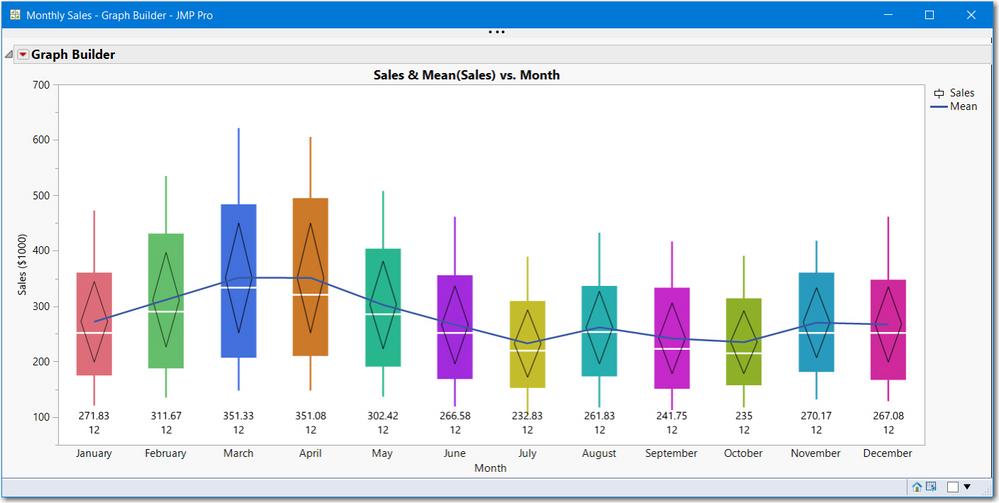
The example might have "too much nformation" it was created as a learning script for customizing GraphBuilder for JMP 13 but works for later versions. It aso creates custom labels. JMP 15 has ne features of Textlet, Graphlet, etc that might make it easier to add the custom text. The script is attached and the picture it creates is shown below.
There are several key features to do what you want:
- how to get the number of boxplots defined by the X variable. This script uses XPath which creates a boxplot reference bpseg[i]
- how to use JSL send syntax << instead of Dispatch
- For loop.
If you are new to JSL, you will likely need to look up some features in the Help > Scripting Index for XPath, GraphBuilderBox and FrameBox.
I recommend running the script as described below:
- higlight and run lines 1 to 50.
- read, highlight and run lines 51 to 54, look at the changes, made to all boxplots
- read, highlight and run lines 55 to 59 to see how to make changes one boxplot at a time
The key code is:
//assume you like March's style and do not want to show the points
//here is the code to set all
bpseg = gb << Xpath("//BoxPlotSeg");
bpseg << {Box Style( "Solid" ), Confidence Diamond( 1 ), Fences( 0 )};

//if you want to color each by month
for(i=1, i<=nitems(bpseg), i++,
 bpseg[i] << Fill Color(Color Of(As Row State(cc[i])))
);

//if you want to remove points. since ponts are the 3rd element
report(gb)[GraphBuilderBox(1)] << remove element(1,1,3);

//to add them back, uncomment and run the next line
//report(gb)[GraphBuilderBox(1)] << Add Element(1, 1, {Type("Points"), X, Y});
I hope this is enough to get you started. Oh, you need to remove the Dispatch statements targeting individual boxplots in your saved script. the attached script kept three dispatch statements just for comparing symatx and training purposes.
- Mark as New
- Bookmark
- Subscribe
- Mute
- Subscribe to RSS Feed
- Get Direct Link
- Report Inappropriate Content
Re: Creating a Loop in Graph Builder
Thanks for the response. I will look into what you have cited, but some of your response seems to be unrelated to my particular issue, but it is good information nonetheless.
Recommended Articles
- © 2025 JMP Statistical Discovery LLC. All Rights Reserved.
- Terms of Use
- Privacy Statement
- Contact Us